
Server Log Analysis for SEO and GEO: A Field Guide to What Crawlers Actually See
Server Log Analysis for SEO and GEO: A Field Guide to What Crawlers Actually See
The only raw source of what crawlers actually do on your site.
 Ian Sorin
May 19, 2026
37 min read
Ian Sorin
May 19, 2026
37 min read
21 min read
Hey, it’s Ian.
This guide is for the SEO who has heard “log files are powerful” a hundred times and never opened one. By the end, you will know exactly what a log is, how to get one, how to read it, and which patterns to look for, including the AI bots (ChatGPT, Perplexity, Claude) that no Search Console will ever show you.
- Logs are unsampled and uncut, unlike GSC (sampled) or GA (cookie-gated). Every bot hit is recorded, by every engine.
- Two kinds of hits live in your logs: bot visits (Googlebot, GPTBot, ClaudeBot, PerplexityBot...) and human visits. For audits, you only need the bots.
- Getting the logs is half the battle. Plan for GDPR objections and dev pushback. The clean fix is asking the dev team to export bot-only logs (zero personal data).
- Always validate Googlebot (or any claimed bot) via reverse DNS plus IP range. Never trust the user-agent string alone.
- If you use a CDN, your hosting logs miss most of the traffic. Pull logs from the CDN edge, not the origin.
- Orphan pages, crawl waste and 130-day deindexation are three patterns you can only see by crossing a crawl with your logs.
- Crawl frequency correlates directly with ranking. Confirmed under oath in the 2025 Google DOJ trial: logs are a leaky proxy for Google's internal authority score.
- AI crawlers (GPTBot, ClaudeBot, PerplexityBot) are now leading indicators of GEO visibility. No crawl, no citation. Track them per engine, per page type.
- Building your own analyzer? Accept every log format, connect GSC, GA4 and a crawl, use a columnar database (DuckDB), count visits rather than raw hits, and verify bots without flagging real crawlers as fake.
What server logs actually are
Before we go anywhere, let me explain what a server log file actually is, because half the SEOs who say "I should really get into log analysis" have never been told this part in plain words.
Think of a server log file as passport control at an airport. Everyone who wants in has to declare who they are, and every single arrival gets written down, no exceptions.
Every single time something on the web makes a request to your site (a human opening a page, a search engine crawling it, a browser fetching an image or a JavaScript file, an API call), your web server writes one line to a text file describing what happened.
That file is the log. It looks like this (real raw line):
35.247.92.18 - - [04/Nov/2026:09:17:22 +0100] "GET /blog/article-name HTTP/1.1" 200 2741 "-" "Mozilla/5.0 (compatible; Googlebot/2.1; +http://www.google.com/bot.html)"
Don't try to read it yet, we will decode it together in a few minutes with an interactive widget. For now, just hold onto three things:
- It is a plain text file, line by line, with no fancy database, no UI, no dashboard. Pure raw signal.
- It is generated automatically by your web server software (Apache, Nginx) or your CDN (Cloudflare, Fastly, etc.). You do not have to do anything for it to exist, it is already there, recording.
- Every request leaves a trace. Real users, search engine bots, AI crawlers, image fetches, your monitoring scripts, even hackers probing your site. All of it. Line after line.
That last point is where the magic is. If Googlebot hit your homepage at 3:47am last Tuesday, it is in there. If GPTBot scraped your latest article, it is in there. The log file does not have an opinion, does not filter anything, does not lose data to consent banners. It just writes.
Now that you know what it is, let's look at why this matters more than any dashboard you have access to.
The two kinds of hits in your logs (and why it matters)
Every line in a log file falls into exactly one of two buckets. Before you do anything else, you need to mentally separate them, because they tell completely different stories.
Bot hits
Visits from automated agents: search engine crawlers, AI engine crawlers, monitoring tools, scrapers, security scanners. They identify themselves (usually honestly) in the user-agent string.
What they tell you: how the algorithms see you. Pure SEO/GEO signal.
Human hits
Visits from real users with a real browser. They carry IP addresses, referer chains, session signals. They contain personal data under GDPR.
What they tell you: how people use the site. Useful, but you have Analytics for that.
For the kind of audit we are doing here, you only care about bot hits. Drop the human traffic entirely (it is what your dev team will want anyway, for GDPR reasons we will get to in a minute). What is left is a clean dataset of every automated visit to your site, and that dataset is gold.
The bots that actually matter in 2026
Five years ago, "log analysis" essentially meant "Googlebot analysis." Today the cast is larger and the stakes are higher because every one of these bots feeds a different distribution channel: classic search, AI Search engines (ChatGPT, Perplexity, Claude, Mistral), and the next generation of LLMs being trained right now.
The 3 types of AI bots (and why they don't have the same value)
If you only remember one thing from this section, remember this. The AI ecosystem uses three different categories of bots, each with its own purpose, its own crawl behavior, and its own strategic value to you as an SEO:
User-agents: GPTBot, ClaudeBot, CCBot, Bytespider, Google-Extended (token).
Crawl pattern: no specific pattern. They try to fetch every page they can find.
Insight value: long-term. A visit does not guarantee your content ends up in the next model (a heavy filtering pipeline runs on the raw corpus: dedup, spam removal, sampling). But the reverse is far more reliable: no training bot visits = almost zero chance of being in the corpus. Track these as a presence check for the next generation of LLMs.
User-agents: OAI-SearchBot, PerplexityBot, Claude-SearchBot.
Crawl pattern: similar to Googlebot but much less aggressive. Roughly 1 visit per page per day, with a preference for new pages.
Insight value: medium. Tells you whether your URLs are eligible to show up in AI Search results. Half the story only.
User-agents: ChatGPT-User, Perplexity-User, Claude-User, MistralAI-User.
Crawl pattern: triggered every time a user asks a question that requires fetching a specific page. Each hit equals one user prompt that surfaced your URL.
Insight value: the highest you will get. This is your closest thing to an "AI Search Console." User bot hits are the strongest leading indicator of actual citation in AI answers.
The mental model is two teams. The Knowledge team (training bots only) feeds the next model training cycle. The Grounding team (search bots + user bots together) feeds the live answers users see today.
For SEO and GEO work, you want to spend almost all your attention on the Grounding team, and especially the User bots. That is where the actionable signal lives.
The full lineup (directory)
14 bots worth knowing, grouped by team. Click a section to expand the list.
🔎
Search bots (5)
+
Googlebot/2.1bingbot/2.0OAI-SearchBot/1.0PerplexityBot/1.0Claude-SearchBot📚
Training bots (5): presence check for the next model generation
+
GPTBot/1.0ClaudeBot/1.0CCBot/2.0Bytespider(robots token)⭐
User bots (4): track these first, highest GEO signal
−
ChatGPT-User/1.0Perplexity-UserClaude-UserMistralAI-UserIf you are doing GEO (Generative Engine Optimization) work and you are not already segmenting your log analysis by these three categories, you are flying blind.
The volume of User bot hits on a given page is the single most direct signal of whether your content has any chance of being cited by that AI engine, and at what rate.
Same machinery as Googlebot, same logs, same techniques. The patterns I am about to walk you through apply to every one of these crawlers. I will use Googlebot as the running example because it is the biggest dataset, but everything generalizes.
Anatomy of a log line: try it yourself
Before you can analyze anything, you need to be able to read a single log line. Apache and Nginx default to a format that looks like the one below. Tap any colored part, or use the arrows, to see what it actually means.
Reality check: getting the logs is half the battle
Before we even talk about analysis, let me say something most articles on this topic conveniently skip: as a consultant, your single hardest problem with log audits is not analyzing them, it is getting your hands on them in the first place.
Plan for friction. Plan for two to four weeks of back-and-forth before you see a single log file.
Below are the five objections you will run into, in roughly the order of frequency. Click on each to expand the fix that actually works.
❓
"What are server logs?"
+
🛡️
"We can't share these, it is a GDPR issue"
+
⏳
"We don't keep them that long"
+
None of this is glamorous. It is also not optional. Build the time and the GDPR-clean export process into your engagement before you promise any insights.
Make the dev's life easy (and sanity-check the bill first)
Here is the detail that decides whether you get your logs in five minutes or five weeks: how much work you make it look like. Pulling logs is an unusual request, it lands on a developer's desk as extra work, and plenty of them quietly resent it. So remove every reason to say no.
Be explicit and accommodating on three points when you ask:
- Format: whatever is easiest for them. Do not impose anything. Tell them to send the raw file in the exact format their server spits out by default (Apache combined, Nginx, a JSON export from the CDN, a .gz archive, it does not matter). A solid analysis setup ingests any of them, so there is no reason to create work on their side.
- Delivery: plan for heavy files. Log files are big. Ask how they would rather hand them over (a shared drive link, an S3 bucket, SFTP) instead of assuming email will cope. If they would rather split one huge file into several smaller chunks, great: just ask them not to overlap the date ranges, so the same log lines do not land twice. Duplicate lines should be de-duplicated on your side anyway, but a clean split spares everyone the headache.
- Cadence: this is not a one-shot. Logs are most valuable watched over time. Ask whether they can drop you a fresh export on a recurring basis, monthly or quarterly, so you can keep an eye on crawl behavior continuously instead of working off a single blurry snapshot.
Confirm with the developer that this is genuinely simple before you promise the client a log audit. The gap is brutal: I have had developers send me a clean export in five minutes, and I once had one bill the client 800€ just to pull the logs. Same data, wildly different effort and price. So get a reality check on the work involved up front, especially since you will be coming back for a fresh export every month or quarter.
Can't get the real logs? The Plan B inside Search Console
If retrieving raw logs is going to take three weeks, or if the answer is a flat "no", there is a fallback hidden inside Google Search Console: the Crawl Stats report. It is the closest thing to "Googlebot logs straight from Google itself".
How to get to it (two clicks):
- In Search Console, open Settings (gear icon at the bottom of the left menu).
- Under the Crawling (Exploration) section, click Open Report next to Crawl stats.
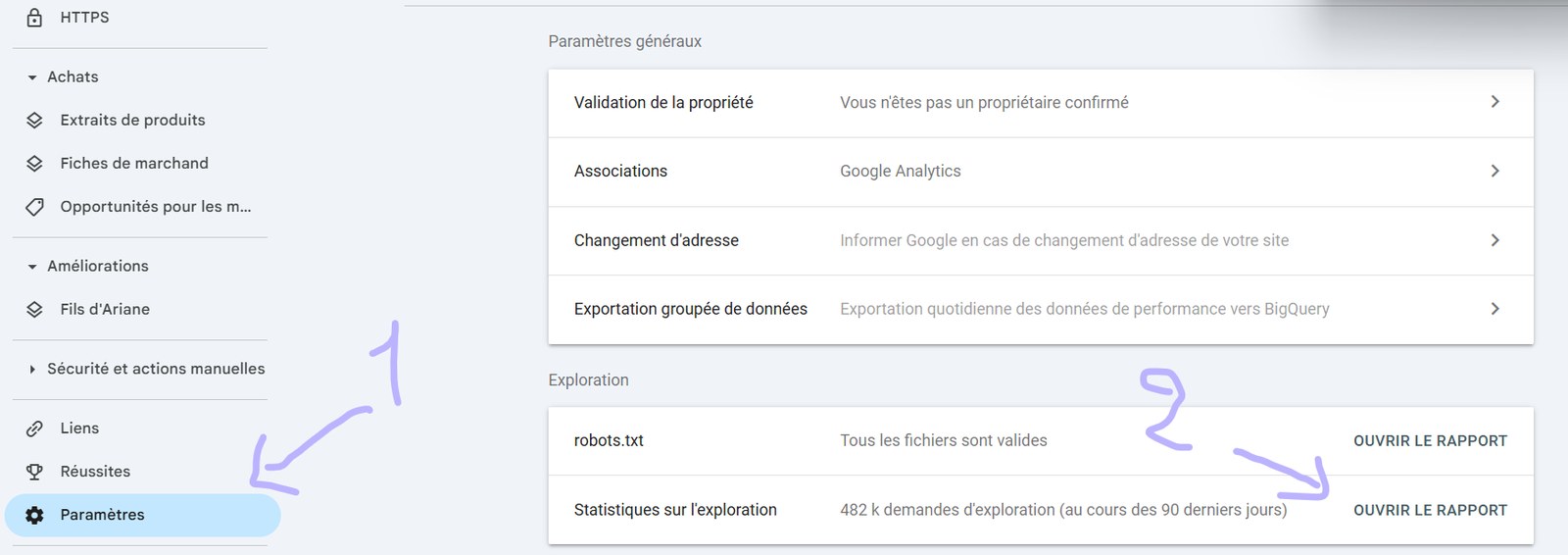
From my own side-by-side comparisons against real CDN logs, this report only reflects roughly 20 to 50% of the true Googlebot hit volume, and you cannot drill down to individual URL paths or run granular cross-references. It is not a substitute for raw logs.
That said, if you have nothing better, it is still useful for two things: spotting big anomalies (a spike of 5xx, a sudden drop in volume) and watching macro trends over weeks. Just remember that whatever number you see, the real one is bigger.
Before you touch the data: 3 setup checks
OK, you have the files. Now run these three checks every time, before drawing a single conclusion.
1. Make sure you are actually looking at Googlebot (and not a fake one)
Your raw logs contain everything: humans, real bots, scrapers, and a surprisingly large army of fake bots pretending to be Googlebot to bypass rate limits or stay under the radar. To isolate the real Google crawler, you need two filters working together:
- User-agent match against the official Googlebot strings (Smartphone, Desktop, Image, Video, News, AdsBot).
- Reverse DNS lookup on the IP, then forward DNS confirmation. The hostname must end with .googlebot.com or .google.com.
The serious SaaS tools (OnCrawl, Botify, SEOLyzer) do this automatically. If you are doing it in Python, here is the rule of thumb: a hit that says "Googlebot" in the user-agent but resolves to a random IP in Singapore is not Googlebot. Drop it.
Fake bots: the impostors hiding in your logs
A fake bot is any traffic that claims to be Googlebot, GPTBot, ChatGPT-User, ClaudeBot or PerplexityBot in the user-agent string, but does not come from the official IP ranges of the provider it pretends to be. Plain and simple: an impostor.
The key technical asymmetry to understand:
The user-agent string is just an HTTP header. Any developer can set it to literally anything in two lines of code. Calling yourself "Googlebot/2.1" is the most basic form of impersonation, anyone running a script can do it.
The source IP address is assigned by the network and cannot be spoofed for a normal TCP connection (the three-way handshake would never complete). You can only originate traffic from an IP that is actually yours.
That asymmetry is exactly why every serious provider publishes an official IP range list for its crawler. The user-agent is the part anyone can claim. The IP is the part only the real provider can use. Cross-checking both is the only way to know who you are really talking to.
Who fakes a bot identity, and why?
- Competitor research scrapers grabbing your prices, your product catalog, your blog content.
- SEO tools that do not want to be blocked by your WAF, so they impersonate Googlebot to walk through unchallenged.
- AI training pipelines from smaller players who want your content without respecting your robots.txt.
- Security probes and malicious scanners looking for exploitable endpoints, hiding behind a "trusted" user-agent.
- Bandwidth abusers testing whether they can hammer your origin without being throttled.
Why it matters for your analysis: if you do not filter them out, you will massively overestimate Google's (or any AI engine's) actual crawl activity. You will draw conclusions about crawl waste, crawl budget allocation and AI visibility on data that is half noise. You may also waste server resources serving full pages to scrapers you should be blocking outright.
Validate every "bot" hit against the official IP ranges of the provider. Reverse DNS lookup is the quick version. Matching against the published JSON ranges is the bulletproof version. Any hit that fails the check goes to a "suspected fake" bucket.
A reverse DNS lookup is just "given this IP, what hostname does it claim to be?". You only need three commands you can run in any terminal (Mac, Linux, Windows PowerShell). For a Googlebot example IP like
66.249.92.18:
- Reverse lookup, get the hostname.
host 66.249.92.18
Expected output: something likecrawl-66-249-92-18.googlebot.com. If it does not end in.googlebot.comor.google.com, stop here, it is not Googlebot. - Forward lookup, resolve that hostname back.
host crawl-66-249-92-18.googlebot.com
The IP it returns must match the one you started with. If it matches, it is confirmed Googlebot. - Automate it. Do not run this by hand on millions of log lines. In Python, the
socket.gethostbyaddr()function does the same in two lines. Most SaaS log tools (OnCrawl, SEOLyzer) do it automatically when you ingest the file.
Try it yourself: a live reverse DNS check
Reading the commands is one thing, seeing them run is another. Pick a known crawler IP below, or paste any IPv4 you found in your own logs, and the tool runs a real forward-confirmed reverse DNS lookup live (through Google's public DNS). Watch what happens when you try the AI crawler.
Forward-confirmed reverse DNS, the proper way to tell a real crawler from a spoofed one.
One important limit: this reverse DNS dance is reliable for Googlebot (and Bingbot) because Google publishes proper, forward-confirmable hostnames for its crawlers. Most LLM crawlers (GPTBot, ClaudeBot, PerplexityBot and friends) do not play that game, so a reverse DNS lookup on them usually returns nothing useful, and it is simply not the check to rely on. For AI bots, validate the hit against the provider's official published IP ranges instead, the JSON files in the next section. Same goal, different tool.
Official IP range sources (the only ones you should trust)
Tap each provider to expand its official endpoints. Pull these JSONs in a daily cron and match every claimed-bot IP against them, that is the cleanest verification setup you can build.

Google (Googlebot and other crawlers)
+
Five official JSONs to pull:
- googlebot.json: common Googlebot ranges
- special-crawlers.json: AdsBot, etc.
- user-triggered-fetchers-google.json
- user-triggered-fetchers.json
- goog.json: all Google global ranges

OpenAI (ChatGPT bots)
+
Three JSONs, one per bot:
- gptbot.json: GPTBot (training)
- searchbot.json: OAI-SearchBot (ChatGPT Search)
- chatgpt-user.json: ChatGPT-User (live fetches)

Perplexity
+
Two JSONs:
Heads up: Cloudflare delisted Perplexity from its "verified bots" in August 2025 after finding stealth crawlers outside the published ranges. An IP inside the list is still a reliable signal, but an IP outside does not automatically mean "not Perplexity."

Microsoft Bing
+
📦
Automation tip (aggregator repos)
+
- AnTheMaker/GoodBots: CIDR lists for Googlebot, Bingbot, AhrefsBot, Applebot, ClaudeBot, Common Crawl, DuckDuckBot, Facebook, etc., updated daily by GitHub Actions.
- sefinek/known-bots-ip-whitelist: TXT, CSV and JSON formats, covers AI crawlers too.
For a clean GEO setup: pull the official JSONs daily (Google, OpenAI, Perplexity, Bing), and fall back to user-agent + reverse DNS for Anthropic.
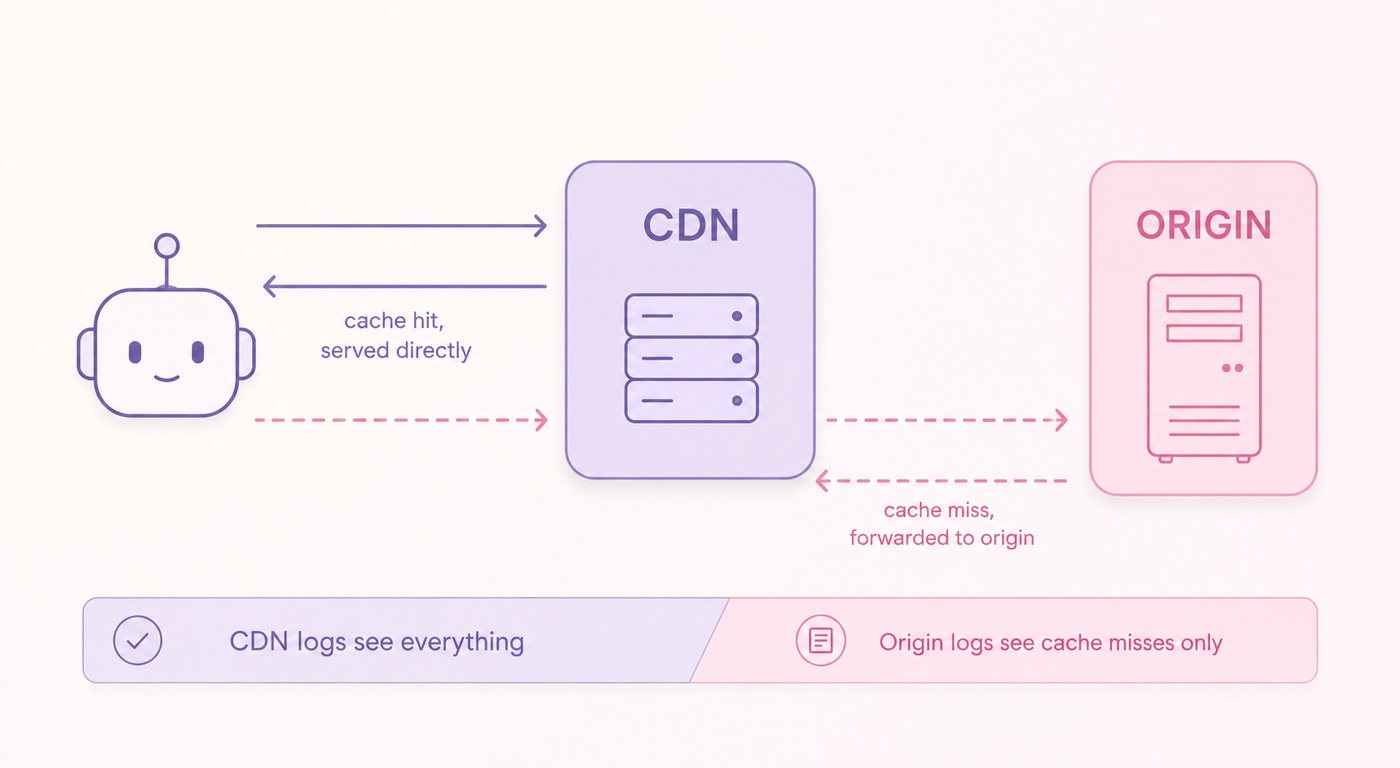
2. If you have a CDN, get the logs from the CDN, not the origin
A CDN (Cloudflare, Fastly, Akamai...) serves a large share of your traffic directly from its cache. Those requests never reach your origin server, which means your hosting logs simply do not contain them.
If a site uses a CDN, ask the dev team for the CDN logs directly. The hosting logs alone will give you an incomplete view.
3. Make sure your tools can actually handle the volume
Forget Excel. Forget Google Sheets. A medium e-commerce site generates 1 to 5 GB of log files per day, often split across multiple files. We are talking millions of lines per week minimum.
Your options, in order of friction:
OnCrawl, Botify, SEOLyzer. They handle ingestion, Googlebot validation, segmentation, dashboards. Best ROI if you audit logs more than twice a year.

My preferred route for ad-hoc audits. A Jupyter notebook on a laptop chews through tens of millions of lines without breaking a sweat. Full control, zero cost, infinite custom analysis. Full Python + Google Colab walkthrough for SEO is in my dedicated guide.
Two flavors:
- AI chat: if your site is small, upload a log sample to ChatGPT or Grok and ask questions in natural language. Quick exploration.
- AI agents (Claude Code, Cursor agents, custom n8n flows), let an agent open the file, run scripts iteratively, build segmentations, and even cross with GSC data. Far more powerful, but also far more capable of being confidently wrong.
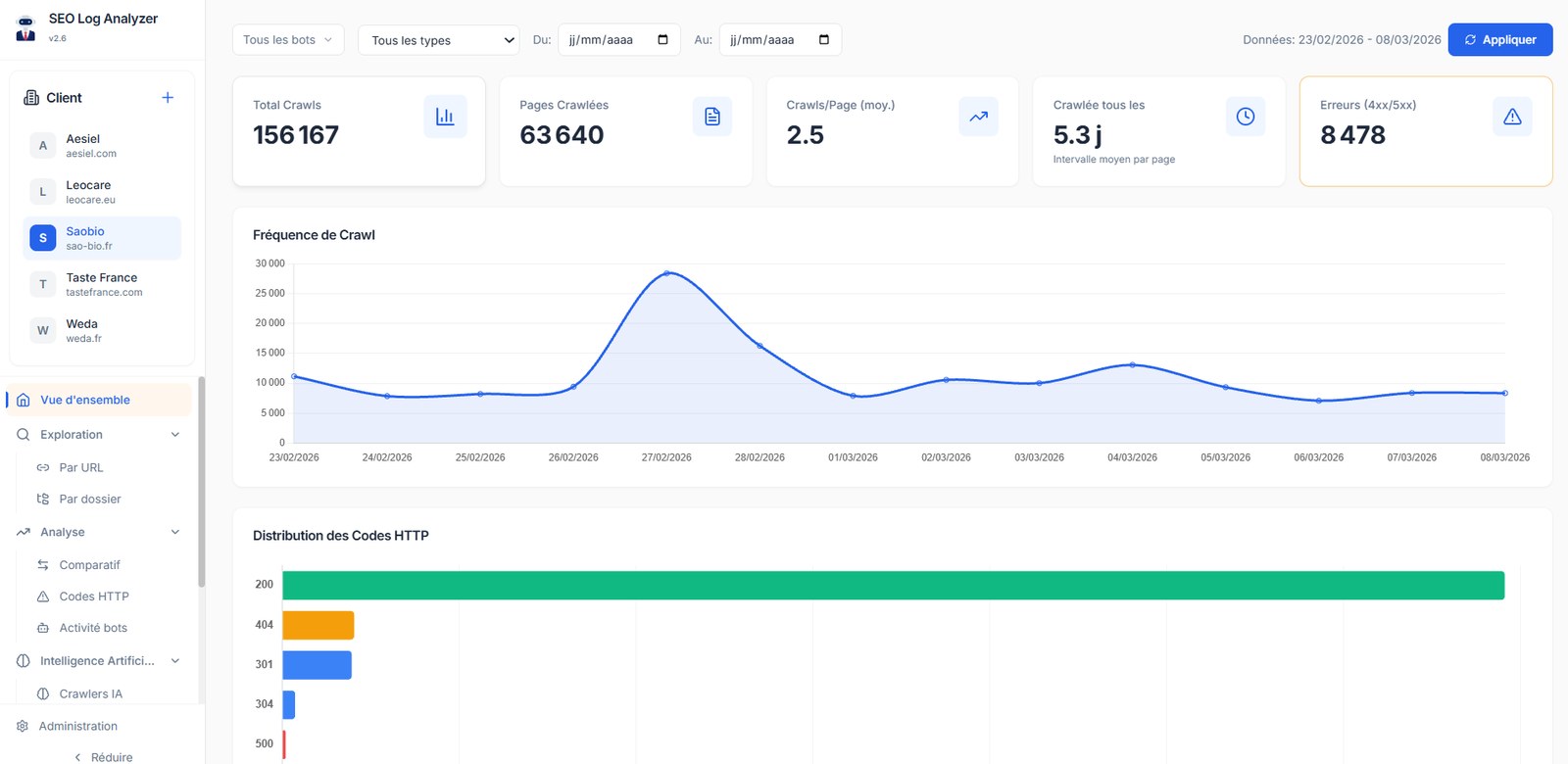
wc -l or grep on the file), (3) run the same question via two independent prompts and confirm they converge. No guardrails, no decision.What I really use day-to-day is a small custom log analyzer I built myself (vibe-coded with an AI agent, backed by a local database). It stores the historical logs of every client I work with, so I can look at trends over months, run cross-client benchmarks, and add any custom view I need without waiting for a SaaS roadmap. Few hours to build, zero subscription, full control. What I learned building it is further down.
The 8 patterns you can only see in logs
This is where the magic happens. Each of the patterns below is something I have personally used to unlock real wins. None of them show up in your Search Console or Analytics dashboards. They all require logs.
Pattern 1: Orphan pages: the easiest quick win
An orphan page is a page on your site that is not linked from any other page. It exists, it might rank, it might even bring revenue, but it lives outside your internal structure. Googlebot still finds it (often via the sitemap, old backlinks, or pure crawl memory) but it gets zero internal authority signals.
The detection method is brutally simple: cross your full crawl (e.g. Screaming Frog) with your logs and find URLs that appear in the logs but not in the crawl.
Once the cross-check is done, you typically end up with three buckets:
Your healthy core. These pages are linked from your site and Google fetches them.
Pages you linked from your site, but that Google never visits. Usually weak signals or low internal authority. Investigate.
Pages Google visits that your sitemap and internal links never mention. On large e-commerce sites this bucket is frequently the biggest of the three, sometimes by an order of magnitude. That is your goldmine (or your cleanup pile).
Orphan pages are problematic because, cut off from your internal linking, they:
- Are fragile and can be deindexed at any moment.
- Usually perform poorly in SEO.
- Eat a chunk of your crawl budget for nothing.
- Hurt UX if they are outdated product pages still being found via search.
Pattern 2: Crawl budget waste
Crawl waste is when Googlebot repeatedly visits pages that bring zero traffic and have no real strategic role. Every hit on a useless page is a hit not spent on a page that matters.
The methodology has three steps:
- Categorize every URL by page type (category, product, blog, paginated, filtered, tracking parameter, etc.).
- Pull Googlebot hits per type (logs) and organic clicks per type (GSC).
- Cross the two: which page types attract the most crawl but produce the least traffic?
A typical pattern you will spot: a section of the site that exists for UX reasons (logged-in user areas, navigation hubs, internal tools) gets a disproportionate share of Googlebot hits, while bringing zero clicks and zero impressions. Every hit there is one less hit on a page that could actually rank. That is crawl waste in its purest form.
Common crawl waste suspects:
?utm_source, ?fbclid, internal tracking that creates duplicate URLs Google has to crawl twice.
Page 84 of your blog archive. Usually a symptom of a missing taxonomy or filter system.
Combinatorial explosion of filter combinations (?color=red&size=M&sort=price-asc) that can multiply your crawled URLs by 100x.
JSON or partial HTML responses Google should not be hitting at all.
Pattern 3: Status code drift (crawl vs logs over time)
A Screaming Frog crawl is a snapshot at time T. Logs let you watch your pages over weeks and months. The difference matters.
On a large travel site I audited, when we crossed crawl data with three months of logs we found that one third of all pages were returning status codes to Googlebot different from what the crawler had logged. Pages that the crawler saw as 200 OK were 301-ing or 404-ing for Googlebot, because the site's stock or content state had changed since.
This single insight explained months of "mysterious" ranking volatility the client had been blaming on Google updates. The updates were not the culprit. The site's own pages were lying about being healthy.
Logs also surface status codes that crawlers like Screaming Frog will never report. The most useful one is 499 (Client Closed Request): a bot started fetching your page, did not get a fast enough response, and gave up before the server finished. This shows up regularly in the logs of AI User bots (ChatGPT-User, Perplexity-User, Claude-User), which have short patience.
A page that consistently returns 499 to AI crawlers = a page silently failing to be considered. The fix is upstream: speed up the response, starting with your TTFB (Time To First Byte). Server response time, caching layer, dynamic rendering: that is where you look.
Pattern 4: Real-time anomaly detection (before GSC notices)
Search Console has a 2 to 3 day lag. By the time it tells you something is broken, you have already lost three days of crawl signals and rankings.
Logs are real-time. If you monitor them with a SaaS tool (OnCrawl, SEOLyzer, Botify) or your own pipeline, you can catch issues the moment they happen.
You roll it back the same day, before Search Console even sees it. Without that alert, you would have lost 48 to 72 hours of crawl budget on dead-end redirects.
Build automated alerts on your logs (don't wait until you check the dashboard)
Monitoring once a week is fine for trend analysis. For real-time anomalies, you want automated alerts that ping you the moment something breaks, ideally directly in your team's Slack.
The setup is simple in principle: a tool (Datadog, OnCrawl alerts, SEOLyzer, or a Python script + Slack webhook) watches your logs in near real-time and fires an alert when a threshold is crossed. The trick is picking the right thresholds. Here are the alerts I systematically set up for clients:
Examples I systematically set up, grouped by severity. Tap each tier to expand.
🚨
Tier 1: critical (page someone now)
+
⚠️
Tier 2: warning (catch within the hour)
+
💡
Tier 3: info (good to know)
+
Where to pipe these alerts? Create a dedicated #seo-alerts Slack channel and route everything there. Every consultant or in-house SEO I have seen build this ends up using it as a real-time pulse of the site's technical health. No more discovering issues three days late in the GSC report.
Lightweight DIY setup if you don't want to pay for a SaaS: a daily cron job on your CDN logs that runs a small Python script, computes the alert metrics, and posts to Slack via an incoming webhook. Less than 100 lines of code, zero ongoing cost.
Pattern 5: Crawled but not indexed (the 130-day rule)
This one is criminally underused. Here is the principle:
If a page goes roughly 130 days without a single Googlebot hit, Google effectively deindexes it. The URL moves into the "Crawled, currently not indexed" bucket in Search Console.
You can use this to find your weakest pages before Google does the cleaning for you. The recipe:
- Run a full crawl of your site (Screaming Frog or equivalent).
- Pull your server logs for the last 4 months.
- Cross the two and isolate URLs that exist in the crawl but do not appear in any log line over those 4 months.
That list is your pages on death row. Now go look at them and find the common patterns: thin content, duplicate templates, auto-generated text, near-empty product variants, etc. Then make the call: improve, consolidate, or kill.
This is the cheapest indexation audit you can run. No SERP API costs, no third-party tool, just two CSVs and a Python join.
Pattern 6: The real internal linking opportunities
When SEOs work on internal linking, the question is usually "which pages should we push?" and the answer is usually "the ones with the most backlinks" or "the ones ranking top 3 already."
Logs give you a third, more honest answer: the pages Googlebot crawls most often are the ones it considers most important. That is not a metaphor, it is mechanical. Google has a finite crawl budget per site, and it allocates it ruthlessly to where it perceives value.
Two surprises you commonly find when you aggregate Googlebot hits per URL on a real site and sort by frequency:
It is often a hub of fresh content (news, blog feed, "latest" pages). Google reads those much more aggressively than your front door because they signal updates.
Google keeps hammering them anyway. That is the loudest signal you will ever get that those pages have organic value, while you are explicitly telling Google not to index them. Lift the noindex on the right ones and rankings can change quickly.
Listen to where Google is already putting its effort. It is a much better internal linking heatmap than any tool can give you.
Pattern 7: Crawl frequency and ranking are two sides of the same coin
This is probably the most important takeaway of the whole article. And it is not just my observation, Google's own engineers have said it under oath.
Q* (page quality, i.e., the notion of trustworthiness) is incredibly important. If competitors see the logs, then they have a notion of "authority" for a given site.
Google Engineer · DOJ antitrust deposition · February 18, 2025
That is exactly the insight that makes log analysis so powerful in practice. On a classifieds site, I cross-referenced Search Console performance (clicks, impressions, average position) with Googlebot hit frequency per URL. The correlation was direct and bidirectional:
Pages that rank well get crawled more often. Google reinforces what already performs.
Pages that are crawled more often tend to climb. Activate the crawler and ranking follows.
Crawl frequency is both a symptom of ranking (Google rewards winners) and a cause of ranking (more crawl, more re-evaluation, more chances to win). Which means that when you are trying to push a page up, one of the most effective levers is to increase its crawl frequency: better internal links from already-crawled pages, fresh content nearby, fast server response, manual URL inspection in GSC.
Pattern 8: AI crawler presence: your GEO leading indicator
If Google Search relies on crawl signals to decide what to rank, AI engines rely on crawl signals to decide what is even in their universe. ChatGPT cannot cite a page it has never seen. Perplexity cannot summarize a domain its bot has never fetched. No crawl, no citation, no AI visibility. Full stop.
And right now, there is no AI Search Console. No equivalent of GSC for ChatGPT, Perplexity or Claude. The only way to measure your visibility in those engines is through their bot hits in your logs.
Two ways to read your AI bot data (and why both matter)
Remember the three categories from earlier: Training, Search, User. Each one answers a different question:
- User bots = your real-time AI visibility (citation likelihood, right now).
- Search bots = your eligibility in AI Search indexes (medium-term presence).
- Training bots = your chance of being included in the next model's corpus (long-term presence in the foundation itself).
If a training bot never visits a page, that page has almost no chance of being part of the next generation of LLMs. If a training bot does visit, your page survives a heavy filtering pipeline before making it in, but at least it had the opportunity. So track all three, and read each one for what it actually tells you.
Why? Because each User bot hit equals one real user prompt that surfaced your URL. ChatGPT-User on your /pricing page yesterday means: someone, somewhere, was talking to ChatGPT about something pricing-related, and ChatGPT decided your page was a relevant source to fetch. That is as close as you will ever get to an "AI impression" metric in 2026.
But hit ≠ citation. The page being fetched is a prerequisite for citation, not a guarantee. AI engines still filter out fetched pages they judge low-quality before generating the answer. Poor content never plays.
Three things that block User bots (and why your logs lie if you ignore them)
Before you celebrate or panic about a User bot volume, you need to understand the three silent blockers that distort the picture:
AI User bots generally do not execute JavaScript. If your content only renders client-side, ChatGPT-User fetches an empty shell. Same problem Googlebot used to have a decade ago, but at scale, and right now.
The User bot hits a 401, 403 or the paywall HTML, not the article. Your "User bot visited my page" hit in logs is meaningless if what was served was just the paywall.
4xx and 5xx responses count as "hits" but the bot got nothing usable. Worse, ChatGPT uses a caching system and follows redirects: a 301 means the destination URL is the real fetch, not the original.
For accurate User bot measurement: keep only hits with status code 200 (OK) and 304 (Not Modified). Drop everything else. The 304 captures ChatGPT's cache validation hits, which still count as a real engagement with your URL.
The 2 metrics that actually report AI Search visibility
Strip everything down and you are left with two numbers worth tracking weekly per AI engine:
Total number of valid User bot hits (status 200 + 304) per engine, per period. Tracks raw AI impression volume. Trend is what matters.
Number of distinct pages crawled by User bots per engine, divided by total indexable pages of the site. Tracks how much of your inventory has any AI Search exposure at all.
Two custom ratios I track for every client
Once you have the raw volumes, the real insight comes from ratios that cross logs with other data sources:
Cross your AI referral traffic (in Analytics, filtered by ChatGPT, Perplexity referrers) with bot hits in logs. Tells you what share of "AI impressions" actually convert into clicks. A 0.5% rate means you are surfaced but not chosen.
What share of your site has any AI presence at all. Big delta between engines (ChatGPT 60%, Perplexity 12%) is a red flag pointing at robots.txt, server speed or content fitness issues.
Three actionable signals you can extract today
Pages with consistent User bot hits but zero clicks from AI referrers. The AI surfaced you, the user did not click. Usually a sign of poor snippet, weak title, or your page being used as a source without attribution. Worth investigating one by one.
Pages that get Google SEO visits but have zero AI bot crawl. These are your top candidates for explicit AI-friendly optimization (semantic markup, clear answers near the top, llms-friendly structure).
Always segment your AI bot data three ways: by language (some AI engines are heavily English-biased), by article topic / cluster (some topics get crawled disproportionately), by page type (blog content typically dominates over product pages, sometimes by 10x).
Cross your logs with content size and ranking
Two extra crosses worth running:
- User bot visits × content size. Plot User bot hits per page against page word count. Most sites show a strong correlation: longer, denser content gets fetched more by AI User bots. If yours is the opposite, you have a content thinness problem the AIs are quietly registering.
- User bot visits × GSC average position. Cross your AI User bot frequency per URL with the Google average ranking position of that same URL. The correlation is usually tight, which confirms that AI Search bots are pulling heavily from Google's index when they decide what to ground their answers on.
Watch out for model and product updates
AI bot crawl behavior is not stable, and it changes with product releases:
June 13, 2025 (ChatGPT Search update) and August 7, 2025 (GPT-5 release) both produced visible step-changes in ChatGPT-User crawl patterns. ChatGPT-User also stopped fetching /robots.txt at some point. Around the same period, the dominant grounding strategy moved away from training knowledge towards live web search (Dan Petrovic's analysis on GPT-5 confirms this). Translation: AI bot crawl is now an even bigger lever than it was 12 months ago.
Despite the hype, AI bots are not really crawling /llms.txt yet in any meaningful volume. If you published one, do not expect to see it light up your logs. The format exists, the adoption is still catching up. Worth publishing for the future, not for an immediate signal.
If you are serious about GEO, your log file is now your most important measurement instrument, full stop. No SaaS "AI visibility tracker" subscription matches the ground truth of a properly filtered User bot dataset.
Your 30-minute first audit
Want to run your own log audit this weekend? Here is the minimum-viable version:
- Get bot-only logs from the dev team (4 weeks minimum, pulled from your CDN if you have one). Filtered server-side to bot user-agents = zero GDPR drama.
- Validate the major bots using user-agent + reverse DNS. Segment into Googlebot, Bingbot, GPTBot, OAI-SearchBot, ChatGPT-User, ClaudeBot, PerplexityBot, Google-Extended, and "other."
- Compare daily Googlebot hit volume to GSC Crawl Stats. If the numbers diverge by more than 20%, your dataset is incomplete (usually a CDN problem).
- Group by URL path and sort by hit frequency descending, per bot. Look at the top 50 for each engine. Are these really your most important pages? If not, you have a structural problem.
- Cross with a Screaming Frog crawl. URLs in logs but not in the crawl = orphans. URLs in the crawl but not in logs over 4 months = at indexation risk.
- Cross with GSC performance. Pages with high crawl + low clicks = potential crawl waste or thin content. Pages with low crawl + decent impressions = internal linking opportunities.
- Build a "GEO heatmap" using AI bot hits per page type. Is GPTBot crawling your money pages? Is PerplexityBot missing entire sections? You will probably be surprised.
- Pick three actions, ship this week. Do not boil the ocean.
You can pair this with my deep technical guide on how Google crawls the web if you want to understand why the crawler behaves the way it does, and with the Python and Google Colab guide if you want the no-cost technical setup to crunch the data.
Building your own log analyzer: 7 lessons from the one I built
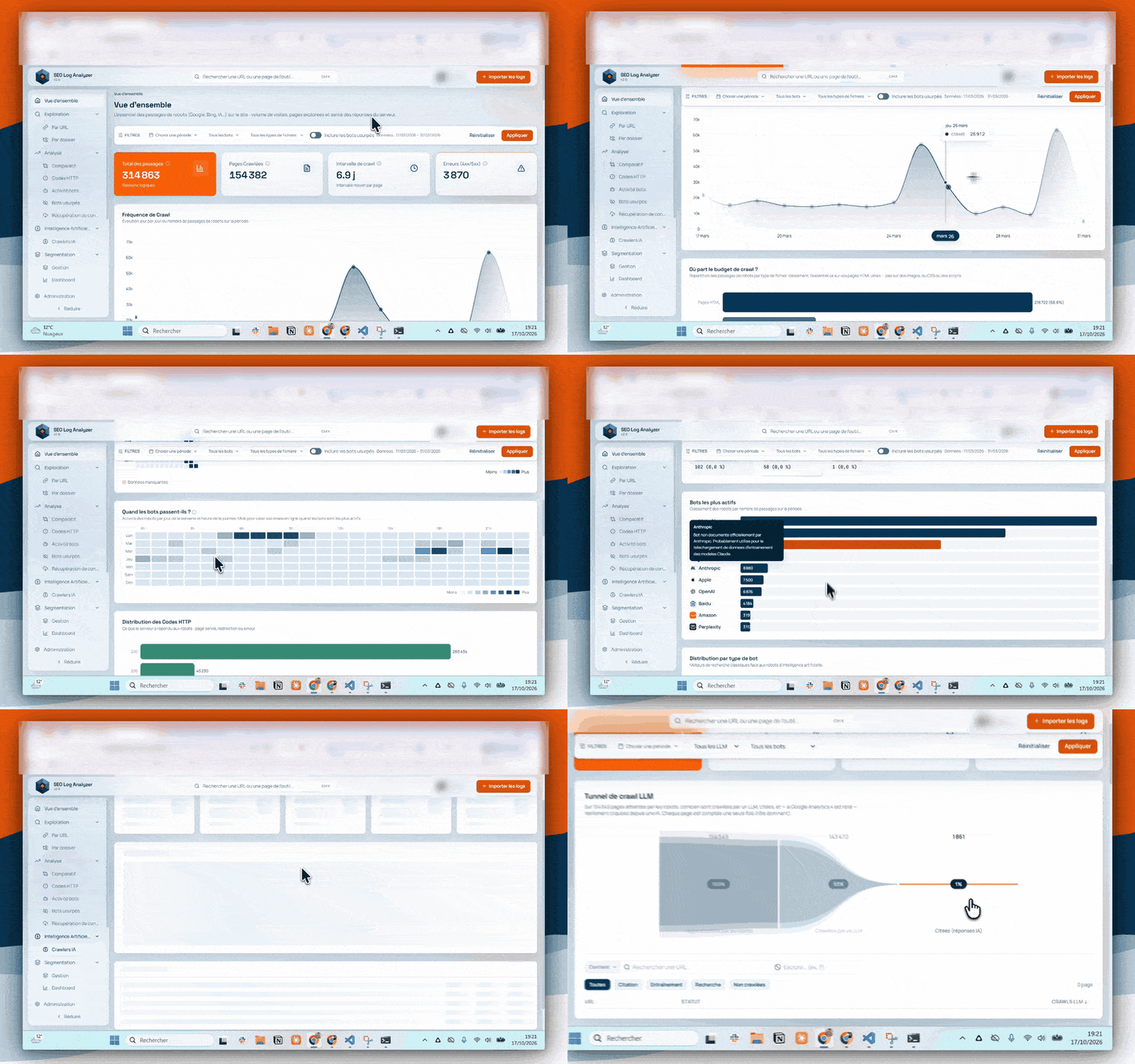
Earlier in this guide I mentioned that my day-to-day setup is a log analyzer I built myself. I started it in early 2026 for Empirik, the SEO agency I work at in Lyon, and the agency's SEO consultants use it on their own clients.
With an AI coding agent, building your own is within reach of most technical SEOs. If you go down that road, here is what I would watch out for.
1. Accept every file format your clients send
Clients do not send logs the way you would like. Some of mine send Excel files, others CSV, others plain .txt exports.
The line format also changes with the server: Apache, Nginx and CDN exports each write their fields in their own way. The importer has to recognize and parse all of them, otherwise every new client starts with a conversion chore.
2. Connect GSC, GA4 and a crawler
Logs alone tell you what bots fetched. Most of the findings in this guide (orphan pages, crawled but not indexed, crawl versus clicks) come from crossing logs with other data.
So plan the connectors from the start: Google Search Console, GA4, and either a built-in crawler or an import of a Screaming Frog crawl.
3. Install it locally rather than hosting it
We are 7 SEO consultants at Empirik, with around ten clients each. Hosting one central tool that stores and processes everyone's logs was a pain, because log files are very heavy.
The setup we kept: each consultant installs the tool on their own computer and imports only the logs of their own clients.
4. Pick a columnar database (I moved from SQLite to DuckDB)
Even split per consultant, a log database fills up fast. I started with SQLite, which stores data row by row: to count anything, it had to read through every row again, and it got slow.
I then switched to DuckDB, which stores data column by column and only reads the columns a query needs. Counting hits per bot touches the bot column, not every full line.
| Measured in the tool | SQLite | DuckDB |
|---|---|---|
| Dashboard load time | 6 s | 0.1 s |
| First launch of the tool | 15 s | 1 s |
5. Count visits, not only hits
A hit and a visit are two different things. A bot can request the same page 3 times in 2 seconds (CDN retries, prefetching): that is 3 hits in the logs, but only 1 real visit.
Counting raw hits inflates the crawl frequency of the pages where these bursts happen. The tool groups them with one rule:
Same bot, same IP, same URL, same HTTP status code and less than 5 seconds between two hits = 1 visit.
6. Classify AI bots by role
As covered in the section on the three types of AI bots, an AI bot hit does not mean the same thing depending on which bot sent it. The tool tags each one by role:
- Training: GPTBot, ClaudeBot.
- Search: OAI-SearchBot, PerplexityBot.
- Citation triggered by a user: ChatGPT-User, Claude-User.
Lumping all three into a single "AI bots" line hides the user-triggered fetches, which carry the most GEO signal.
7. Catch fake bots without false accusations
Plenty of traffic claims to be Googlebot or an OpenAI crawler without being one (see the fake bot check above). The tool verifies each claimed bot in this order:
- Official IP ranges: if the IP sits in the ranges the provider publishes, the bot is genuine.
- Reverse DNS, for the providers where it works. It does not work for all of them: for OpenAI, for example, the reverse lookup returns nothing.
- No official IP list and no reliable reverse DNS: the bot is left as is and counted as valid, so the tool never labels a real crawler as fake by mistake.
This fallback does not weaken the analysis: the bots that matter for SEO and GEO all fall into the first two cases.
Why server logs are still the most underused source in SEO
Logs are not glamorous. They are big, ugly text files, often hard to access, often locked behind a hosting ticket or a CDN dashboard.
The tools to analyze them are either expensive (SaaS) or technical (Python). And the payoff requires you to actually read the output, not just dump it into a report.
That friction is exactly why the people who do use them have an edge. While most SEOs argue on LinkedIn about whether GSC sampling is a problem (it is), the rest of us are looking at the actual ground truth and finding 6-figure orphan page goldmines.
If you take one thing from this article, take this: your audit tools tell you about your site. Your logs tell you about Google's relationship with your site. Those are two completely different things, and only one of them moves the needle.
Key Takeaways
GSC is sampled, GA is consent-gated, crawlers are simulations. Logs are the only raw and complete source.
Two kinds of hits live in logs. For audits, ask the dev team for bot-only exports. Zero personal data, zero GDPR issue.
User-agent + reverse DNS, every time. Spoofed Googlebot is everywhere.
If you have a CDN, the cache absorbs most traffic. Origin logs are blind to it.
Crawl ✕ logs cross-check. The easiest quick win in any audit.
No Googlebot hit for ~4 months = automatic deindexation. Spot pages at risk before Google does.
Confirmed under oath in the 2025 DOJ trial. Crawl frequency is both a symptom and a lever of ranking.
GPTBot, ClaudeBot, PerplexityBot, OAI-SearchBot. Track them per engine and per page type. No crawl, no AI citation.
That's all for today. Bye!
Ian Sorin is an SEO consultant based in Lyon, France. With a deep passion for understanding how search engines work under the hood, he specializes in technical SEO and data-driven strategies.