

How Google Crawls the Web: The Complete Technical Guide

How Google Crawls the Web: The Complete Technical Guide
The complete technical guide: crawl budget, scheduling, rendering.
 Ian Sorin
January 25, 2026
31 min read
Ian Sorin
January 25, 2026
31 min read
Updated: October 2026
Hey, it’s Ian !
Are you sure you know everything about Google crawl ? Really everything ?
Today I’m sharing everything I know about how Google crawls the web. We’ll cover the technical process, crawl budget, predictive crawling (yes, Google now predicts if your page is worth visiting), and a hidden rule that causes pages to get deindexed after a specific number of days.
Fair warning : this is dense. But if you’re serious about technical SEO, bookmark this one.
Let’s dive in.
- Crawling comes before everything: no crawl = no indexing = no ranking
- Crawl budget = crawl rate (how fast) + crawl demand (how much Google wants your content)
- Google now uses predictive crawling: ML decides if your page is worth visiting BEFORE crawling
- The 130-day rule: pages not crawled for 130 days get removed from the index
- Content freshness matters: regularly updated sites get crawled more often
- Nofollow doesn’t prevent crawling: it only affects PageRank flow
- User data can influence Crawl Rate.
- Google put real numbers on all of this: at a live event in Barcelona, Google shared average timelines for crawling, indexing and serving, from ~20h to discover a new URL up to 3-6 months to recover from a core update
I. The Crawling Process: Step by Step
Before we get into the advanced stuff, let’s make sure we’re aligned on how crawling actually works.
“Hi! I’m Googlebot. Let me show you how I explore the web and decide which pages deserve to be in Google’s index. It’s more complex than you think!”
🔄 The Crawl Journey: From Discovery to Indexing
Click on each step to learn more about what happens (and what can go wrong)
🔍 Step 1: URL Discovery
Google finds new URLs through multiple sources: following links from already known pages, reading your sitemap, or from external links pointing to your site.
- Internal links from crawled pages
- XML sitemaps
- External backlinks
- Google Search Console URL submission
- Orphan pages (no internal links pointing to them)
- Missing or broken sitemap
- Noindex on linking pages
- Pages too deep in site architecture
1.1 URL Discovery
The web is massive. We’re talking trillions of URLs out there.
Google’s crawling process begins with a list of web addresses from previous crawls and sitemaps provided by site owners. From there, Google follows links on those pages to discover new URLs.
Not all pages get discovered. And not all discovered pages get crawled. Google has to make choices because even their resources aren’t infinite.
1.2 How Googlebot Works
Googlebot is Google’s main crawler software. Think of it as a very sophisticated browser that visits web pages, reads their content, and follows links.
Every decision Googlebot makes is algorithmic, there’s no manual intervention deciding which pages to visit. Instead, it relies on signals and machine learning to prioritize what matters most.
Here’s what Googlebot handles automatically:
- Scheduling decisions: which sites to crawl and how often, based on historical value and freshness signals (and user data)
- Volume management: how many pages to fetch from each site without exhausting resources
- Politeness controls: managing load to avoid overloading your servers (Google genuinely tries to be a good web citizen)
- Change detection: revisiting pages periodically to check if content has been updated
1.3 Fetching & Rendering
It’s important to distinguish between two types of actions within this infrastructure:
- Crawlers: They work in batches, processing a constant stream of URLs continuously. This is the ‘standard’ Googlebot activity.
- Fetchers: These handle URLs individually. When you use the ‘URL Inspection’ tool in Search Console, you’re triggering a Fetcher, not the main crawler. It’s a surgical, one-time request.
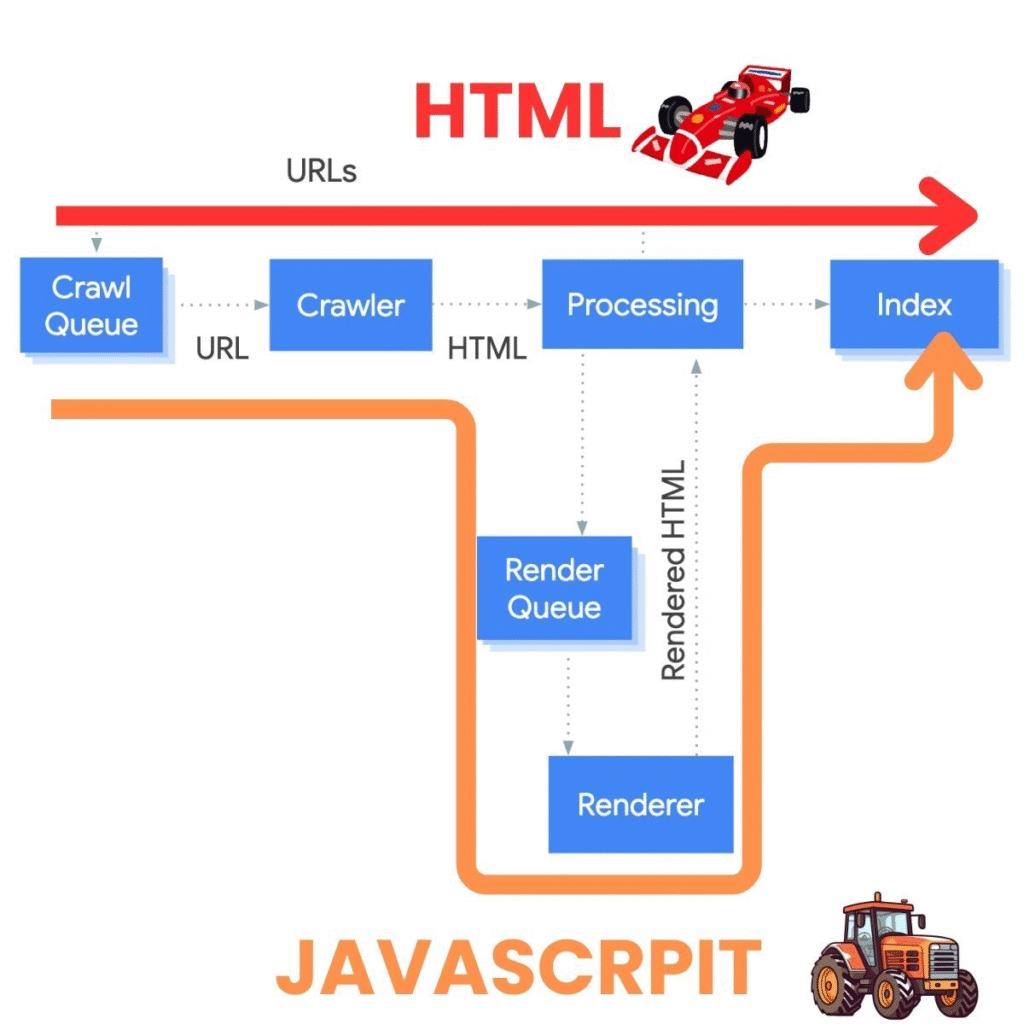
So after Crawling there is two distinct operations:
Fetching = downloading the page data (HTML, resources)
Rendering = using a headless Chrome browser to turn HTML, CSS, and JavaScript into the visual representation of the page
This matters a lot for JavaScript-heavy sites. If your content is rendered client-side, Google needs to execute that JavaScript to see what’s actually on the page.
And did you know Googlebot has a “download limit”?
To keep the web efficient, according to google official statement Googlebot doesn’t read infinitely large files. For most web pages and scripts, it only looks at the first 2MB of data. If you’re hosting PDFs, the limit is much higher at 64MB.
Why does this matter? > Once Googlebot hits that limit, it simply stops downloading and only indexes the part it has already seen. This applies to the “uncompressed” size of your files, meaning the actual weight of your code, not the zipped version your server sends.
This rule also applies to your CSS and JavaScript files. If your scripts are too heavy, Google might only see a portion of them, which can break how your site is rendered. Keep your files lean to ensure Googlebot gets the full picture!
Inside the render: Googlebot has a time budget
Once Googlebot has fetched your HTML, the render step spins up a headless Chrome that does not wait forever. In a detailed experiment, Tony McCreath (Website Advantage) instrumented a live page and watched Googlebot behave as if it runs on its own internal clock.
That clock pauses while your code executes or while a network request is pending, and it fast-forwards when nothing is happening. Rather than counting down a fixed timer, Googlebot watches the browser event loop to decide when a page has finished loading.
Concretely, it keeps an eye on the browser task queue: the list of pending jobs the page still has to run (timers, fetch callbacks, script execution, and so on). As long as that queue has work waiting, Googlebot considers the page still busy.
It takes its DOM snapshot once that task queue is empty, meaning nothing is left to execute and the page has gone quiet. That snapshot is the version of your HTML Google actually indexes.
There is also an upper safety ceiling, measured in the tens of seconds rather than a fixed value. Past that point, Googlebot cancels every pending network request and finalizes whatever it has so far.
One caveat worth stating plainly: these exact numbers come from Tony’s observations on a single instrumented page, not from a published Google spec. The lesson holds either way. Get your critical content into the DOM early, and never gate it behind long request chains or artificial delays.
Googlebot quietly drops resources it judges non-essential
During the render, Googlebot does not load everything on the page. Tony’s experiment showed it cancelling cross-origin resources served without CORS headers, anything disallowed in robots.txt, some web fonts, and tracking events such as Google Analytics or Facebook hits fired after the initial load.
The practical risk is easy to miss. If your main content depends on a cross-origin fetch with no CORS header, Google may never see it, even though your visitors do.

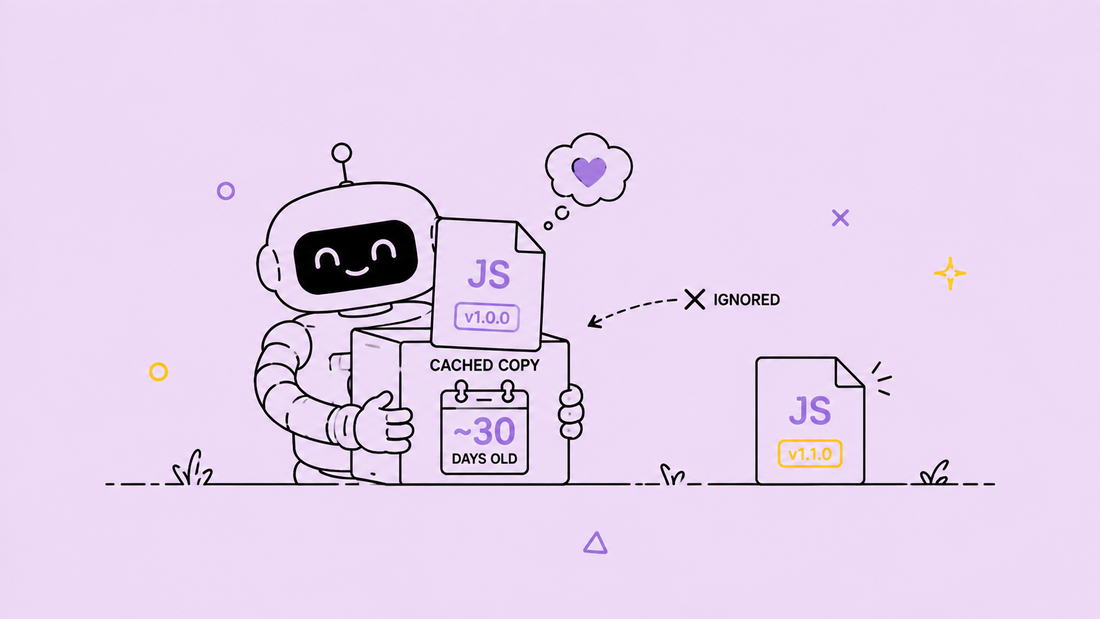
The render cache can be up to 30 days old
The Web Rendering Service caches resources like your JavaScript and CSS for up to about 30 days, and Tony found this cache ignores your HTTP Cache-Control headers.
So when you ship a fix to a client-side rendered page, Google can keep rendering it with the old cached script for weeks. If a change has to be picked up quickly, version your asset filenames rather than trusting cache headers.
A giant viewport to reach lazy-loaded content
To discover lazy-loaded content, Googlebot expands its viewport to an enormous height (Tony measured over one million pixels) and fires resize events, which wake up any IntersectionObserver-based loaders.
In practice, though, only the first two or three lazy sections load before the time budget runs out. Keep your primary content in the initial HTML or in those first sections, not buried at the bottom of an infinite scroll.

One quick curiosity about that fetching step. It is easy to assume Googlebot only ever sends GET and POST requests. It does not. Gary Illyes, who works on Search at Google, addressed this on LinkedIn after getting the question a few times:

“HEAD, OPTIONS, PUT, PATCH, and DELETE account for less than 1.5% of the total number of requests all Google’s crawlers send. And why do we send these types of HTTP requests? JavaScript, that’s why. Basically it seems that some JavaScript […] is initiating these requests and rendering does its rendering things.”
Gary Illyes, Google Search Analyst, on LinkedIn
So if you spot the occasional HEAD, OPTIONS, PUT, PATCH or DELETE from Googlebot in your server logs, it is almost never a scraper faking the user-agent.
It is the rendering step running your client-side JavaScript, which fires those methods on its own. At under 1.5% of all crawler requests, it stays a rounding error in your crawl stats, so there is nothing to fix.
1.4 The Role of Sitemaps
Sitemaps are XML files that list your URLs and tell Google “hey, these pages exist.”
Are they mandatory? No.
Are they highly recommended? Absolutely.
Sitemaps help Google discover pages that might be hard to find through internal linking alone. They also provide metadata like when a page was last modified.
Best practice : Let your CMS generate sitemaps automatically. WordPress, Shopify, and most modern platforms do this out of the box.
II. How Long Does Crawling, Indexing and Serving Take?
At the Google Search Central Live Deep Dive Europe event in Barcelona, organized by Gary Illyes and Cherry Sireetorn Prommawin, Google put concrete numbers on something most SEOs only ever guess at: how long crawling, indexing and serving take.
The slides covered three separate stages. Crawling is discovering and fetching a URL. Indexing is turning that fetch into something searchable. Serving is what happens once a page already sits in the index, from a snippet update to a core update.
2.1 Crawling: from discovery to crawl demand
These numbers line up with the step-by-step process described in Section I. Discovery and sitemap processing confirm that Google needs time to notice a URL exists, before it even decides whether to fetch it.
| Step | Typical | Range (min to worst case) |
|---|---|---|
| Discovery (new URL) | ~20 hours | up to weeks, sometimes never |
| Refresh (known URL) | ~30 days | weeks to never |
| Sitemap processing | ~24 hours | up to 14 days, or never if quality is low |
| Robots.txt update | ~24-25 hours | n/a |
| Crawl capacity update | 4 hours to 1-2 weeks | seconds in back-off, 1-3 weeks during recovery |
| Crawl demand update | ~20 hours | weeks to months |
2.2 Indexing: from rendering to structured data
Once a page is fetched, indexing has its own timeline. Google defines “end to end” here as the point where every critical process involved has finished successfully, which is why that figure sits at a modest ~1.5 hours while individual pieces like link annotations or a site move can run for weeks or months.
| Step | Typical | Range (min to worst case) |
|---|---|---|
| Rendering | seconds (render) to hours (queue) | days to weeks |
| Meta annotations | 45-90 minutes | 200 seconds to 1-4 days |
| Link annotations | minutes to 1-3 weeks | n/a |
| Indexing, end to end | ~1.5 hours | months, or never if quality is low |
| Removal | 1-3 weeks | hours to days minimum |
| Canonicalization change | 1-3 weeks | up to months when signals conflict |
| Site move | 1-3 months | a few weeks minimum (small sites), 6 months to 1+ year (large sites) |
| Structured data updates | hours to 1-2 weeks | weeks, or never if quality is low |
| Images | hours to days | 150 seconds minimum, weeks to months maximum |
| Videos | hours to days | minutes minimum for metadata, weeks to months for deep analysis |
2.3 Serving: what happens once a page is already indexed
The last stage covers what search results show you, and how slow that can be to catch up. A core update is the extreme case: the slide put rollout at 2-4 weeks, then 3 to 6 months before a site fully recovers, with the next core update landing 6 months to a year later.
| Step | Typical | Range (min to worst case) |
|---|---|---|
| Removal on Search Console (by owner) | ~2 hours | minutes minimum, 24 hours maximum |
| Snippet update | 1-2 days | several weeks to months |
| Text result image update | 1-2 weeks | several weeks to months |
| Title update | 1-2 days | several weeks to months |
| Manual action removal | 1-2 weeks | 2-3 days minimum, 4-6 weeks or much longer on dormant sites |
| Core update change | 3-6 months to recover | 2-4 weeks rollout, 6 months to 1 year until the next core update |
| Spam update change | 1-2 weeks, continuous | 1-2 days rollout, months for batch refreshes |
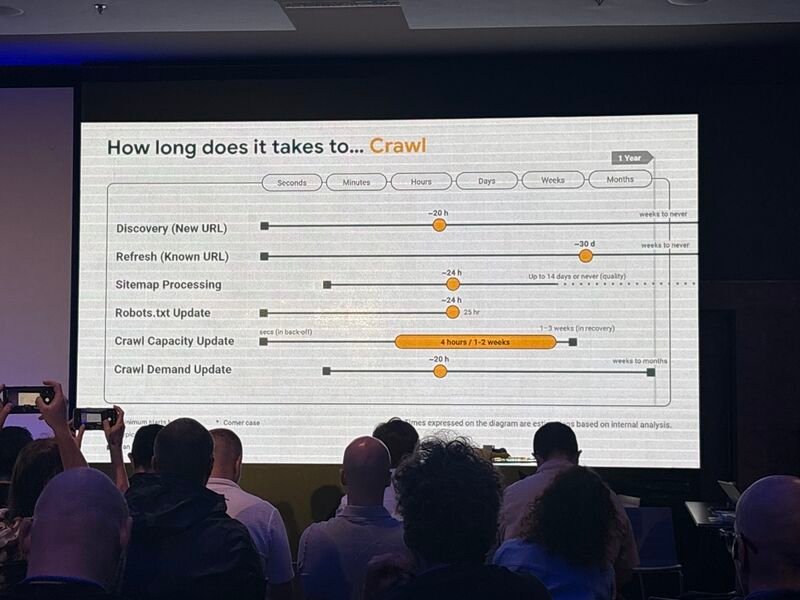
Photos from the Google Search Central Live Deep Dive Europe event in Barcelona. Credit: Estela Franco, on LinkedIn.
With these baseline timelines in mind, the next question is what pushes a given URL toward the fast end of each range, or the slow one. That is exactly what crawl budget is about.
III. Crawl Budget: What It Is and Why It Matters
This is where things get interesting.
“I can’t visit every page on the internet, I have limits too! My ‘crawl budget’ determines how many pages I can visit on your site. Let me explain how it works…”
3.1 Defining Crawl Budget
Crawl budget is made up of two components:
Crawl Rate = the maximum number of concurrent connections Googlebot can use to crawl your site. This is calculated based on your site’s responsiveness. Fast site = higher crawl rate. Slow site = lower crawl rate.
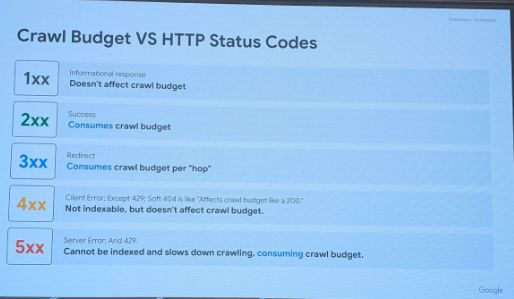
Google’s infrastructure is built to ‘not break the internet.’ If your server returns a 503 (Service Unavailable), the crawler doesn’t just stop; it drastically slows down its entire cadence for your host, assuming your server is overwhelmed. It can take a long time for the crawl rate to return to normal after a 503 spike.
Crawl Demand = how much Google wants your content. This is affected by:
- URLs that haven’t been crawled before (new content)
- Google’s estimation of how often your content changes
- The perceived quality and popularity of your pages
It’s the number of URLs Google can AND wants to crawl on your site.
3.2 When Does Crawl Budget Actually Matter?
I often see consultants and agencies talking about “crawl budget” for websites with fewer than 5,000 pages.
At that scale, these sites are tiny compared to the size of the web, and crawling them entirely is absolutely not a problem for Google (assuming the site is worth crawling in the first place).
Crawl budget only becomes a real issue when a website reaches hundreds of thousands of pages, and more realistically, millions, according to Google representatives themselves.
So if someone warns you about your crawl budget for a small website, be cautious: your provider may not really know what they’re talking about.
For smaller sites, the focus should be on crawl demand. If your content hasn’t changed in a year, Google might decide to only recrawl it every two weeks instead of every day.
3.3 HTTP Status Codes & Crawl Budget
Not all HTTP responses are equal when it comes to crawl budget. Here’s how different status codes impact your crawling:
3.4 Search Console Crawl Stats Report
Want to see how Google actually crawls your site? The Crawl Stats report in Search Console is your friend.
Where to find it: Settings > Crawl Stats
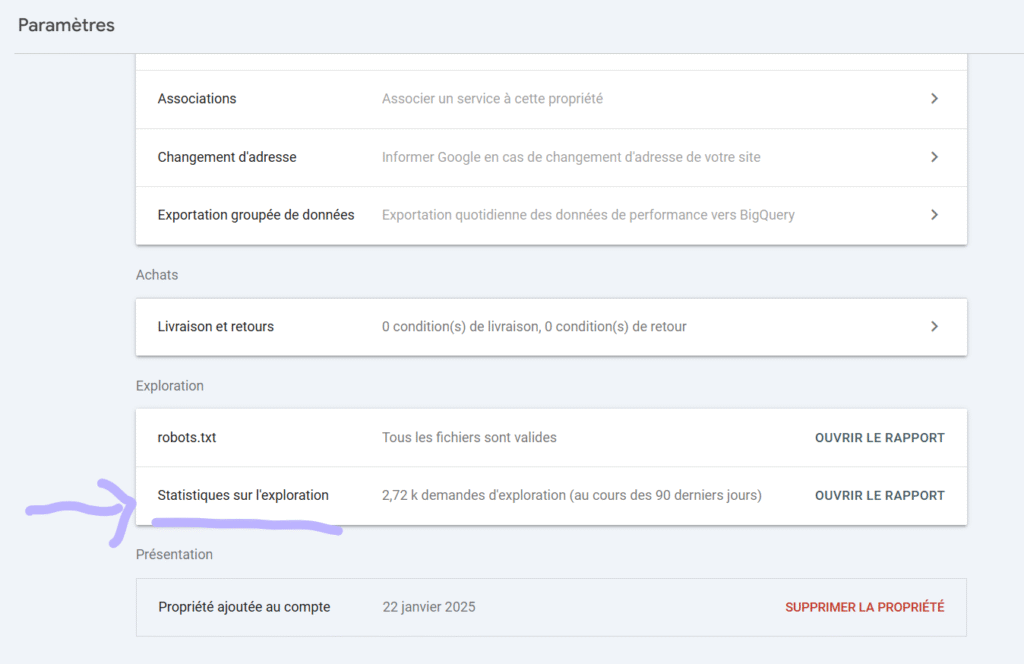
Key metrics to monitor:
- Total crawl requests: How many URLs Google requested (successful or not)
- Total download size: How much data Google fetched
- Average response time: How fast your server responds to Googlebot
Host status details tell you about the technical health of your site from Google’s perspective. These are the infrastructure-level issues that can block crawling entirely:
- Robots.txt fetch: Shows failure rate when Google tries to access your robots.txt. If this fails, Google stops crawling your entire site until it’s resolved.
- DNS resolution: Reveals issues with your domain name resolution. If Google can’t resolve your domain, nothing gets crawled.
- Server connectivity: Tracks when your server was unresponsive. Consistent connectivity issues lead to reduced crawl rates over time.
Crawl request breakdown is where you get the detailed picture of what Google is actually doing on your site. This data helps you understand crawl patterns and identify potential issues:
- Response types: Distribution of status codes (200, 301, 404, 5xx). A high percentage of 5xx errors is a red flag that needs immediate attention.
- File types: What Google is fetching: HTML pages, images, JavaScript, CSS. If JS/CSS makes up a huge portion, your site might be rendering-heavy.
- Crawl purpose: Discovery (finding new URLs) vs Refresh (re-crawling known pages). A healthy site should show both, with refresh dominating for established content.
- Googlebot type: Which crawler is visiting: Smartphone (primary), Desktop, Image, etc. Since Google uses mobile-first indexing, Smartphone should be the main crawler.
Reading the trend lines matters as much as reading the numbers. In a recent Search Off the Record episode, John Mueller and Martin Splitt made a useful point about these reports: a small, isolated blip (a handful of 500 errors, a server hiccup during a host migration) usually sorts itself out and isn’t worth chasing.
What actually deserves your attention is a line that keeps climbing. That steady rise is the signal that something structural changed.
They also reminded us that the internet is built to be resilient, and Google simply retries. A failure that lasts a few minutes or a few hours is nothing to worry about. According to them, Google only really starts reacting once an outage stretches beyond roughly 24 hours, which in internet time is already a very long one.
And also don’t forget : this report dont show you 100% of googlebot’s visits on your website. From experience it only show 30 to 50% of real googlebot’s visits. If you wanna get all the data you have to collect and analyse your website’s server logs.
3.5 Google Leaks: Content Change Detection
This is where it gets really interesting. According to data from the Google Leaks, we now know that Google’s crawler actively checks if content is different from the last time it visited.
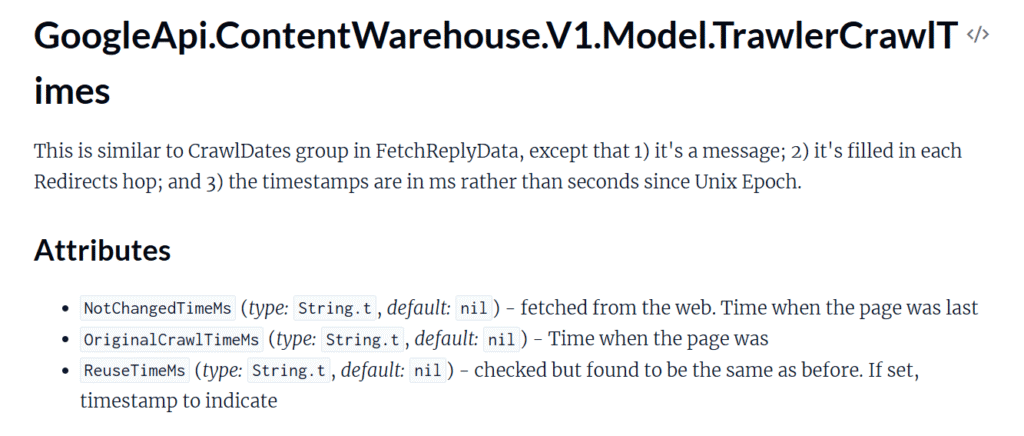
What this means for you:
- Google compares current content to the last crawled version
- This comparison directly influences how often your site gets crawled
- Sites with regularly updated content → crawled more frequently
- Stale sites with no changes → crawled less often
The leaks also revealed that Google uses aggressive caching and throttling mechanisms to make crawling efficient while protecting the servers they crawl.
For example : If Google News fetches a page, the Search team might receive that exact copy 10 seconds later instead of crawling your site again. This shared cache allows Google to ‘see’ updates via one tool even if the other hasn’t visited you yet.
IV. Predictive Crawling
Over the past few years, Googlebot has stopped blindly crawling every page it comes across.
“I’ve gotten smarter over the years. Now I try to predict if a page will be worth visiting BEFORE I actually crawl it. Why waste resources on low-quality content?”
4.1 The Shift: From “Crawl Everything” to “Crawl Smart”
The era when Google indexed almost everything you asked it to ? That’s over.
Google doesn’t even want to crawl all pages anymore. The reason is simple : cost optimization and resource efficiency. Crawling the web is expensive, even for Google.
4.2 How Predictive Crawling Works
Google uses machine learning to predict if a page is worth crawling before actually crawling it.
Don’t take my word for it. Here’s what Google employees have said:

“I know that we use machine learning to identify or predict the quality that we’ll get from a crawl. It’s interesting to try to predict how much quality we can get from a specific crawl before it even happens.”
Martin Splitt, Google Developer Relations, November 2020
“My mission [in 2024] is to find a way to crawl even less. […] We’re crawling roughly as much as before, however scheduling got more intelligent and we’re focusing more on URLs that more likely to deserve crawling. ”
Gary Illyes, Google Search Analyst, April 2024
Let that sink in. Google’s explicit mission is to crawl less, not more.
4.3 What Google Evaluates
The prediction is based primarily on:
- Overall quality of previously published pages on your site : If your existing pages are low quality, new pages inherit that reputation
- Historical crawl data : How valuable were previous crawls of your site?
- Site-wide signals : Authority, trustworthiness, technical health
4.4 The QualityRisk Factor
Google essentially calculates a “quality risk” score before deciding to crawl. The logic is:
- Low quality risk → Higher crawl priority
- High quality risk → Lower crawl priority (or no crawl at all)
This means that improving your overall site quality doesn’t just help the pages you optimize, it helps ALL your pages get crawled and indexed.
4.5 Temporal & Content Patterns in Crawling
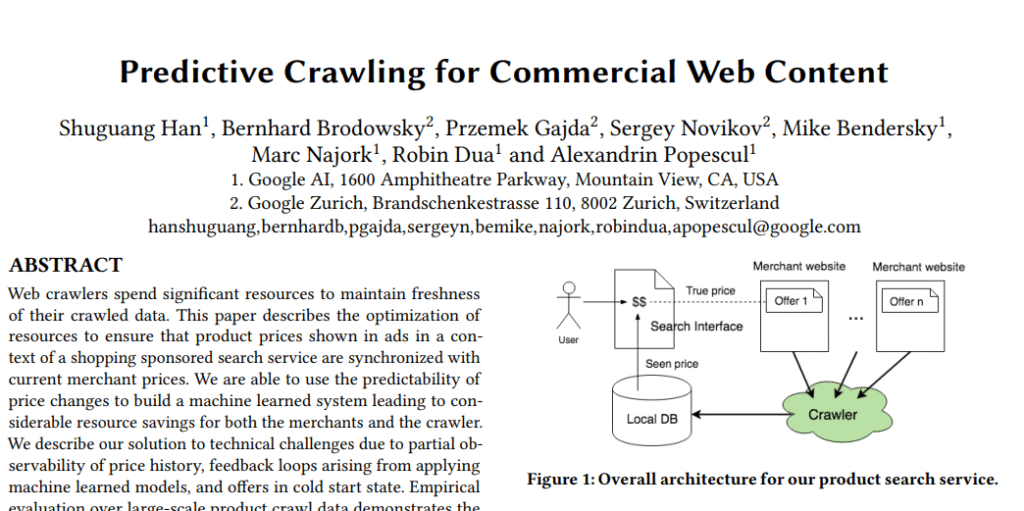
Google’s research has revealed fascinating patterns about when and what gets crawled. These insights come from analyzing millions of pages and their change dynamics.
Temporal patterns that affect crawl scheduling:
- Midnight peaks: Content changes are most common around midnight (local time), likely due to automated updates and scheduled publishing. Google’s crawler accounts for this.
- Weekday vs weekend: Changes are more likely to happen on weekdays than weekends. The crawler adjusts its scheduling accordingly.
- Category-specific rhythms: Different types of content have different change frequencies. News sites change constantly; corporate pages rarely update. Google learns these patterns per site and category.
These patterns help Google’s crawler make smarter decisions about when to visit your site. If your content typically updates at 9 AM, Google may learn to check around that time rather than crawling randomly throughout the day.
4.6 Change-Indicating Signals (CIS)
Google also uses external signals to decide when to crawl. These are called Change-Indicating Signals (CIS).
V. The 130-Day Rule: Google’s Hidden Deindexation Threshold
This is a great discovery in recent SEO research, and it comes from Alexis Rylko, who identified this pattern through extensive data analysis.
5.1 The Discovery
After analyzing crawl data from multiple sites using Screaming Frog and the Google Search Console API, Alexis discovered a consistent pattern :
Pages not crawled for 130 days get removed from Google’s index.
That’s it. 130 days without a Googlebot visit, and your page disappears from search results.
5.2 How It Works
Crawl frequency is dynamic and page-specific. Each page on your site has its own crawl frequency that evolves over time based on:
- Content quality
- PageRank (internal + external links)
- Depth in site architecture
- Update frequency
- And most of all : human traffic.
If this frequency degrades to the point where Googlebot hasn’t visited for 130 days, the page gets removed from the index.
Think of it as Google’s housekeeping mechanism, removing pages it considers unimportant to keep the index lean and efficient.
5.4 What Determines Crawl Frequency
Understanding this helps you prevent pages from hitting the 130-day threshold:
Content Quality: High-quality, unique content gets crawled more often. Google’s scheduling is dynamic, when indexing signals indicate quality has improved, crawl demand increases.
“Scheduling is very dynamic. As soon as we get the signals back from search indexing that the quality of the content has increased across this many URLs, we would just start turning up demand.”
Gary Illyes, Google Search Analyst
PageRank: Pages with more internal and external links are considered more important and get crawled more frequently. The deeper a page is in your site architecture, the less important it appears to Google.
Site Architecture: Pages buried deep in your site hierarchy (many clicks from homepage) are seen as less important and may not be crawled frequently enough to stay indexed.
5.5 How to Audit Your Site
Method 1: Screaming Frog + Search Console API
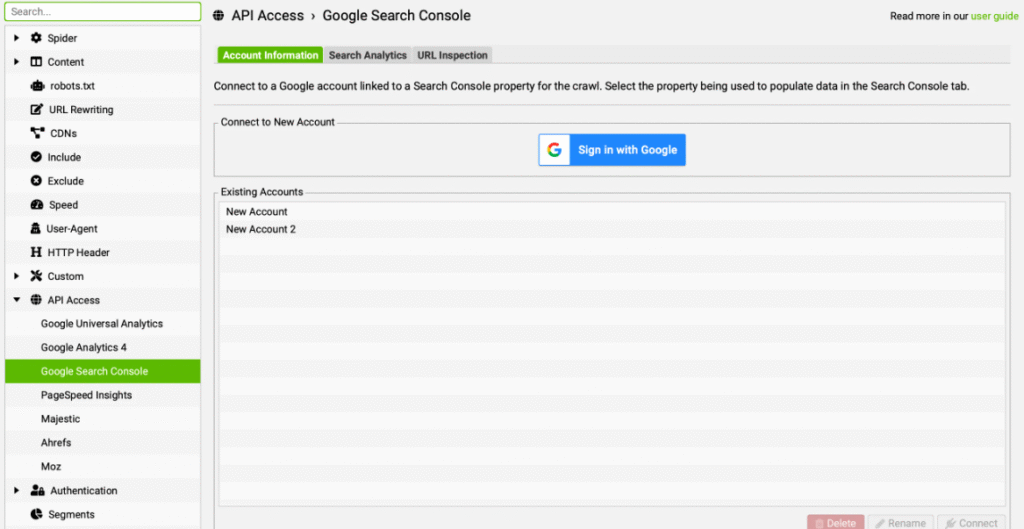
- In Screaming Frog, go to Configuration > API Access > Google Search Console
- Connect your account and enable “URL Inspection”
- Check “Fetch only indexable URLs”
- Run your crawl
- Sort by “Days since last crawl” in descending order
- Investigate any pages approaching 130 days
Free Tool: Visualize Your Deindexation Risk
I built a free tool (in French) that helps you visualize which pages are approaching the 130-day threshold and are at risk of being deindexed.
How it works: Import a CSV export from Screaming Frog (with Google Search Console API data), and the tool shows you exactly which pages need attention.
Method 2: Log File Analysis
Ask your hosting provider or developer to export server logs for at least the last 130 days. Cross-reference with your crawled URLs, any crawlable page NOT present in the logs for 130+ days is likely deindexed or at risk.
So if you notice that one of your pages hasn’t been crawled or indexed for, say, at least 110 days and it actually matters to you, it’s time to react.
Update the content, share the page on your social networks to generate traffic, add internal or external links to it. Create activity around that page to attract Googlebot back.
Personally, I build n8n workflows for my clients that call the Google Search Console API and send me an email as soon as a page hasn’t been crawled for at least 110 days. This gives me a few days to react and warn the client before it’s too late.
VI. Common Myths Debunked
Let’s clear up some misconceptions I see floating around.
6.1 Myth: Nofollow Links Prevent Crawling
THE MYTH
“Adding rel=nofollow to a link prevents Googlebot from crawling that page.”
THE TRUTH
Google introduced nofollow links to let sites indicate that certain pages shouldn’t count when computing web metrics (like PageRank). But it does NOT prevent Googlebot from crawling those pages.
6.2 Myth: Submitting a Sitemap Guarantees Indexation
The truth: Sitemaps help with URL discovery, but they don’t guarantee indexation. Google still evaluates quality before deciding to index a page.
Submitting a sitemap is like handing Google a list of addresses. Whether Google actually visits and keeps those addresses in its directory depends entirely on their perceived value.
6.3 Myth: The site: Search Shows What’s Indexed
A lot of people type site:yourdomain.com into Google, count the results, and treat that number as their real index coverage. It isn’t.
In the same Search Off the Record episode, John Mueller was clear on this: the site: operator is an artificial query, and Search Console is the actual source of truth for indexing.
He gave a telling example. After you migrate from an old domain to a new one with proper redirects, a site: search on the old domain can still surface those old URLs one, two, even three years later. It doesn’t mean the migration failed. It just means Google still knows those URLs exist and will happily show them when you explicitly ask for them (click through and you land on the new site via the redirect).
VII. Search Console Insights: Understanding “Crawled – Not Indexed”
If you’ve ever looked at your Search Console coverage report, you’ve probably seen these frustrating statuses. Let me explain what they actually mean.
First, a mindset shift that will save you a lot of stress. In a Search Off the Record episode dedicated to this exact report, Martin Splitt and John Mueller argued that you shouldn’t read it as a static inventory to police page by page, nor as a checklist of things to fix. It’s far more useful as a detection tool for changes and patterns, whether you expected them or not.
Say you launch a migration and set up redirects. You should then see a steep rise in “Page with redirect”, pages excluded from the index because they now point somewhere else. Read as an inventory, that spike looks alarming. In reality, it’s exactly what you asked for. And as long as it hasn’t shown up yet, it simply means Google hasn’t processed the change (remember, the data isn’t real time).
The same logic applies to canonicals. Seeing Google pick a different canonical than the one you declared is worth a look, not a panic. Google often settles on the URL that everyone else links to (for example the non-www version). The page stays indexed and findable; only the reported URL changed.
A domain property in Search Console makes all of this easier, since you no longer have to untangle www vs non-www or http vs https every time a canonical shifts.
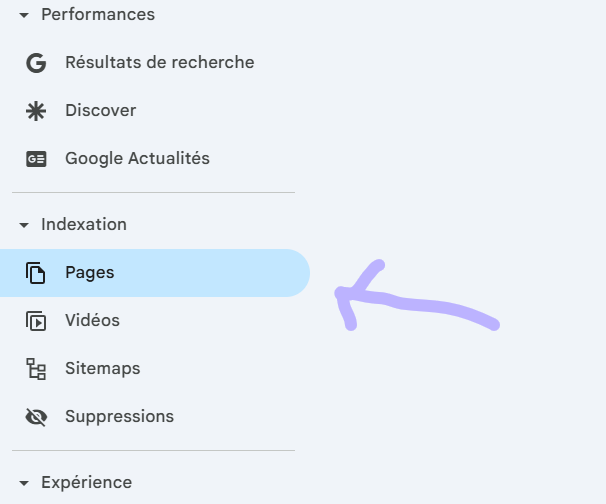
7.1 “Discovered – Currently Not Indexed”
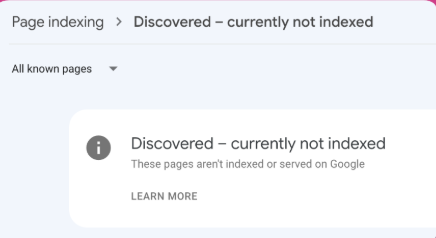
This means Google knows the URL exists but hasn’t crawled it yet. Google has probably “predicted” that it’s not worth crawling. This is predictive crawling in action, your page was filtered out before Googlebot even visited.
7.2 “Crawled – Currently Not Indexed”
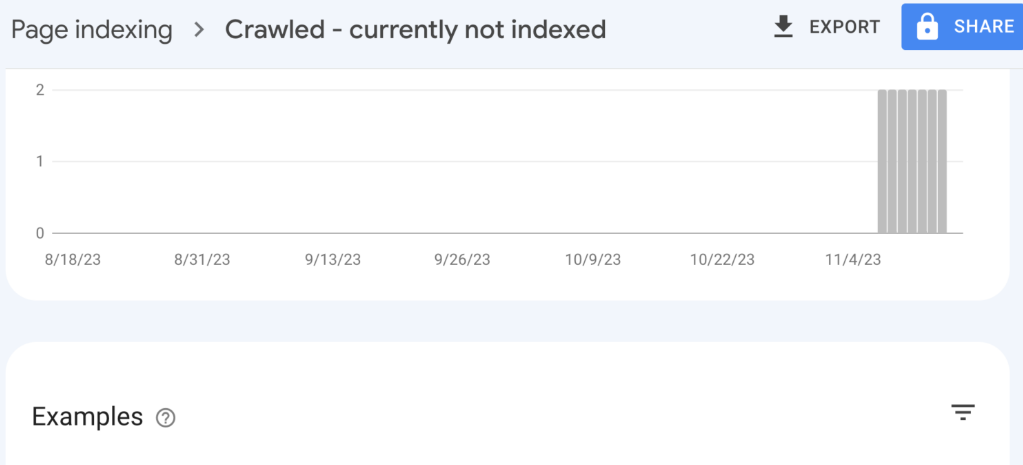
This means Google crawled the page but decided not to index it. Google decided the page isn’t worth indexing. This could be due to thin content, duplicate content, low quality, or simply that Google doesn’t see enough value.
7.3 “Not Indexed” Is Not a To-Do List
This is where a lot of beginners get trapped. They open the report, see hundreds or thousands of “not indexed” URLs, and assume it’s an error on their side that they have to clear. Two more takeaways from that Search Off the Record episode are worth keeping in mind here.
The “Mark as fixed” button doesn’t fit every case. It’s genuinely useful for real technical problems, for example a batch of 404s caused by a misconfigured server that you’ve since repaired. But for many “not indexed” reasons there is nothing to fix on your end: it’s simply Google deciding a page wasn’t worth keeping. Marking those as fixed won’t change that decision.
A 404 labeled “error” is often the correct behavior. If you delete a category, a rise in 404s is expected and healthy. It’s an error, yes, but an expected one. Chasing a permanently “all green” Search Console, a demand that often comes from management, is the wrong goal. Pages that never existed, or that you removed on purpose, are supposed to return an error.
VIII. What Google Tracks During Crawl (Google Leaks Insights)
Thanks to the Google Leaks, we now have visibility into what Google actually monitors and logs during the crawling process. This is stuff that was never officially documented.
“I keep detailed notes on every site I visit. Response times, SSL issues, redirect chains… Everything goes in my database and influences how I crawl your site in the future.”
8.1 IP Reputation
Google maintains lists of known spammy IP addresses. If your site is hosted on one of these IPs, it gets rejected for almost all crawls.
Your hosting provider matters. Cheap shared hosting with bad neighbors can hurt your crawlability !!
8.2 Redirect Handling
Google handles redirects very well. They’ve built sophisticated systems to follow and understand redirects but they’re also tracking everything about how you use them.
What Google monitors with redirects:
- Redirect delays: How long each redirect takes. Slow redirects impact user experience and crawl efficiency.
- Chain lengths: How many hops before reaching the final destination. Long chains (3+ redirects) waste crawl budget and signal poor site maintenance.
- Historical patterns: How your redirect behavior has evolved over time. Sudden changes in redirect patterns can trigger additional scrutiny.
Google uses this historical data to calibrate how their crawlers should behave on your site going forward. Sites with clean, fast redirects get treated better than those with messy redirect chains.
8.3 SSL & Security
Bad SSL certificates are logged. Security issues affect crawler behavior. If you have certificate problems, expect reduced crawling.
Clean SSL = smoother crawling.
8.4 Robots.txt Monitoring
Google measures and records everything about your robots.txt:
- Response times
- Error rates
- Changes over time
They keep a small history to understand how their bots should behave. If your robots.txt returns errors (like a 503), Google stops crawling your entire site until it can successfully fetch the file.
8.5 Crawl Error Logging
All crawl errors are logged and used to recalibrate crawl frequency. Consistent errors = reduced crawling.
If Googlebot keeps hitting 5xx errors on your site, it will back off to avoid overloading your servers. The problem is, it might not come back as frequently even after you fix the issues.
IX. New Revelations: User Data, Spam Scores & Crawl Priority
Recent legal proceedings and leaks have given us unprecedented insight into how Google really decides what to crawl. Spoiler: it goes way beyond just technical factors.
Before we dive into the recent revelations, let’s put everything together. Here are the 5 critical factors that influence Google’s crawl decisions in 2026 :
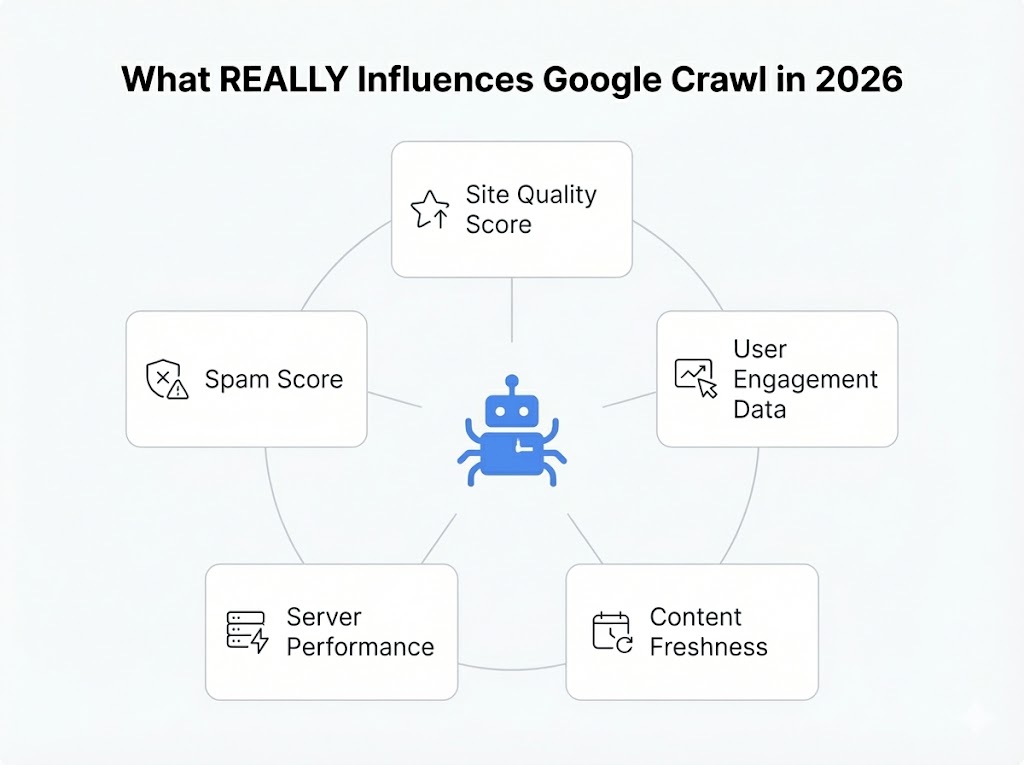
Now let’s explore the two most surprising ones that emerged from legal proceedings …
9.1 The DOJ Antitrust Trial Revelation
During the DOJ antitrust trial against Google, something fascinating emerged. Court documents revealed that Google doesn’t just look at your site’s technical health when deciding crawl priority, they also look at how real users interact with your site.
According to DOJ findings:
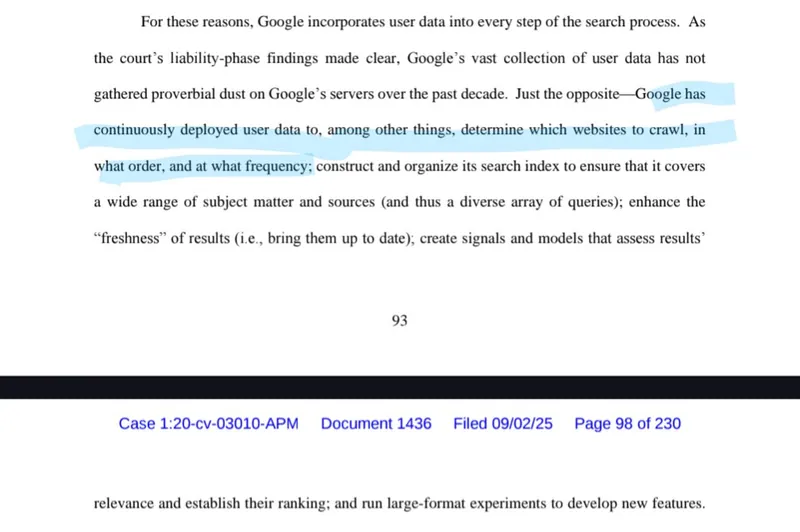
This is huge. It means that user engagement signals directly influence whether Googlebot prioritizes your pages for crawling.
What this means practically:
- Pages that users engage with get crawled more frequently because Google sees ongoing interest
- Pages with poor engagement metrics may see reduced crawl frequency over time
- New sites with no user data start at a disadvantage, Google has nothing to base crawl priority on except technical signals and site reputation
This creates a virtuous (or vicious) cycle: popular content gets crawled more, stays fresh in the index, and maintains rankings, while ignored content slowly fades from Google’s attention.
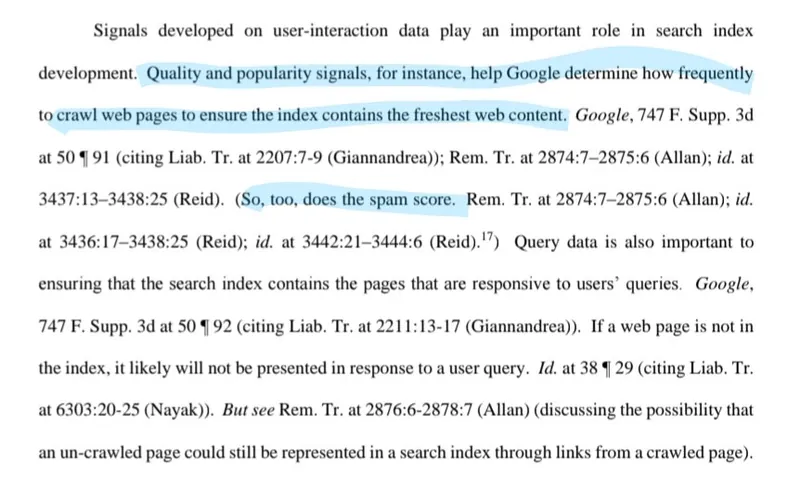
9.2 Spam Scores and Crawl Frequency
Google assigns spam scores to websites, and these scores directly affect how often your site gets crawled.
Think of it like a trust rating. Every site has a spam score based on various signals:
- Link profile quality: Are you associated with link schemes or spammy networks?
- Content patterns: Do you have thin, duplicated, or auto-generated content?
- User behavior signals: High bounce rates, pogo-sticking, low engagement
- Historical violations: Past manual actions or algorithmic penalties
- Neighborhood analysis: What other sites share your hosting IP or link to you?
X. ⚠️ The Geoblocking Trap
Google crawls the web almost exclusively from the United States (typically from California, with IP addresses starting with 66.x.x.x). If you use geoblocking to restrict your site to a specific country (e.g., only allowing French IPs), Googlebot will receive a 403 error or a timeout.
While Google has a few localized IPs for high-value content, they are extremely ‘frugal’ with them. Rule of thumb: never geoblock Googlebot if you want to stay indexed.
XI. Conclusion
Crawling is the foundation of everything in SEO. Without it, nothing else matters.
Here’s what you should take away from this :
Key Takeaways
Google now decides if your page is worth crawling BEFORE visiting. Site reputation matters more than ever.
Pages not crawled for 130 days get deindexed. Monitor your crawl frequency and address at-risk pages.
Your site-wide quality affects crawling of ALL pages, including new ones. Clean up low-quality content.
Google detects content changes. Regular, meaningful updates keep you in the crawl rotation.
The web is getting bigger, but Google’s appetite for crawling is getting smaller. The sites that understand this shift and optimize accordingly will have a significant advantage.
If you found this useful, bookmark it and share it with someone who needs to understand crawling better.
That’s all for today. Bye !
Ian Sorin is an SEO consultant at Empirik, a digital marketing agency based in Lyon, France. With a deep passion for understanding how search engines work under the hood, he specializes in technical SEO and helping websites get discovered, crawled, and indexed effectively.