
How Python and Google Colab Can Make Your SEO Life Easier

How Python and Google Colab Can Make Your SEO Life Easier
You don't need to be a coder. LLMs changed the game.
 Ian Sorin
January 2, 2026
3 min read
Ian Sorin
January 2, 2026
3 min read
If you’re an SEO professional and you haven’t started using Python yet, you’re missing out on a serious productivity boost.
But here’s the good news: thanks to LLMs like ChatGPT, Claude, or Gemini, you don’t need to be a coding expert anymore. These AI assistants can write Python code for you. All you need to know is what’s possible and how to run it.
But before we get into all the cool stuff, let’s start with the basics: what exactly are Python and Google Colab?
Python and Google Colab: What Are They?
What Is Python?

Python is a programming language. Think of it as a way to give precise instructions to your computer: “take this file, filter these rows, export the result.” That’s it.
What makes it relevant for SEO is that thousands of ready-made tools (called “libraries”) already exist. Need to scrape a site? There’s a library. Analyze 100,000 URLs? There’s a library. Generate PDF reports? Library. You don’t reinvent the wheel, you just assemble existing pieces.
What Is Google Colab?
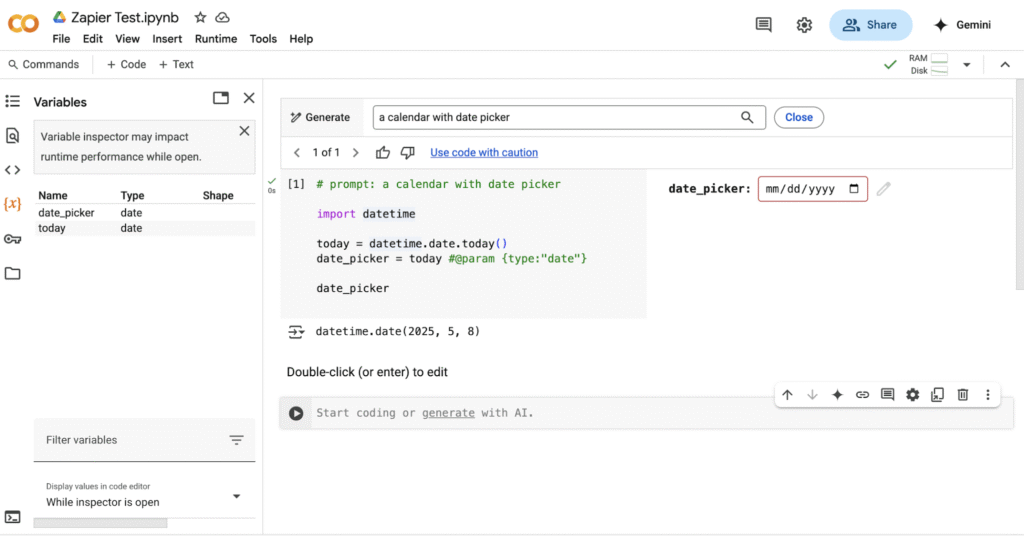
Google Colab (short for Colaboratory) is a free, cloud-based platform that lets you write and run Python code directly in your browser. No installation required. No configuration headaches. Just open it and start coding.
It’s built on Jupyter Notebooks, which is a format that combines code, text, and visualizations in a single document. The file format is .ipynb (which stands for IPython Notebook). Think of it as a Word document, but for code, you can write explanations, run code blocks, and see results all in one place.
Why Google Colab Over Other Solutions?
There are other ways to run Python: installing it locally, using VS Code, or other cloud platforms like Kaggle or Deepnote. But for SEO work, Google Colab hits the sweet spot:
- Zero setup – Just open your browser and go
- Free – Including access to GPUs for AI tasks
- Google Drive integration – Easy file management and sharing
- Collaboration – Share notebooks like Google Docs
- Gemini built-in – Google’s AI assistant is integrated directly to help you code and debug

Your First Script in 5 Minutes
Enough theory. Let’s get your hands dirty with a real example that works every time.
The goal: Create a simple script that checks if your meta titles are too long (over 60 characters) or too short (under 30 characters).
Step 1: Open Google Colab
Go to colab.research.google.com and click “New notebook”. That’s it, you now have a blank canvas ready to run Python code.
Step 2: Ask an LLM to Write the Code
Open ChatGPT, Claude, or any LLM you prefer. Copy-paste this prompt:
Meta Title Length Checker
BEGINNER FRIENDLYWrite me a simple Python script for Google Colab that: 1. Lets me paste a list of meta titles (one per line) 2. Checks each title’s character count 3. Flags titles that are too long (>60 chars) or too short (<30 chars) 4. Displays the results in a clear table Keep it simple, no external files needed. The user should just be able to paste their titles directly in the code.
Step 3: Copy the Code to Colab
The LLM will give you a block of code. Copy it entirely and paste it into the empty cell in your Google Colab notebook.
Step 4: Run It
Click the “Play” button on the left of the cell (or press Ctrl+Enter). The script runs, and you see the results right below.
From here, you can ask the LLM to modify the script: “Add a column showing how many characters to remove” or “Export the results to a CSV file.” The possibilities grow as you experiment.
How I Use Python and Google Colab (My Workflow)
Let me share my personal workflow, because it took me a while to figure out the most efficient way to work with these tools.
Step 1: Ask an LLM to generate a complete .ipynb file
Instead of asking ChatGPT or Claude for code snippets that I’d have to copy-paste, I ask them to generate a complete .ipynb file with well-structured cells. This way, when I import it into Google Colab, I get a nicely organized notebook with clear sections rather than one giant block of code.
Step 2: Import and run
Once I have my notebook file, I upload it to Google Colab and click “Run all” to execute all cells sequentially. That’s it, the script does its magic.
Step 3: Debug if needed
Sometimes things don’t work on the first try. That’s normal. Having multiple cells makes debugging much easier, you can identify exactly which part failed and fix it without re-running everything.
Cool Things You Can Do in SEO with Python and Google Colab
Now for the fun part. Here’s a (non-exhaustive) list of what you can accomplish with Python for your SEO work.
Web Scraping
Beautiful Soup + requestsExtract data from websites: competitor analysis, content audits, price monitoring. Fetch HTML and parse specific elements like H1 tags, prices, or any CSS selector.
soup = BeautifulSoup(response.text, ‘html.parser’)
soup.find_all(‘h1’)
Analyzing Large Datasets
PandasHandle 500,000+ row CSVs with ease. Merge data from GSC, GA4, Ahrefs, and Screaming Frog into one unified table. All your SEO data in one place.
df = pd.read_csv(‘data.csv’)
merged = pd.merge(gsc_df, ahrefs_df, on=’url’)
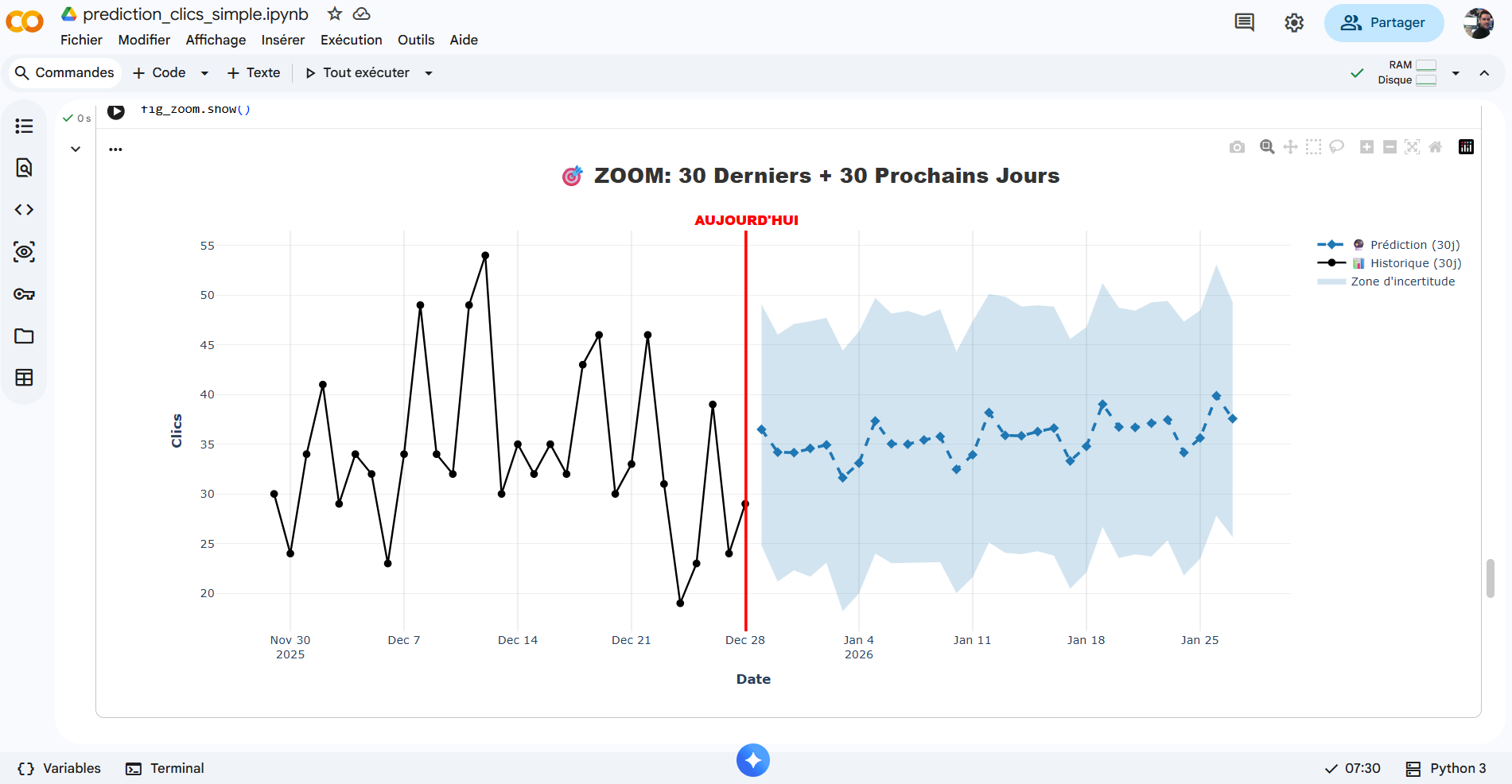
Forecasting SEO Performance
Facebook ProphetPredict future traffic patterns from historical Search Console data. Automatically captures trends, seasonality, and exceptional events. Perfect for setting realistic goals.
Generating PDFs & PowerPoints
reportlab, fpdf2, python-pptxAutomate report generation. Create PDFs from scratch or convert HTML. Generate PowerPoint presentations with text, images, and charts. Monthly client reports on autopilot!
slide = prs.slides.add_slide(layout)
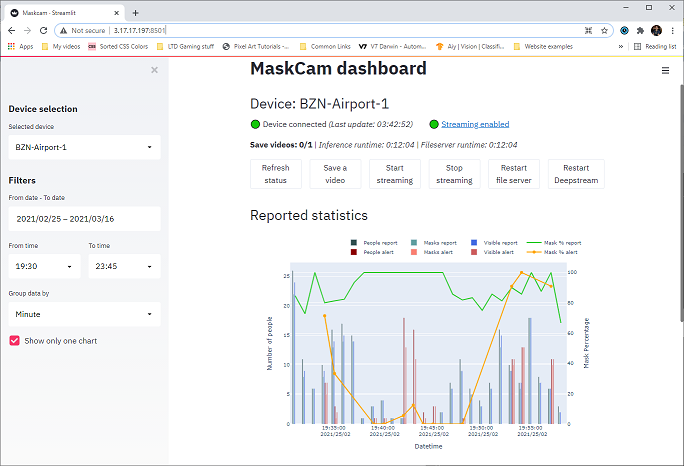
Building Apps with Streamlit
StreamlitCreate web applications with a user interface, without being a web developer. Build dashboards, internal tools, or client-facing apps using pure Python.
Browser Automation
SeleniumAutomate browser actions: clicking buttons, filling forms, taking screenshots. Essential for testing, repetitive tasks, or scraping JavaScript-heavy sites.
driver.get(‘https://site.com’)
driver.find_element(By.ID, ‘btn’).click()
AI Models (Free!)
Hugging Face TransformersFree, unlimited access to thousands of pre-trained AI models. Content classification, sentiment analysis, entity extraction, automatic Q&A, no paid APIs needed.
from transformers import pipeline
classifier = pipeline(‘sentiment-analysis’)
Image Processing
PillowFormat conversions (JPG, PNG, WebP), resizing, cropping, compression, filters, watermarks. Batch-convert 500 images to WebP for better Core Web Vitals.
img = Image.open(‘photo.jpg’)
img.save(‘photo.webp’, ‘WEBP’, quality=80)
Connecting to APIs
requests + any APIConnect to LLM APIs (OpenAI, Anthropic), DataForSEO, SERP API, Thot SEO, Search Console API, and many more. Automate anything that has an API.
response = requests.post(api_url, headers=headers, json=data)
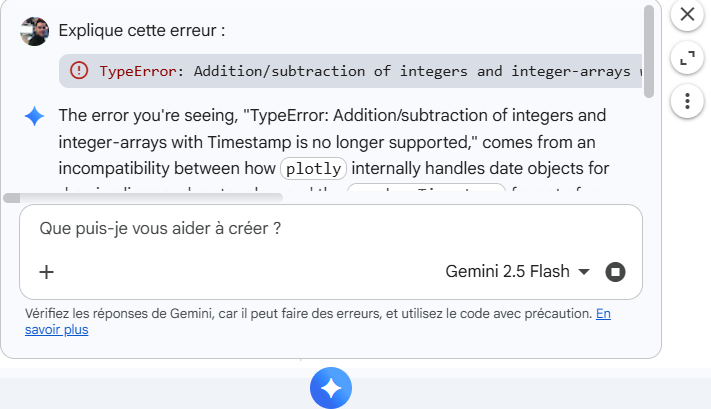
Coding with Gemini
Built into Google ColabGemini is directly integrated into Google Colab. Hit an error? Ask Gemini to explain it and suggest fixes. It’s particularly good at debugging, trust me.
Analyzing Files
ydata-profilingUpload files through the browser or generate an “Import files” button in your code. ydata-profiling automatically generates comprehensive EDA reports from any CSV.
profile = ProfileReport(df)
profile.to_notebook_iframe()
Downloading Files
google.colab.filesOnce your script has processed data and created an output file, download it directly to your computer with one line of code.
files.download(‘your_file.csv’)
Previewing Websites
requests + IPython.displayFetch a webpage’s HTML and display it directly in your notebook. Quick way to check a page without leaving Colab (JS-heavy sites may not render correctly).
display(HTML(response.text))
Embedding HTML/CSS/JS
IPython.displayEnrich your notebooks with custom HTML, CSS, and JavaScript. Create custom visualizations, interactive dashboards, or animations from your Python data.
display(HTML(f”””<div>…</div>”””))
Extra Tips for Google Colab
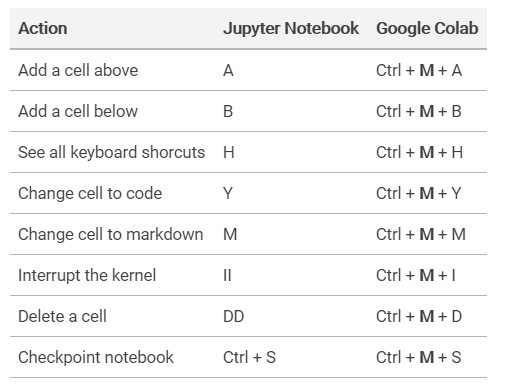
Keyboard Shortcuts (Windows)
These shortcuts can save you a lot of time once you get used to them:
Import Notebooks from GitHub
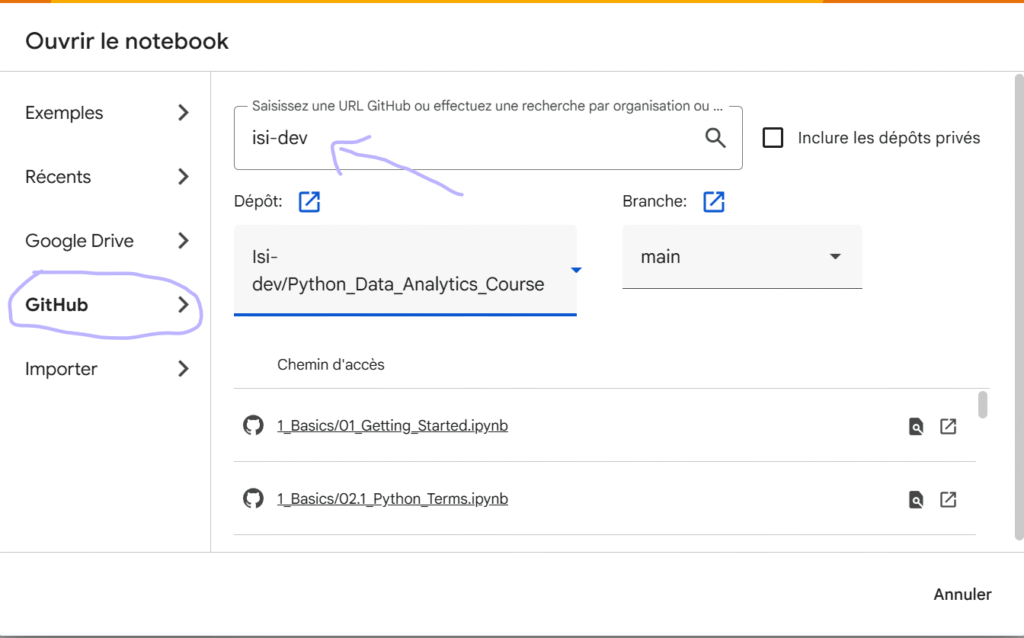
Found a great notebook on GitHub? You can import it directly into Google Colab with one click. Go to “File” > “Open notebook” > “GitHub” tab, then enter either the creator’s username or the repository URL containing the notebook(s).
[IMAGE PLACEHOLDER: Screenshot of Google Colab’s “Open notebook” dialog showing the GitHub import interface]
Structure Your Notebook with Headings
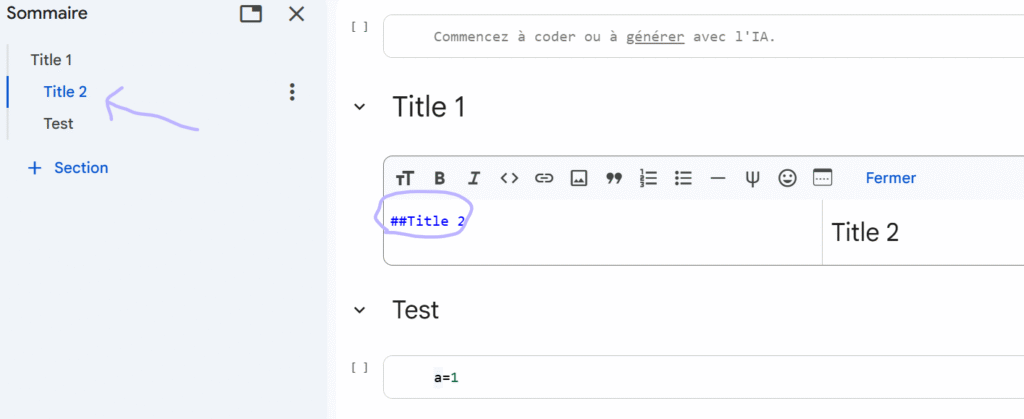
Just like you structure an article with headings for SEO, you can do the same in Google Colab. These headings create collapsible sections, making your notebook much easier to navigate.
To add headings, create a text cell and use hashtags:
# = H1## = H2### = H3- And so on…
Using R Instead of Python
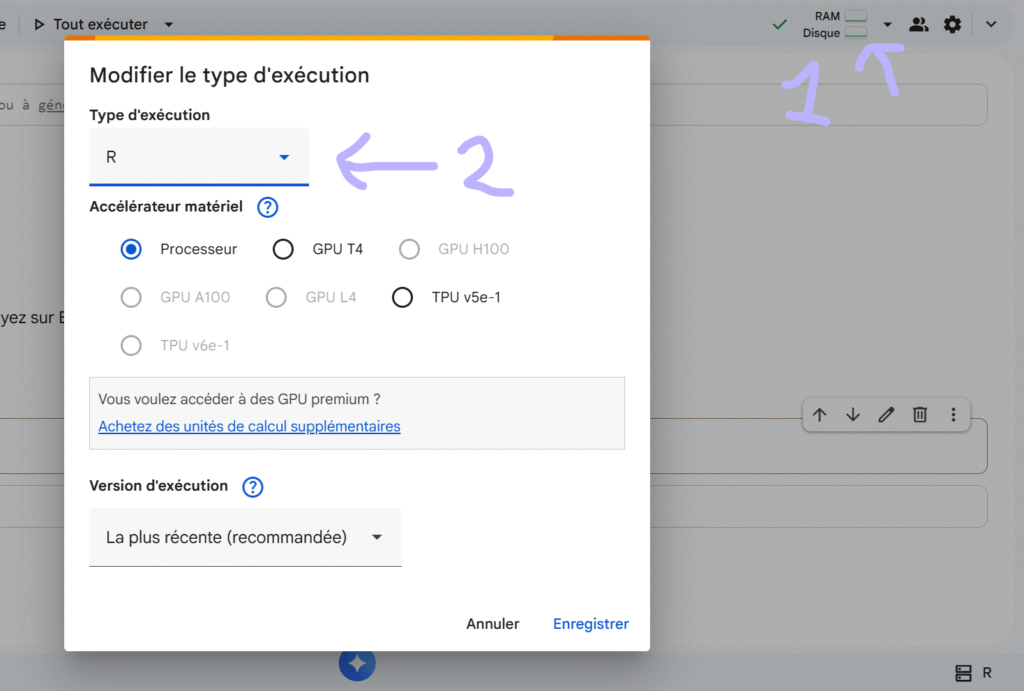
If you’re more comfortable with R, Google Colab supports it too! By default, execution is set to Python, but you can change it in the runtime settings (top-right corner of the interface) and select “R” as the runtime type.
What Should You Automate First?
Not sure where to start? Take this quick quiz to find your first Python project.
What takes the most time in your daily SEO work?
How comfortable are you with technical tools?
Your first project: Data Analysis with Pandas
Start by merging your GSC and Screaming Frog exports into one unified file. Ask an LLM for this prompt:
Your first project: Automated PDF Reports
Create a script that generates a PDF summary from your SEO data. Ask an LLM for this prompt:
Your first project: Simple Web Scraping
Build a scraper to extract H1 tags and meta descriptions from a list of URLs. Ask an LLM for this prompt:
Your first project: Browser Automation
Automate a task you do repeatedly in your browser. Start simple, think about what you click on every day. Ask an LLM for this prompt:
Final Thoughts
I hope this article has inspired you to give Python and Google Colab a try. There are probably dozens more use cases I haven’t mentioned here, the possibilities really are endless.
The barrier to entry has never been lower. With LLMs writing code for you and Google Colab handling all the technical setup, there’s nothing stopping you from automating tedious tasks, analyzing data at scale, and building tools that make your SEO work faster and smarter.
If you have use cases you’d like me to add to this article, feel free to reach out!
Ian Sorin is an SEO consultant at Empirik, a digital marketing agency based in Lyon, France. He uses Python and Google Colab daily for his SEO analyses, from processing large datasets and automating reports to building custom tools that make his workflow faster and more efficient.