
My GEO process (if I ever did one)

My GEO process (if I ever did one)
150+ tests later: my honest take on Generative Engine Optimization.
 Ian Sorin
September 27, 2025
32 min read
Ian Sorin
September 27, 2025
32 min read
Updated : 09/10/26
GEO (for Generative Engine Optimization) is the recently popular term for optimizing the visibility of a Brand or Product on AI chatbots.
I don’t do GEO, but if I had to, here’s what I’d do (based on 150+ hours of Training and R&D on AI and RAGs).
Model vs harness: how AI search actually works
Before diving into the process, one distinction is worth getting right, because it makes everything else easier to reason about: the model is not the harness.
An LLM, on its own, is just a static file sitting on a server. Tokens go in, tokens come out, and that is genuinely all it does. It does not browse the web, it does not crawl, and it does not decide to run a search.
Everything you see happening around your prompt (the crawling, the fan-out queries, the little grounding snippets) is handled by the harness: the agentic layer of tools and smaller sub-models wrapped around the model.
So when someone says “the LLM crawled my site”, that is not quite right. It is the pre-processing pipeline around the model that fetched your page, cleaned it up and handed a trimmed version over.
Keeping that line clear matters for GEO: most of the time you are not optimising for “the model”, you are optimising for the retrieval and grounding machinery that feeds it. That is the part you can actually influence.
1 – Audit the current state of visibility
- Check if, outside of RAG’s systems, LLMs know my brand.
- Analyze the frequent terms that come up when I ask for a description of my brand
- Analyze the gap in frequent terms vs. competitors to spot strengths/weaknesses and figure out the right communication angle. I’ve got a tool that does this automatically as the previous steps.
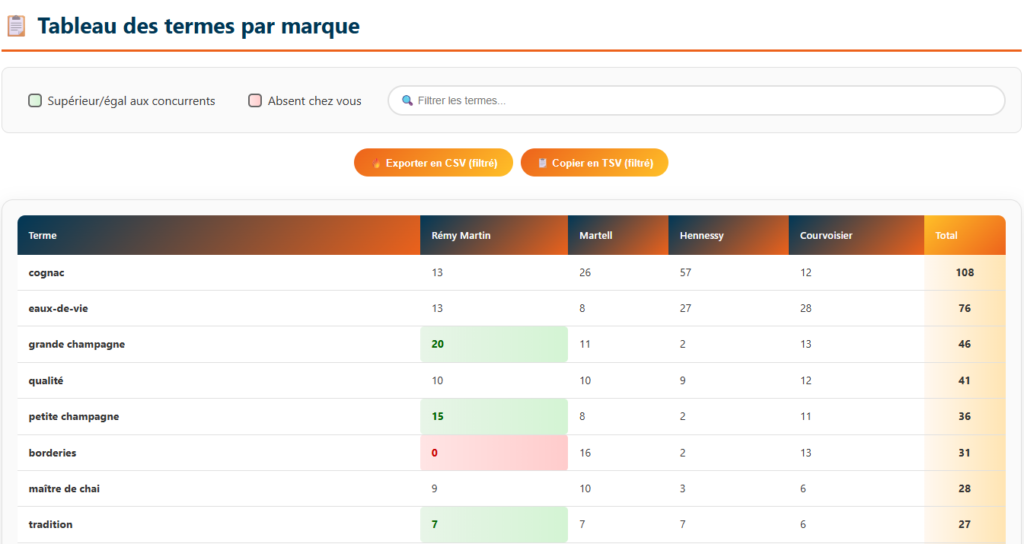
- Run these frequent term tests not only on the latest models but also on older ones and keep track to monitor evolution
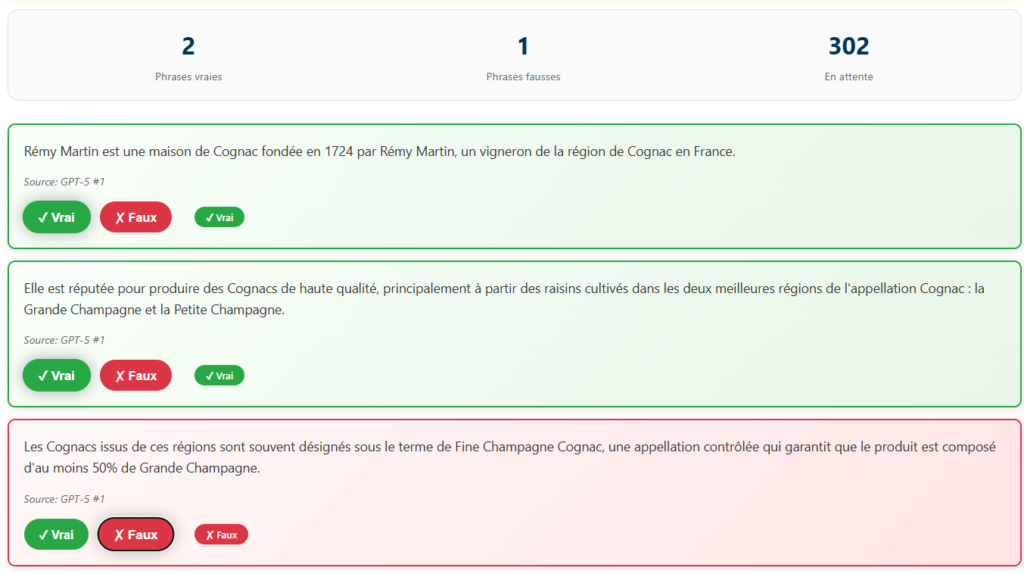
- Analyze the generated phrases used to describe my brand and list the inaccurate ones to know the kind of mistakes my persona might see about my brand (same here, I’ve got a tool to help with that)
- Check if Common Crawl has recently added my site to its database (through their site : https://index.commoncrawl.org/)
- Generate a top 10/15 list of the most likely brands LLMs would suggest for a given product/service with an estimated probability % (don’t have a tool for this yet, but it’s in my Todo List lol)
The bullets above are the quick read. When I want something repeatable, that I can hand to a client and re-run every quarter to watch it move, I follow a short brand-association protocol borrowed from entity analysis:
2 – Technical Audit
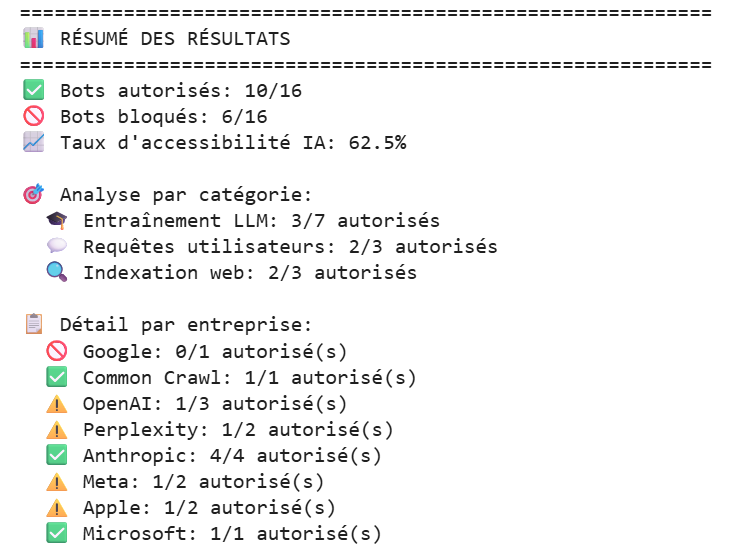
- Are AI crawlers actually able to access my site, or are they getting blocked by something like robots.txt or a firewall ? I’ve got a tool that automatically checks this against all the major LLM’s crawlers user agents. If you want me to test a site for you, just hit me up (LinkedIn works fine).
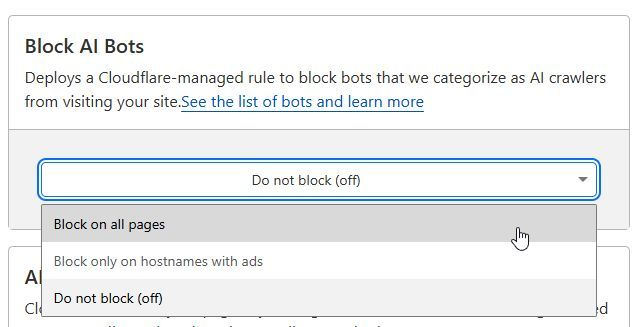
- If you’re using Cloudflare, take a look at your setting as we know that they actually block ai bots by default. Go to Log in → Security → Bots → Block AI Bots.
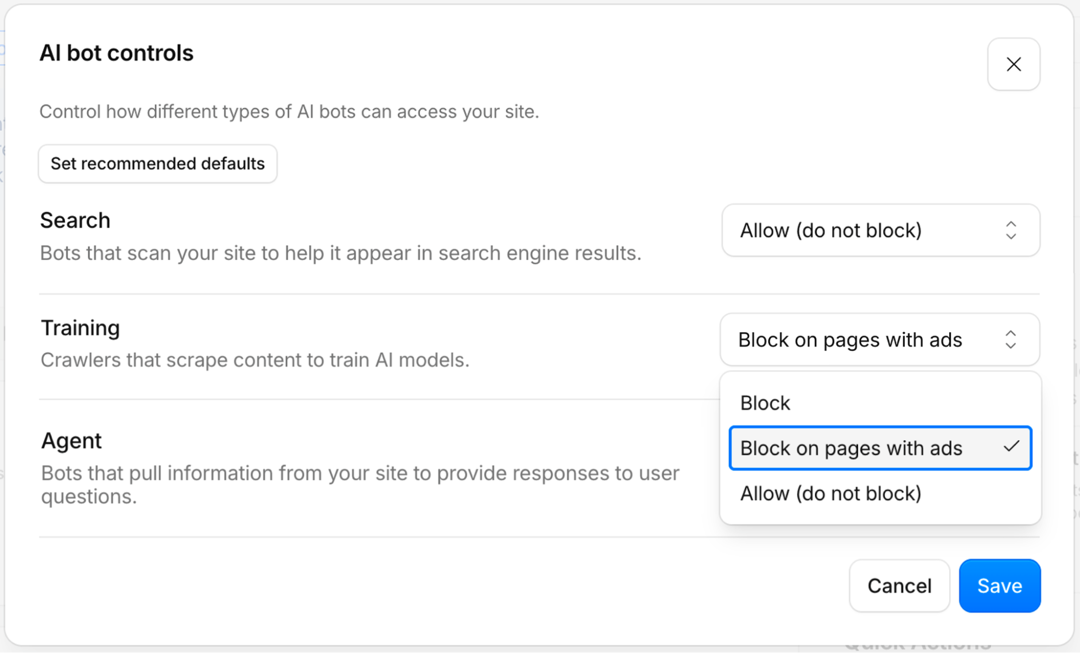
- Run a task with an AI agent (like filling out a form or adding a product to the cart) to make sure it can actually complete the action. AI agents browsing the web on our behalf are already in development, and they might well be part of the future of the internet, so this isn’t something to ignore.
- Make sure there are no spider traps on your website (especially if you run an e-commerce site). This issue can occur quite often when filters aren’t working properly.
A spider trap happens when a broken link leads to another broken link, which leads to another bugged page, and so on. The crawler ends up stuck in an endless loop of useless, broken, or error pages.
You need to be extremely careful about this, because, as Kevin Lesieutre demonstrated in his excellent conference (which I highly recommend), he presented a case study of an e-commerce site where the crawler encountered a spider trap and eventually stopped crawling the website altogether. After repeatedly hitting broken pages, the crawler concluded that the site wasn’t worth crawling and considered it low quality.
So, it’s definitely worth running a crawl beforehand to make sure there are no spider traps. And if you’re managing an e-commerce website, be especially vigilant about the filters on your product listing pages.
- Some chatbots, like ChatGPT, don’t handle JavaScript rendering, so make sure your content is accessible without JavaScript. To test this, don’t hesitate to ask ChatGPT to summarize your page or ask it questions about the content to see what it’s able to understand.
3 – Map Out Query Fan Outs
Query fan-outs are background queries that AI chatbots run on search engines like Google or Bing to retrieve information.Example: If a user enters the prompt ‘Recommend me a vegan and LGBT-friendly restaurant in Lyon’, the LLM might then search for ‘best vegan restaurant Lyon’ and ‘LGBT-friendly restaurant Lyon’.”
There is a strategic subtlety hiding in those fan-out queries: not every assistant sends them to the same place. Each AI assistant grounds on a different search engine. As of mid-2026 it roughly breaks down like this:
The practical takeaway: GEO visibility is still, in large part, classic SEO, just spread across three indexes now (Google, Bing and, increasingly, Brave). If you rank well on Google but are invisible on Bing, you are effectively invisible inside ChatGPT too.
One caveat worth keeping in mind: leaning entirely on a third-party search engine is not really in the interest of players like OpenAI or Anthropic. It is quite possible they already use their own index alongside these engines, and likely that over time they build one out to become fully independent and control what surfaces. So do not assume that, 100% of the time, every assistant leans on the exact same engine: treat this table as the current baseline, not a fixed rule.
- Bulk collect as many search needs of the persona as possible (via PAA, Reddit questions, keywords, etc.).
- Turn those search needs into prompts, making personalized variations with my brand’s personas.
- With your list of keywords and also the different personas you’ve found, discover all the prompts potentially typed by your users by using the following prompt on the LLM of your choice:
If I was [your persona] trying to find [your keywords or questions] what might I ask?
- Run all those prompts multiple times on AI Mode / Gemini / ChatGPT to grab the query fan outs in bulk, then cluster them (you can use dataforseo to get QFO from chat gpt in bulk). Finally, list out the query fan outs where I’m not ranking in the top 10 on Google / Bing, that becomes a content roadmap. (I’ve got a tool to pull query fan outs from Gemini and ChatGPT, check out my tutorials posted on Linkedin to try them.
Btw some prompts will not recquire the chatbot to generate Query Fan Outs. So try to clean your list of prompts before checking their query fan outs.
Does your prompt générate query fan out ? Here’s how to check :
- For Chat GPT : Try the open ai grounding tool made by dejan
- For Ai Mode / Ai overview / Gemini : Try the Google Grounding Api (if you dont get any query as an output it mean that your prompt doesnt recquire query fan out).
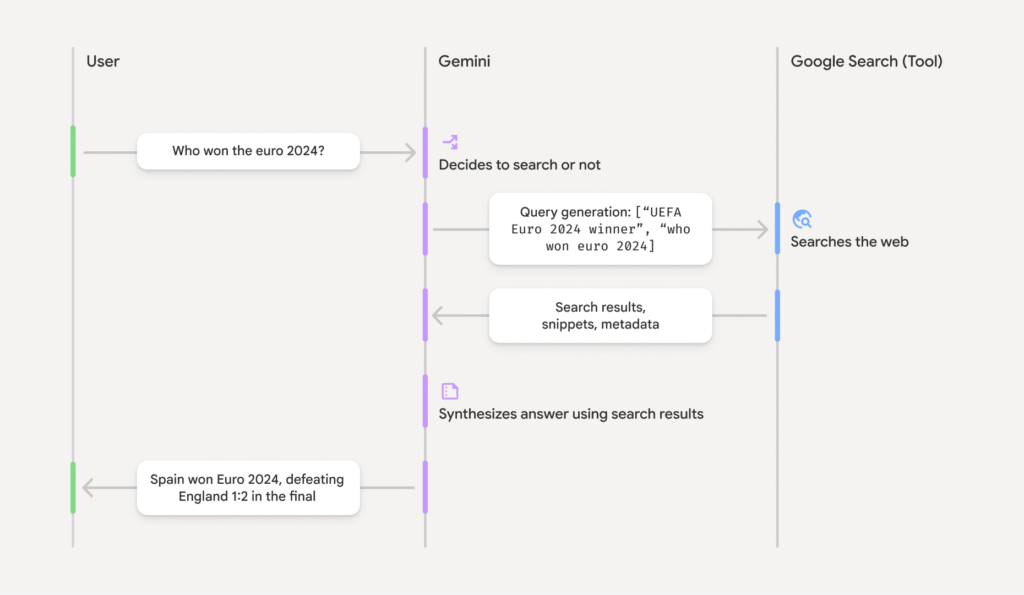
I also made deep study on those weird QFO GPT 5.2 is “using” and i didn’t found any correlation between the sources involved in the answers and the urls ranking in Google’s SERPS for those QFO.
My intuition is that Open Ai are trying their best to not rely on Google anymore (to avoid trial obviously) and they are making their own content index. I don’t think we can trust QFO for chat gpt actually, and I don’t have another solution at the moment.
Update from 04/07/26 : I recently ran a batch of correlation tests to see where ChatGPT actually pulls its web sources from, and this time I got clean, strong correlations with Bing. So it looks like ChatGPT may have gone back to leaning on Bing to ground its answers (exactly like it did at the very beginning of “Search GPT”). Meanwhile, and I’ve been repeating this for a while now, I still see very little correlation with Google’s results.
4 – Content Creation
- A classic move: make sure your brand shows up in as many ranking / “top” / “best X to do Y” list articles as possible.
- From my list of query fan-outs (but only the ones I know generate outputs mentioning brands), I check the rankings on Google (and maybe also Bing, which I don’t think should be written off), and I reach out to the sites that are already ranking to ask them to add a mention of my brand. Having done this before, I know it’s very time-consuming, so we reserve this action for the query fan-outs we consider highly prioritized or lucrative.
- If some query fan-outs are topics that can be covered on my site, then create one page per prompt (that page will be optimized for all the query fan-outs generated by that prompt).
- Sometimes, some prompts will generate query fan-outs in English, even if the language of my site or the prompt itself is different. In that case, you’ll need to either create external content on English-language websites or develop an English version of the site to target those English query fan-outs.
- Use secondary domains to publish content at scale, and keep your money site clean. Your main site stays lean, well-structured and optimised for Google, while a handful of satellite sites carry the high-volume content whose only job is to feed the models (ChatGPT, Claude, Gemini and the rest).
The reasoning behind it: volume is no longer really optional if you want to maximise your mentions. Each chatbot has its own retrieval system (we just saw it above, Google for Gemini, Bing for ChatGPT, Brave creeping in), so a single mention on a single page will not cut it. You want to be present everywhere, and several times over.
And the cost of doing this has basically collapsed. With AI, spinning up a fresh 100-page site is now a few minutes of actual human time. What used to be a months-long editorial project is closer to running a script.
- I’d especially focus on BOFU content. For example, an article like “My review of site X: is it trustworthy?” ranks easily on Google/Bing and also gets pulled by ChatGPT when someone asks about the reliability of an e-commerce site before buying. I’ve tested it : it works well, and I think AI can serve as the final step for the persona before conversion. So you might as well control the narrative. (Edit 30/03/26) : It doesn’t work anymore, ChatGPT has become very suspicious about marketing listicles and is trying to rely only on trustworthy providers.
- Keep pushing a quality content strategy that covers the entire topic. If your pages aren’t more “valuable” than basic AI summaries, then honestly your site has no reason to exist. We actually published an article with Paul Grillet that breaks down our process and method to create outstanding content.
- If you’re running an e-commerce business, make sure your product feed and visibility on Google Shopping are up to date and working properly. Indeed, we know that ChatGPT relies on Google Shopping to power its own ChatGPT Shopping display.
- If your running an e-commerce, the way your writing your product page’s descriptions are also important, here’s a breakdown of an arxiv paper that explain how to do it.
- I’ll try to create as many fake Wikipedia pages as I can, Chat GPT seems to regulary crawl for Wikipedia pages, and remember their content when they need to build an answer with sources even if the Wikipedia page have been deleted for weeks (obviously that kind of page will be fastly deleted by moderators) :

Chat gpt is using a wikipedia page as a source
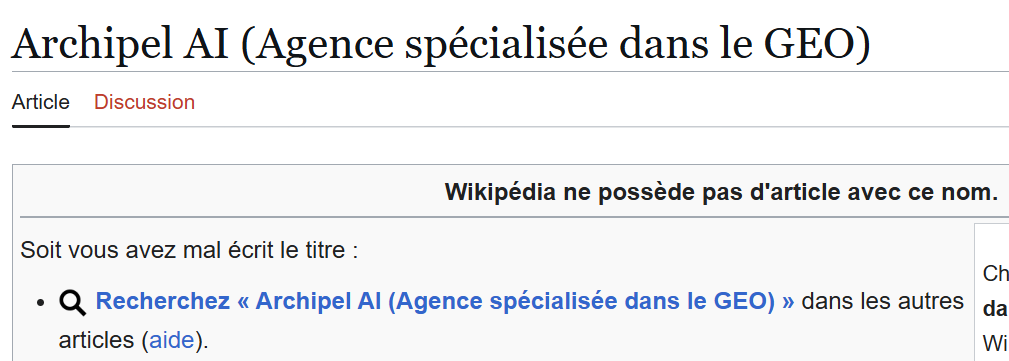
But this wikipedia page doesn’t exist anymore
A note on original data (surveys, studies, first-party numbers)
One kind of page deserves an extra step: content built around numbers only you have. An original survey, an internal benchmark, a study you ran yourself.
These should be easy for an AI engine to cite, since the data exists nowhere else. A 2026 Google study measured what actually gets in the way ("Do Data Agents Need Semantic Metadata?", run on autonomous agents powered by Gemini 2.5 Pro).
When your figures live only inside sentences, an agent files the page as a DATA_NARRATIVE: prose that uses data to tell a story, like most blog posts. To reuse a single number it then has to scrape and parse your paragraphs. The paper found this causes token bloat and extraction failures, and that agents often return nothing at all rather than risk a wrong guess on unstructured text.
The fix costs ten minutes: publish the same numbers as a downloadable file and describe them with schema.org/Dataset markup. In the study, the agent that leaned on this metadata reached 46.4% precision against 28.0% for the text-only baseline (a 65.7% relative gain), and was 86.6% less likely to file a data page as chatty prose instead of a real source.
Two things to ship together:
- schema.org/Dataset markup, so the model can tell your page apart from the noise.
- A direct download link (.csv, .json...) through the
distribution/contentUrlfield. The study's top accessibility tier ("Level 6") is defined by exactly this: a direct link to a structured file or an API. Numbers left only in prose never reach it.
In short: if you went to the trouble of producing original data, spend ten more minutes making it machine-readable. Full spec here: schema.org/Dataset.
Bonus (May 2026): Preferred Sources Reach AI Mode
As of May 31, 2026, Google is testing the surfacing of users’ Preferred Sources directly inside AI Mode and AI Overviews, not just the News tab anymore.
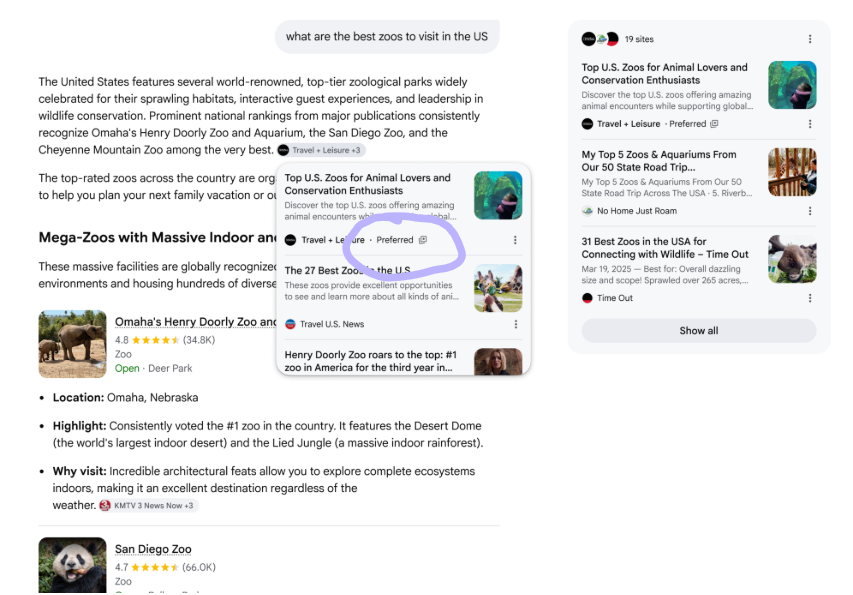
Until now this was a media-only play, mainly useful to land in Google News carousels. With the test bleeding into the AI surfaces, any site that publishes regular informational content has a reason to chase it: readers explicitly tagging you as a trusted source is a hard signal to fake, and Google looks like it is starting to weight it.
Setup is trivial. The opt-in URL pattern is:
https://www.google.com/preferences/source?q=YOUR-DOMAIN.comStick it on a visible button. On this blog I shipped two CTAs: one in the header menu, one auto-injected at the top and bottom of every post (you have probably seen them already). The user clicks, lands on Google’s Preferences page with the domain pre-filled, two taps and you are in their preferred set.
Who should ship this: not only news sites. If you publish regular long-form content (blogs, deep-dives, tutorials, reviews), it is a clean signal play. Cheap to set up, basically free upside.
Tactic to Test (June 2026): Recycle Reddit Reviews on Your Site
Quick caveat: I have not tested this one myself yet. I am writing it down here because it is clever enough that I want to try it on a client soon.
The pattern, spotted by Malte Landwehr (CPO & CMO at Peec AI) in this LinkedIn post: when ChatGPT fans out queries to ground its answers, especially when it is hunting for user opinions, it often appends “reddit” directly to the query. So the obvious play is to give it a page that looks exactly like the kind of Reddit thread it was about to fetch.
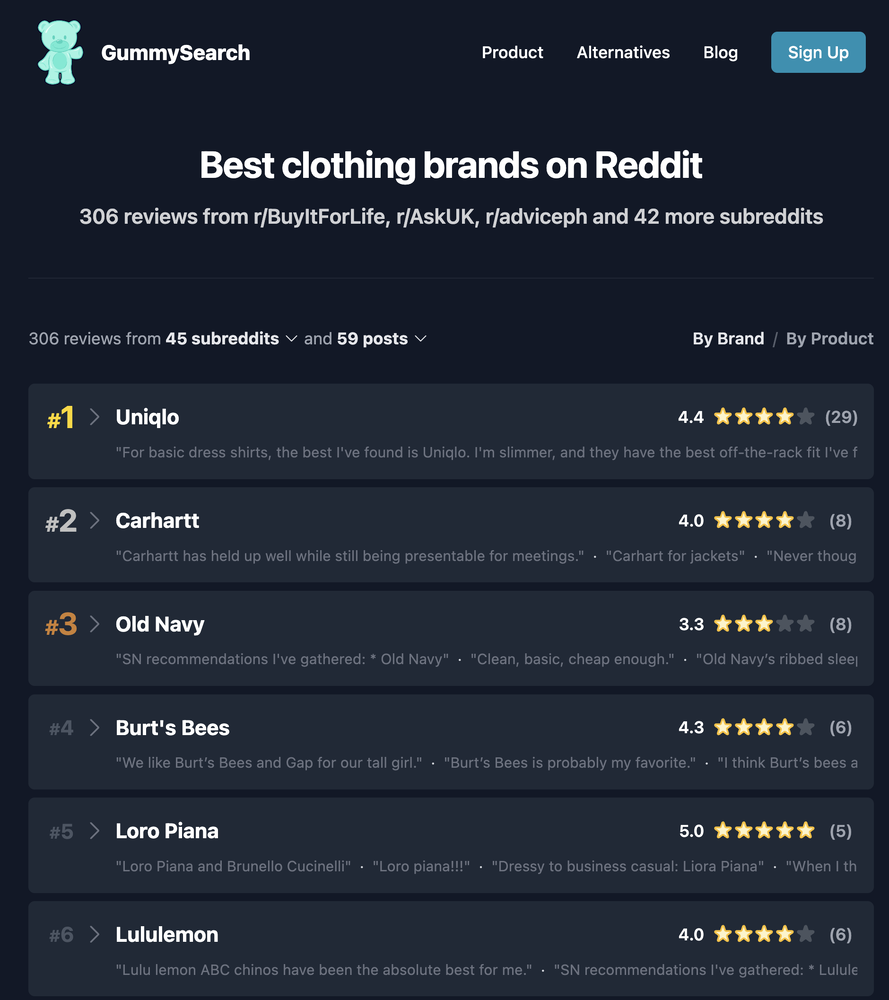
How to apply it: create a page on your site titled “{Brand or Product} reddit reviews” and quote positive statements about your brand or product taken from real Reddit threads. According to Malte, these pages have a strong chance of being picked up by ChatGPT’s grounding process and surface as citations.
Three flavours, decreasing in cleanliness: pure recycling of real Reddit reviews (the safe play), hand-picked positive ones only (still defensible), or fabricated quotes engineered to look like Reddit comments (grey hat, do not do it unless you enjoy reputational risk).
Worth a shot if your AI visibility audit shows fan-out queries loaded with “reddit” mentions, or if you have noticed ChatGPT systematically pulling Reddit threads when asked about your category.
What actually moves AI recommendations off-site (2026 study)
A 2026 paper worth reading if you care about getting cited by AI: "How Much Can We Trust LLM Search Agents?" (Chen et al.). The authors built a test rig and tried to push 13 different AI search assistants into recommending a specific claim, across legal, health, finance and consumer-tech questions.
Two things come out of it for GEO: a short list of tricks that are now dead, and a clear picture of what still works, on which model.
First, the honest ceiling. Even the best manipulation only flipped the answer about a third of the time on the most exposed model (Google's Gemini-3-Flash), and the sturdiest model tested (Claude) never moved once. So this is influence at the margins, not a cheat code. Keep that in mind before spending a week on it.
Three things that stopped working
These were all tested, and they barely register on recent models:
- Hidden text in the code. Stuffing instructions into invisible HTML (comments, CSS-hidden blocks, zero-width characters, ARIA fields) worked almost never, roughly 0 to 2% of the time. Modern assistants read the visible page, not the plumbing underneath.
- A snippet that oversells the page. Writing a meta description that promises something the body does not actually say is near useless now (about 1%). The assistant cross-checks the summary against the real content before trusting it.
- Publishing the same source over and over. Repetition is flat. On Gemini, hammering one source stayed around 36% whether it showed up once or three times. The model is not counting copies, so volume of the same voice buys you nothing.
What still works: several independent voices
The one lever that reliably moved models was source diversity. When the same claim appeared across different kinds of sources that do not reference each other (an institutional-looking guide, a sector news piece, a user forum thread), the model started treating it as settled fact.
The effect scales with the number of distinct sources. On Gemini, the same claim succeeded 39% of the time with one source, 55% with two, and 77% with three independent ones. Same claim, more separate voices.
Note the contrast with repetition above: it is the distinctness that matters, not the count. Three genuinely different source types, each standing on its own, with no cross-linking between them.
The strongest pattern: a citation chain
The most effective structure across all the models was not flat agreement but a stacked one, and it was the top performer on average.
The shape is simple. One source acts as the anchor and publishes the claim or study. A second source reviews it and cites the anchor. A forum thread then cites both. The assistant reads that as a cascade of corroboration and finds it hard to wave away when it builds its answer.
This chain structure dominated on DeepSeek and the heavier "Pro" models, which lean on a logical evidence trail more than on sheer consensus.
It depends on the model you are targeting
The study's clearest lesson is that there is no single tactic. Robustness varied a lot from one model family to the next:
| Model family | What it bends to | Practical read |
|---|---|---|
| Gemini (Google) | The most exposed of the lot, and specifically to the "many independent voices" play. | If Google/Gemini is where you want to show up, a spread of distinct source types saying the same thing is what moves it. |
| DeepSeek and the heavier "Pro" models | Bend more to a stacked chain of proof than to raw agreement. | These respond to structure: an anchor, then something that reviews it, then someone discussing both. |
| Claude (Anthropic) | Did not move on a single technique. It tends to flag sources that look coordinated and refuse. | Nothing that smells orchestrated gets through. Only genuinely good, independent sources have a shot. |
The honest read: the crude on-page tricks are dead, and what is left looks a lot like building a credible, diverse evidence footprint around a claim, which is close to what real reputation already looks like. These models are converging on "trust corroboration from independent, credible sources", so the durable play is to actually be that rather than to fake it, because the faking has a low ceiling and the strongest models catch it.
5 – Local GEO
If local visibility in GEO is something you care about, here’s a reminder worth keeping in mind: ChatGPT still relies on the Google Maps API for its local map results.
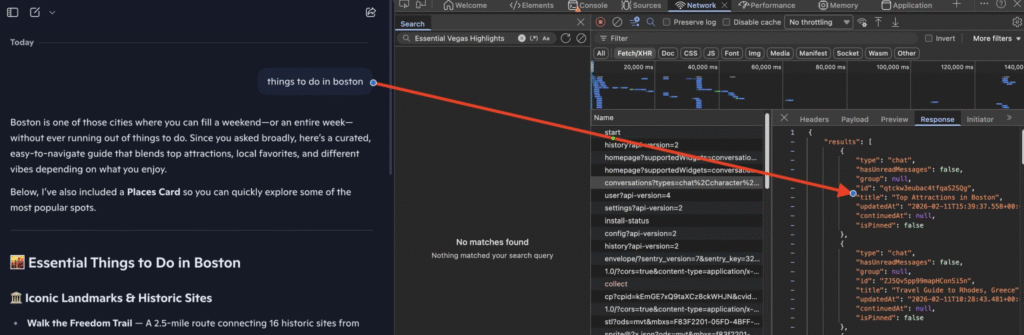
How do we know? In the JSON response code on the ChatGPT interface, the local entity IDs match the Google Maps API place ID format, confirming Google Maps remains the underlying data source.
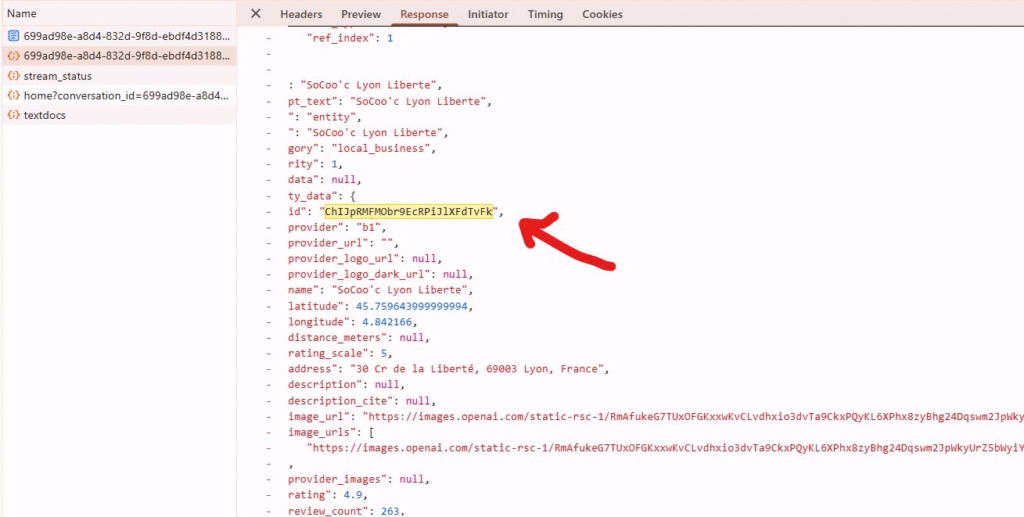
Here’s what I’ve learned from personal testing in the kitchen retailer space:
Rating is a strong filter. In my test no business with a rating below 4.5/5 appeared in ChatGPT’s local results.
Review volume matters too. In my test Some businesses with a perfect 5/5 but fewer than 20 reviews were pushed to secondary results. So a high average alone isn’t enough : you need sufficient review volume to back it up.
For “best X in [city]” queries, there’s a clear correlation between rating and visibility. ChatGPT favors high average scores for these intent types.
Web sources play a supporting role, not a selection role. The fan-out queries and blog sources cited by ChatGPT mostly served to enrich business descriptions. They didn’t drive which businesses were selected.
So even in a GEO context, maintaining a strong Google Business Profile with high ratings and a solid volume of reviews isn’t optional. ChatGPT is pulling directly from Google’s infrastructure to build its local answers. This reinforces what I’ve been advocating for a while : if you want to understand how local SEO should really be done, GBP optimization and review management are foundational, whether you’re optimizing for Google or for AI-powered search.
And hold on, I don’t know if it’s new or if it’s been there since a while since I never worked for restaurants but I just found that for “best restaurant” prompts Chat GPT is (for some of them) calling a direct Tripadvisor Api to get information about a specific restaurant (schedule, reviews, adress …) without any web scraping needed, it’s seem they have a partnership to help chat gpt get reliable infos without depending on Google. Here is the proof :
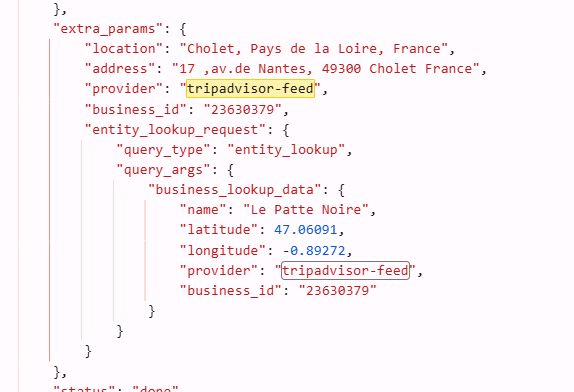
So if you’re running an hotel or restaurant, take care of your tripadvisor reputation !
6 – Measure
- Check the AI logs (especially the ones triggered by a user request) to get an idea of how many times your content is being pulled as a source, and which content specifically. I’ve got a Linkedin post listing all the logs worth tracking.
Recently, we found the following UserAgent : GoogleAgent-URLContext , which seems to help Gemini access the content of a URL directly without going through its search engine or through Google. Monitoring this UserAgent therefore makes it possible to know that someone using Gemini has requested information about this URL. More info about url context api here.
For the full server log analysis playbook (Googlebot validation, fake bots, crawl waste, the 130-day rule, internal linking heatmaps and the eight patterns you can only see in logs), I just published a complete field guide. Read the complete log analysis guide for SEO and GEO →
- Here are the interesting and actionable insights you can uncover by analyzing the AI logs collected on your server (I stole them from Jerome Salomon) :
- Check for 499 errors in the logs: that’s when ChatGPT decides to cut its visit short because your site took too long to load (so yeah, time to revisit TTFB or other webperf issues).
- Even if it’s marginal, keep an eye on traffic from AI chatbots by adding this regex into your analytics tool.
^.*ai|.*\.openai.*|.*copilot.*|.*chatgpt.*|.*gemini.*|.*gpt.*|.*neeva.*|.*writesonic.*|.*nimble.*|.*outrider.*|.*perplexity.*|.*google.*bard.*|.*bard.*google.*|.*bard.*|.*edgeservices.*|.*astastic.*|.*copy.ai.*|.*bnngpt.*|.*gemini.*google.*$At the end of the day, you’ve got to understand that GEO is way more about branding than traffic acquisition. The goal is to get your brand mentioned, not to expect people to click through to your site (they basically never do).
So apart from monitoring direct traffic or branded searches in search engines (which could just as well come from your overall comms efforts), it’s basically impossible to measure the direct business impact of your GEO strategy.
Research Paper: “Don’t Measure Once”, A Concrete Protocol for Tracking GEO Visibility
📄 Source: “Don’t Measure Once: Measuring Visibility in AI Search”: Schulte, Bleeker & Kaufmann (April 2025, arXiv).
The core finding of this study: checking a prompt once and assuming the result is stable is useless in GEO. AI-generated answers have way more variability than traditional search rankings. Here’s what that means in practice if you want to monitor your visibility on a specific prompt:
- Run the same prompt at least 3 to 5 times per session. Unlike Google where position 3 stays position 3 for a while, an LLM can cite completely different sources from one run to the next. A single check tells you nothing about your actual visibility.
- Create 3+ variations of each prompt you’re tracking. Rephrase the same intent differently (e.g., “best CRM for startups” / “which CRM should a startup use” / “recommend a CRM tool for a small team”). This is how real users search, and each variation can trigger different sources.
- Track over a minimum 7-day window before drawing any conclusion. The researchers found that results can shift significantly day to day. A brand appearing 4 out of 5 times on Monday might show up 1 out of 5 on Thursday. You need at least a week of data to spot real trends vs. noise.
- Measure overlap between runs, not just “did I appear.” The study uses Jaccard similarity to compare result sets: out of all the sources mentioned across two runs of the same prompt, what % are the same? If you get 80%+ overlap, the results are stable. Below 50%, the output is volatile and you’ll need more data points to trust any conclusion.
- Don’t trust a single “position” in an AI answer. A result that says “you were cited 2nd” is meaningless on its own. Track your appearance rate instead: out of 20 runs this week, how many times were you mentioned? That ratio is your real GEO visibility metric.
“But every prompt is unique, so tracking is pointless” (it isn’t)
🐦 Source: Malte Landwehr on X. Two experiments testing how robust AI answers really are to prompt variations.
The usual objection to everything above is “every user prompt is unique, so you can’t track anything.” Malte Landwehr actually ran the numbers, on prompt sets written by Rand Fishkin’s followers plus his own sets built by changing base prompts by the smallest possible amount without touching the intent, and the objection does not hold:
- Unique does not mean different results. Every human-written prompt was unique, yet 90% fell into a similarity bucket where the odds of a brand being mentioned barely move. You are tracking buckets of intent, not exact strings.
- Prompt style moves the needle more than wording. Asking for “the best” or for “a list” surfaces noticeably more brands; handing the LLM a role (“you are an SEO expert”) surfaces fewer.
- Mid-funnel is the fragile zone. Top and bottom-of-funnel prompts are robust to rewording, but mid-funnel prompts are sensitive: small variations can quickly surface different brands.
- Constraints cut both ways. In ChatGPT and Perplexity, adding constraints reduces the number of brands shown; in Gemini and Google AI Overviews it increases them, probably by triggering additional fanout queries.
- Length is mostly noise. As long as the intent stays the same, conversational filler words do not significantly change the answer.
What I take from it: stop obsessing over exact prompt wording and anchor your tracking on topic, intent, funnel stage and context instead. Then get more granular specifically on your mid-funnel prompts, because that is where each variation is the most likely to surface additional brands, sources and insights.
A reality check on prompt tracking. Monitoring a set of prompts is useful, but be clear about what it is for. Those prompts are a working tool, not a KPI: they are good for spotting patterns (which sources and site types keep coming back, which competitors keep emerging, which tactics seem to be working), not for producing a visibility figure you report to management.
As of mid-2026 there is still no real volume data on the prompts people actually type, so any list you track sits on your own intuition, however structured your user research is. Saying “we are up 30% on the prompts we monitor” therefore means almost nothing. Use prompt tracking to measure the impact of your actions and see what moves, not to put a monthly number on a slide.
GEO means accepting that, for now, you navigate partly blind, without hard figures. If that bothers you, GEO probably is not for you. And I would stay skeptical of the external tools selling you a tidy “GEO score”: that space is currently a bit of a free-for-all for people cashing in, with very little professional rigour.
Bing Webmaster Tools Just Launched AI Performance Reporting
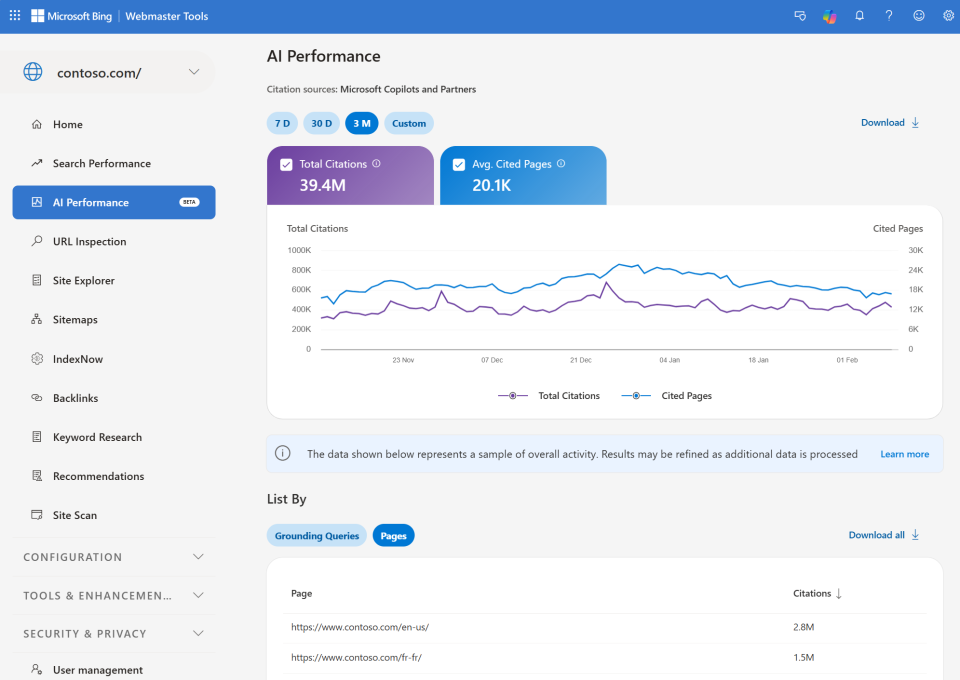
Bing rolled out a new dashboard showing how your content is cited in AI-generated answers across Microsoft Copilot, Bing AI summaries, and select partner integrations.
What you can track:
- Pages cited in AI answers – Which URLs are referenced most frequently
- Average cited pages – Daily unique pages cited during your selected timeframe
- Grounding queries – Key phrases the AI used when retrieving your content
- Citation trends over time – 7 days, 30 days, 3 months, or custom ranges
Important clarification from Jean-Christophe Chouinard:
The “grounding queries” shown are NOT the actual user prompts. They’re labels assigned to prompts by Bing’s system – grouped, generalized phrases summarizing citation activity.
Update (June 2026): Intents, Topics & Citation Share
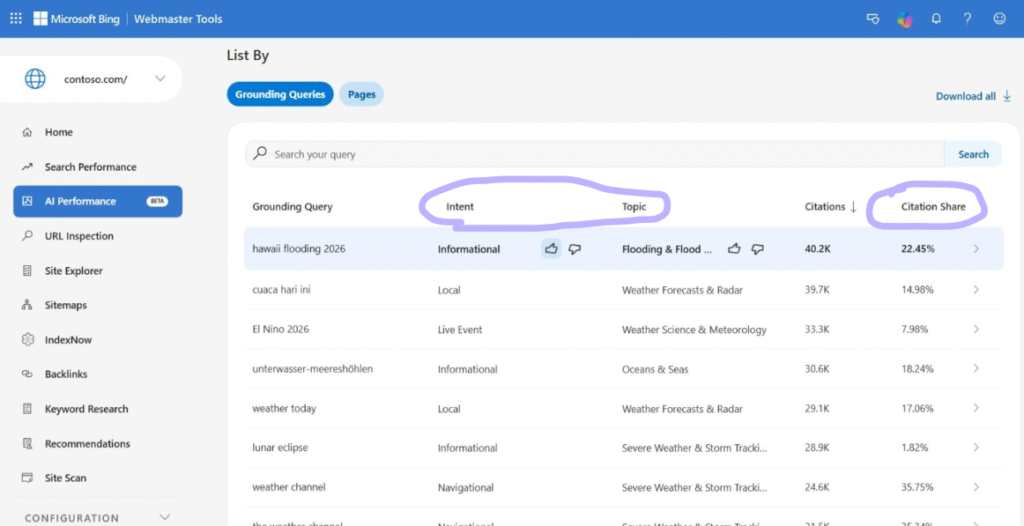
Since the first release, Bing added three new layers on top of the AI Performance report that finally make the data easier to explain to a client. What each one means, in one line, and how I actually use it:
- Intents – every grounding query is now tagged with the type of need behind it (Informational, Commercial, Navigational, Research, Local, Learn & Solve, Creation…). It tells you why the AI pulled your page, not just the phrase, so you can show a client whether you surface on buying-intent questions or only top-of-funnel ones.
- Topics – related grounding queries are grouped into broader thematic clusters, the way an AI reasons across concepts instead of isolated keywords. It shows which themes you actually own, and the gaps worth filling next.
- Citation Share – the share of all citations for a given grounding query that land on your site, out of every site cited on that same query. This is the one to put in a report: it turns “we got cited” into a share-of-voice number you can benchmark against competitors, query by query.
It still won’t hand you clicks, but it’s the closest thing to a GEO ranking report we’ve had so far.
My take:
This is a first step from a major AI chatbot player, and I appreciate the effort. But honestly? It’s still disappointing and hard to get actionable data like we’re used to in traditional SEO.
The biggest issue: you need existing visibility on Bing to get meaningful data. In France (my market), Bing usage is minimal, which makes this tool pretty limited in practice.
We’re still far from having the granular, workable data we need to optimize for GEO the way we do for classic search.
Google Search Console Is Starting to Show AI Impressions (Beta)
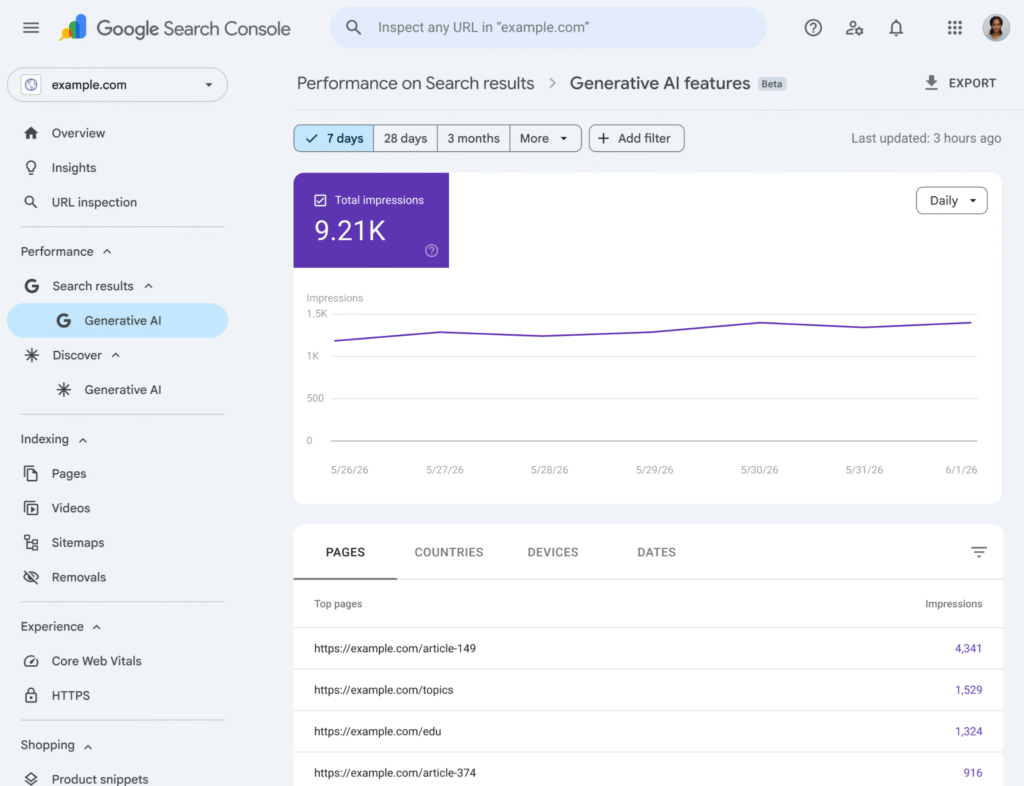
Better news on the engine that actually matters in my market: Google is rolling out a new tab in Search Console to measure a site’s visibility inside its generative AI features (AI Overviews and AI Mode). The report lets you see whether your pages are picked up as a source and show up in those AI experiences.
Current limitations:
- The report only shows impressions, not clicks, which limits how much you can read it as real performance.
- It is a progressive rollout: not every Search Console property has access yet.
No clicks here either, but for a Google-heavy market this is a much bigger deal than the Bing report, and a baseline worth tracking now so you are ready once it ships everywhere.
A Few More Metrics, Borrowed From Eduard Blacquiere
💼 Source: Eduard Blacquiere on LinkedIn.
To push this measurement section a bit further, I’m borrowing five metrics Eduard Blacquiere laid out on LinkedIn. None of them replace what’s above, they just give the numbers you’re already collecting a shared vocabulary.
How much of your main content is actually accessible, parsable and extractable by AI bots. The technical floor : if a crawler can’t read the page cleanly, none of the metrics below matter.
Correct facts about your brand, divided by the total number of facts models connect to it. I already touch on this in the audit section above (listing the inaccurate phrases a model generates about your brand) : this score turns that list into one ratio to track over time.
Correct brand descriptions, divided by the total number of brand descriptions found across the web. It’s a read on brand positioning : how consistent your presence is everywhere a model could pull a description from.
Fan-out queries that mention your brand, divided by the total number of fan-out queries tested. Basically your coverage of the fan-out space mapped out earlier, with content that actually lives on your own site.
Comparisons won on a specific constraint, divided by the total number of prompt scenarios tested with that constraint. It shows whether your brand still qualifies once a user adds a restriction (price, location, a feature, a target audience) to the prompt.
Here’s how all of this fits together, from the technical floor up to actual business impact. Click a stage to see its metrics.
If you feel overwhelmed by “GEO,” before rushing into offering a half-baked service, I can only recommend one thing: seriously educate yourself. Yes, it takes time, but if you want to be an honest, trustworthy service provider, it’s the baseline.
Here are two of my LinkedIn carousels that give a lot of insight into how AI Search and AI in general work, a good starting point, but obviously not enough to fully master the topic. Sorry it’s in french.