

How to time travel and check SERP’s snippets history with Data for Seo api
Your client comes to you with a frustrating question: “We lost 30% of our clicks last month, but I checked—our ranking didn’t change. What happened?”
You dig into the data. Position 3 on the target keyword. Same as before. Search volume? Stable. No algorithm update on your radar. So what’s going on?
Here’s the thing most SEOs overlook: your position 3 today is not the same position 3 from three months ago.
Google keeps adding elements above organic results: more ads, AI Overviews, featured snippets, shopping carousels, local packs… Your “position 3” might now be pushed below the fold, invisible without scrolling. That’s why your CTR tanked—even though your ranking stayed the same.
With Google’s ongoing experiments with AI Overviews—which are known to steal a significant portion of clicks—this problem is only getting worse. Being able to identify when an AI Overview appeared on your target SERP could explain a sudden traffic drop that no other metric can justify.
The solution? Stop looking only at your ranking. Start looking at the entire SERP—and how it evolved over time.
DataForSEO’s Historical SERPs API: Your Time Machine
DataForSEO offers an API endpoint specifically designed for this use case: the Historical SERPs endpoint, part of the DataForSEO Labs API.
Here is the official documentation about it : https://docs.dataforseo.com/v3/dataforseo_labs-google-historical_serps-live/
This endpoint lets you retrieve complete SERP snapshots from the past—not just rankings, but everything that was on the page: ads, organic results, featured snippets, AI Overviews, local packs, People Also Ask boxes, and every other SERP feature Google displayed.
How the API Works
The Historical SERPs endpoint is straightforward. You send a request with your keyword, location, and language—and you get back snapshots of what the SERP looked like at different points in time.
Basic Request Structure
POST /v3/dataforseo_labs/google/historical_serps/live

{
  "keyword": "car insurance",
  "location_code": 2840,
  "language_code": "en"
}
The API returns all available historical snapshots for that keyword. Each snapshot includes:
- datetime – When the snapshot was taken
- item_types – List of all SERP features present (organic, paid, ai_overview, featured_snippet, local_pack, etc.)
- items – Detailed data for each element on the SERP
Key Metrics in the Response
For each item in the SERP, you get two important position metrics:
rank_absolute
The actual visual position on the page, counting every element (ads, snippets, organic, everything). This tells you where the result truly appears.
rank_group
The position within its own category. For organic results, this is what most tools report as “your ranking”—but it ignores everything else on the page.
This distinction is crucial. Your rank_group might be 3 (position 3 among organic results), but your rank_absolute could be 8 or 10 if there are ads, an AI Overview, and a featured snippet above you.
Example Response (Simplified)
{
  "datetime": "2024-11-15 10:30:00",
  "item_types": ["paid", "ai_overview", "organic", "people_also_ask", "related_searches"],
  "items": [
    {
      "type": "paid",
      "rank_absolute": 1,
      "rank_group": 1,
      "domain": "example-insurance.com",
      "title": "Car Insurance - Get a Free Quote"
    },
    {
      "type": "paid",
      "rank_absolute": 2,
      "rank_group": 2,
      "domain": "another-insurance.com",
      "title": "Compare Car Insurance Rates"
    },
    {
      "type": "ai_overview",
      "rank_absolute": 3,
      "rank_group": 1,
      "title": "AI Overview"
    },
    {
      "type": "organic",
      "rank_absolute": 4,
      "rank_group": 1,
      "domain": "your-client.com",
      "title": "Best Car Insurance 2024"
    }
  ]
}
In this example, your client’s page is “position 1” in organic rankings (rank_group: 1), but it’s actually the 4th element on the page (rank_absolute: 4)—below 2 ads and an AI Overview.
The Tool I Built: SERP Time Machine
Raw API data is powerful but not exactly user-friendly. So I built a personal tool called SERP Time Machine to visualize this data and make it actionable.
It’s a Streamlit application that connects to the DataForSEO API and provides several analysis views:
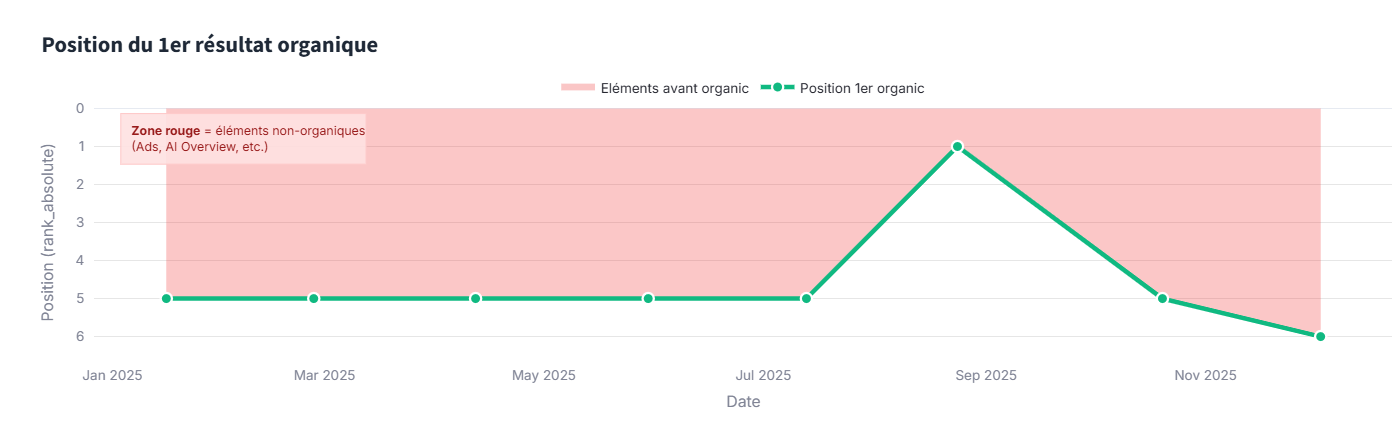
1. First Organic Position Chart
This chart tracks where the first organic result appears over time. The higher the curve, the higher the first organic result is on the page. The lower it goes, the more “polluted” the top of the SERP is with ads, AI Overviews, or other non-organic elements.
2. SERP Comparison View
This view lets you compare two SERP snapshots side by side. You can see exactly what changed between two dates: which elements appeared, which disappeared, and how positions shifted.
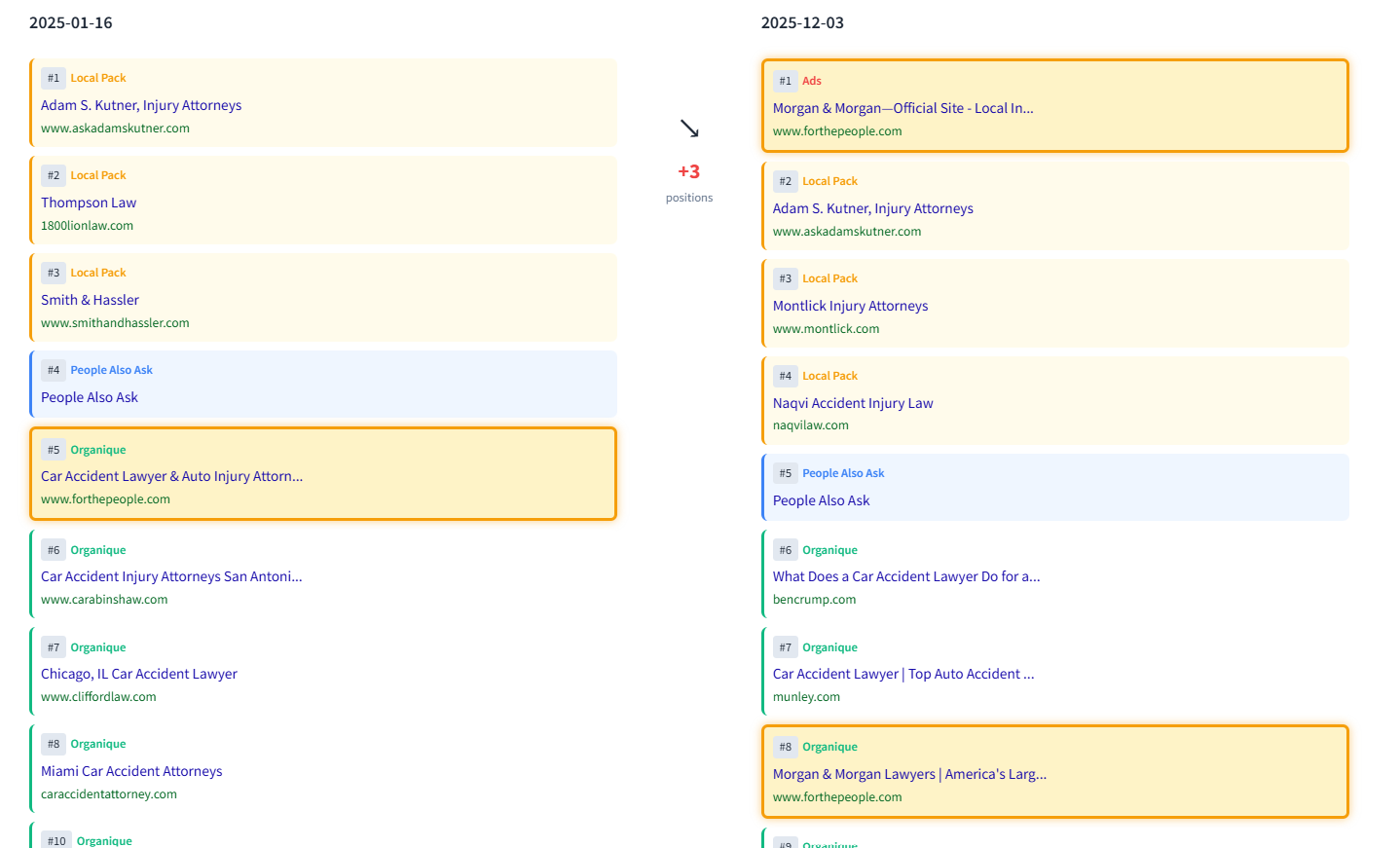
You can track a specific domain and see how its real position (rank_absolute) evolved between the two snapshots—including exactly how many positions it gained or lost due to SERP feature changes.
3. Timeline & Alert System
The tool also provides a timeline heatmap showing when each SERP feature appeared or disappeared, plus an alert system that flags major changes—especially the arrival of high-impact elements like AI Overviews or new ad positions.
Important Limitation: Snapshot Frequency
Before you get too excited, there’s something you need to know: DataForSEO doesn’t capture SERP snapshots every day.
The frequency depends on the keyword’s popularity:
- High-volume keywords might have 6-8 snapshots per year
- Medium-volume keywords might have 3-5 snapshots per year
- Low-volume/niche keywords might only have 1-2 snapshots per year
This is perfect for retrospective analysis—understanding what happened over the past months. But it’s not designed for real-time monitoring of your business-critical keywords.
Going Further: Daily SERP Monitoring with Impakkt
If you need daily visibility tracking for your business-critical keywords, we’ve built a tool at Empirik called Impakkt.
Unlike the DataForSEO API which takes periodic snapshots, Impakkt crawls Google SERPs every day and tracks your pixel position—meaning the actual distance in pixels from the top of the page to your link.

This gives you a real picture of your visibility evolution: you can see how much of the SERP is occupied by SEO results, ads, and various snippets—and how this balance shifts over time.
Impakkt goes even deeper with detailed SERP composition analysis. You can track the presence and impact of specific elements like AI Overviews, shopping carousels, featured snippets, and more:

Key Takeaways
- Stop obsessing over rank_group alone. Your “position 3” might be position 8 in reality if the SERP is crowded with ads and features.
- AI Overviews are a growing threat. Being able to identify when they appeared on your target SERPs can explain otherwise mysterious traffic drops.
- DataForSEO’s Historical SERPs API is a powerful tool for retrospective analysis—understanding what happened over the past year.
- For daily monitoring of your critical keywords, you need a dedicated tool that tracks SERP composition every day.
- Context is everything. The next time a client asks “why did we lose clicks?”, don’t just look at rankings—look at how the entire SERP evolved.
The SERP is no longer just 10 blue links. Understanding its full composition—and how it changes over time—is now essential for any serious SEO analysis.

Ian Sorin is an SEO consultant at Empirik, a digital marketing agency based in Lyon, France. He builds custom tools to analyze SERP data and help clients understand what’s really happening with their organic visibility. Got questions? Reach out at isorin@empirik.fr