

Analytics Without a Cookie Banner: How I Track Usage Cookieless and Consent-Free (and Stay Legal)

Analytics Without a Cookie Banner: How I Track Usage Cookieless and Consent-Free (and Stay Legal)
Cookieless, consent-free analytics with Matomo, inside the CNIL exemption.
 Ian Sorin
August 13, 2026
10 min read
Ian Sorin
August 13, 2026
10 min read
- I wanted basic usage stats for a small side project (sessions, sources, and clicks on two buttons), with no marketing tracking at all.
- France’s data-protection authority (the CNIL) opened an audience-measurement exemption in July 2025: some analytics can run with no consent and no cookie banner, if they stay inside a strict frame.
- Counting clicks on a button is explicitly allowed. E-commerce conversion tracking is not. The line is the purpose plus the tool, not the click itself.
- I self-hosted Matomo, cookieless, with a truncated IP, and renamed its files so adblockers stop eating my data.
- No banner, but a privacy page with an opt-out link is still mandatory. The exemption removes the consent pop-up, not the duty to inform.
I was about to bolt Google Analytics onto a side project of mine, out of pure reflex, when I stopped on a detail that bothered me.
The project is Focalie, a free web app I am building and shipping right now. It is a focus aid for your work sessions: you start a timed deep-work session, the interface gets out of your way, and a detachable mini-bar keeps you on track.
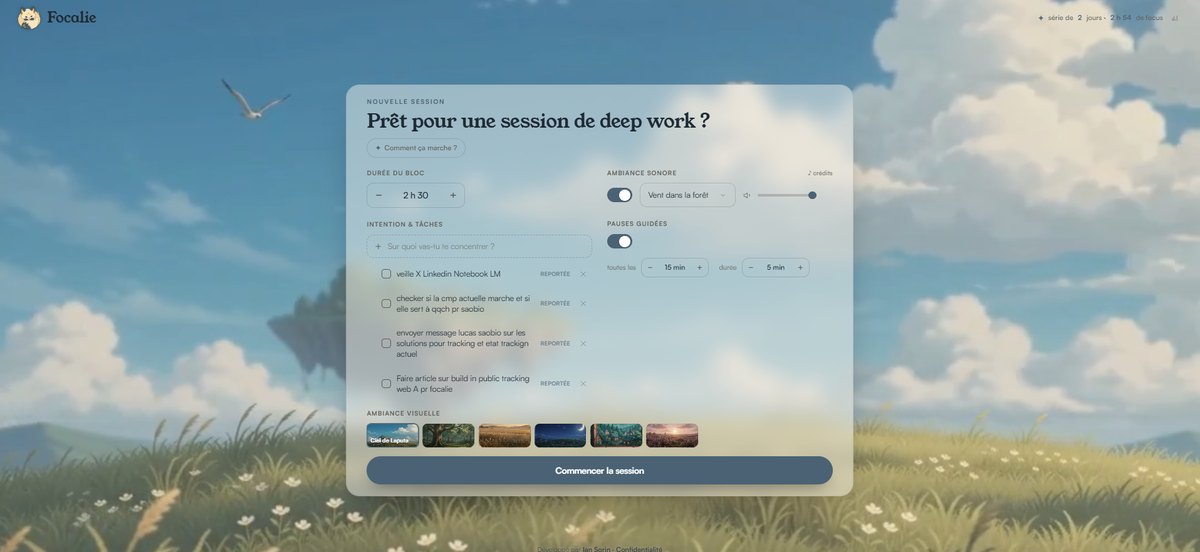
The whole point of that interface is to be calm and to disappear. Adding a cookie consent banner that jumps at you on arrival felt like the opposite of that promise.
So I asked a simpler question: what do I actually need to measure, and do I really need Google (plus a consent pop-up) to measure it?
The answer turned into a small privacy-first analytics setup with no banner at all, and it stays within French and EU law. Here is the full reasoning, and the technical details, in case you run a small product and feel the same friction.
What I actually needed to measure
I did not want an analytics factory. I wanted three ordinary things:
- The basics: number of sessions, new versus returning visitors, traffic sources.
- Clicks on the “Start a session” button (the core action of the app).
- Clicks on the “Detach the mini-bar” button (a secondary feature I wanted to know people actually use).
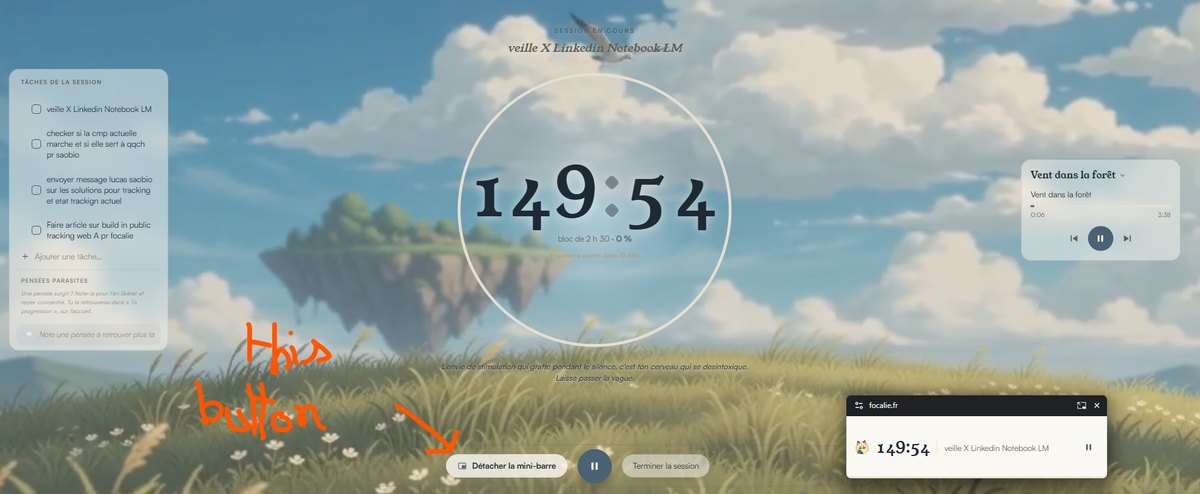
That is the entire list. No funnel, no ad measurement, no profiling, no “who is this person across the web”.
I mostly wanted to answer two questions: are people showing up at all, and once they are here, do they use the features I spent time building?
The reflex I almost followed: GA4, GTM, and a consent banner
My first instinct was the default one that almost everybody reaches for: Google Analytics 4, Google Tag Manager, and a Consent Management Platform (the banner) to be “compliant”.
Then two questions changed my mind.
First, does a consent banner on top of an onboarding screen make a bad first impression for a tool that is supposed to feel quiet? For Focalie, yes.
Second, do I really need the full Google stack to count two buttons? Also no.
The banner is not a small detail. With a consent pop-up, you only measure the people who click “accept”, and you lose the majority who dismiss it. So the banner does not just annoy users, it also quietly wrecks the completeness of your data.
The unlock: France’s audience-measurement exemption
On 4 July 2025, the CNIL (France’s data-protection authority, which enforces the EU GDPR) published updated rules: an audience-measurement tool can run without consent, and therefore without a cookie banner, if it respects a precise frame.
The reference document is the CNIL’s self-assessment grid for consent-exempt audience measurement (PDF, in French), and the plain-language page “Cookies: solutions for audience-measurement tools”.
The surprising part, at least to me, is that counting clicks on a button is explicitly listed as allowed. The grid names the only three kinds of events a consent-exempt tool may collect:
“The solution collects at most three types of events: the mere presence of a person on a page and the information tied to that page; the use by that person of a feature (button click, link click) and the associated information (destination, label, etc.); loading-time, scroll or time-on-page statistics.”
My two buttons fall squarely into the second point. That was the moment the whole GA4-plus-banner plan fell apart, in a good way.
(Source for the quote: the CNIL self-assessment grid, PDF, section on implementation criteria.)
Why e-commerce tracking needs consent but counting my buttons does not
Here is the confusion I had to clear up first, because it almost stopped me.
On my e-commerce projects, click tracking always required consent. So I had filed “counting clicks” under “needs a banner” in my head. That was the wrong lesson.
The difference is not the click. It is the purpose behind it. The same CNIL grid says the tool must disable by default anything with a marketing goal:
The tool must switch off “any measurement with a marketing purpose, including the measurement of conversion-channel performance, of advertising-campaign performance, of acquisition channels”.
So “how much is the cart worth” and “how many people bought” through GA is a conversion and marketing purpose. That needs consent.
My Focalie case (anonymous, internal usage analysis, for my own eyes) is exempt. I had it backwards. The problem was never the click. It was the combination of the purpose and the tool.
To make that split concrete, here is the decision I now use before adding any analytics to a project:
The conditions you have to meet
The exemption is not a free pass. It comes with a checklist, and you have to respect all of it. Here is the short version of the grid:
One point matters more than it looks: the tool vendor self-certifies against this grid. So you need a tool that actually ships this configuration. Matomo does, and its configuration guide is even hosted on the CNIL website (PDF).
GA4 is structurally incompatible with this frame: cross-site by design, third-party, marketing purposes on by default, and transfers outside the EU. No amount of configuration turns it into an exempt audience-measurement tool.
Why Matomo, self-hosted, and not GA4 or GTM
Once the frame was clear, the tool almost picked itself.
Not GA4, for the reasons above.
Not Google Tag Manager. GTM is a third-party Google tool, and the grid excludes any integration with third-party tools. It would weaken the exemption for zero benefit. On top of that, Focalie is a single, light, vanilla HTML file. The buttons already have their own functions, so I call the Matomo tracking API directly in one line inside each function. There is nothing for a tag manager to do.
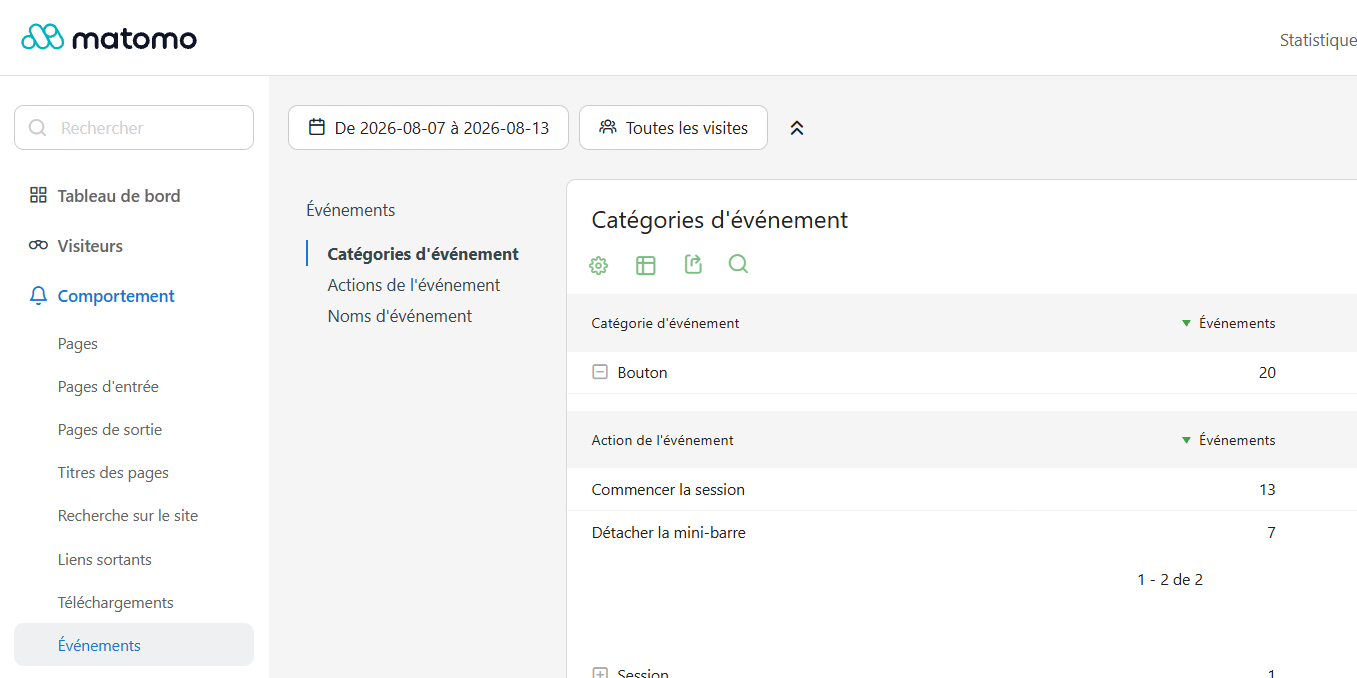
That direct, one-line approach is not just a matter of taste. It is also what makes the results easy to read afterwards. With the stack settled (self-hosted Matomo, called straight from the two buttons), here is what it produces in practice.
Under Behaviour then Events, the two buttons show up under a single Bouton category, each action counted on its own.
The adblocker problem (and why my subdomain is called momo)
Even self-hosted, Matomo gets blocked by adblockers if you keep the factory settings. There are three separate layers to this, and my audience (deep work, productivity, tech) has a high adblock rate, somewhere around 25 to 40%. Without a fix, I would under-count a large slice of real visitors.
Is it fair to route around adblockers? In this specific case, yes. The measurement is anonymous, cookieless, first-party, exempt, and for my own use only. I am not profiling anyone, and Matomo itself documents these workarounds. The parades come from a well-known Matomo adblock guide, and the file-name blocking traces back to the EasyPrivacy list.
The privacy configuration inside Matomo
This is where the “exempt” status is actually earned, in Administration then Privacy:
- Anonymise the IP: mask two bytes (stricter than the CNIL minimum).
- Geolocation from the already-anonymised IP: yes, never from the full IP.
- Cookieless: server-side, plus
disableCookieson the browser side. - Auto-delete raw data: 730 days (24 months, under the 25-month limit).
- I did not enable the “random config_id, every action is a new visit” option. It is too extreme and it would break session and visitor counting.
None of this is exotic. It is a handful of toggles, and it is the difference between “audience measurement” and “tracking”.
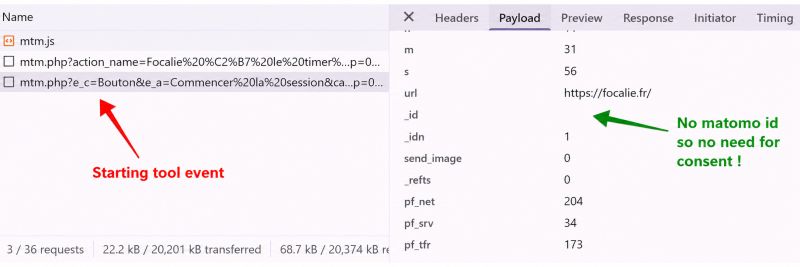
The cookieless mode is not just a checkbox in the admin, you can read it straight off the wire. In the browser’s network panel, the renamed file loads without being blocked (so the adblock workaround holds), and the tracking POST to mtm.php carries an empty _id. An empty visitor id means no identifier is stored, which is exactly the point: no id, so no consent needed.
You still need a privacy page, banner or not
This part is counter-intuitive, so it is worth stating plainly: removing the cookie banner does not remove your duty to inform people.
Two obligations survive the exemption.
The first is transparency. Under GDPR article 13, the moment you process any data you must tell people what you collect, why, for how long, and what their rights are. That holds even with no cookie and even under the exemption.
The second is the opposition right, which the CNIL grid asks for directly:
“Opposition available in the form of a clickable button or link within the privacy policy of the visited site or application.”
So the grid assumes a privacy policy exists, with the opt-out inside it. That is why Focalie has a confidentialite.html page, linked in the footer, which explains what is measured (anonymous audience, no cookie, no third party, truncated IP, 24-month retention) and embeds Matomo’s opt-out module.
The opt-out is a single checkbox. If a visitor unchecks it, Matomo sets a small opposition cookie and stops tracking that browser. That opposition cookie is exactly the mechanism the CNIL grid cites as valid.
One honest technical caveat: the module lives in an iframe served by momo.focalie.fr inside a focalie.fr page. Strict browsers (Safari, Brave) sometimes block third-party cookies in iframes, which can limit that opt-out. As a safety net, Matomo also honours the browser’s “Do Not Track” signal, which I mention on the page.
GA4 plus a banner, versus exempt Matomo, side by side
To sum up the trade-off in one view:
| GA4 + GTM + CMP | Self-hosted Matomo (exempt) | |
|---|---|---|
| Cookie banner | Mandatory | None |
| Share of traffic measured | Only those who accept | 100% |
| Where the data lives | Google, transfers outside the EU to document | My own server |
| Third parties | Yes (breaks the exemption) | None |
| Cost | Free tool, heavy setup | Free, self-hosted |
| Fit for “count two buttons” | Overkill | Exactly right |
What I would take away from this
The lesson is not “Matomo good, Google bad”. It is that I started from the tool instead of starting from the purpose.
Once I wrote down what I truly needed (anonymous usage of two buttons, for myself), the compliant path turned out to be the simpler one, not the heavier one. No banner, no third party, less code, and a first impression that matches what the product promises.
If you run a small product and your analytics needs are genuinely modest, it is worth checking whether you fall inside this exemption before you reach for the full marketing stack. You might find that the honest, minimal setup is also the easy one.
That’s all for today. Bye!
Ian Sorin is an SEO consultant based in Lyon, France. With a deep passion for understanding how search engines work under the hood, he specializes in technical SEO and data-driven strategies.