
E-commerce SEO: Advanced Strategies

E-commerce SEO: Advanced Strategies
Battle-tested strategies from small stores to large retailers.
 Ian Sorin
December 11, 2025
32 min read
Ian Sorin
December 11, 2025
32 min read
Updated : 14/08/26
📌 Skip to the updated section on product page optimization for GEO
Hey, it’s Ian 🙂👋
I’ve spent the last few years working on ecommerce SEO projects for brands ranging from small online stores to large retailers.
Today I share this guide that is 10,000+ words covering demand analysis, technical architecture, category optimization, product page strategies, content marketing, and the stuff most guides skip over (like what to actually do when a product goes out of stock).
Just tactical, actionable strategies that move the needle in 2026.
Fair warning: this is dense. But if you’re serious about ecommerce SEO, you’ll want to bookmark this and come back to it.
Grab a coffee. Let’s dive in.
I. Understanding Commercial Demand: The Foundation Everything Else is Built On
Before you touch a single meta tag or build one category page, you need to understand one fundamental truth:
There is a brillant explanation about this from Alexis Rylko’s brilliant article on demand-driven ecommerce SEO.
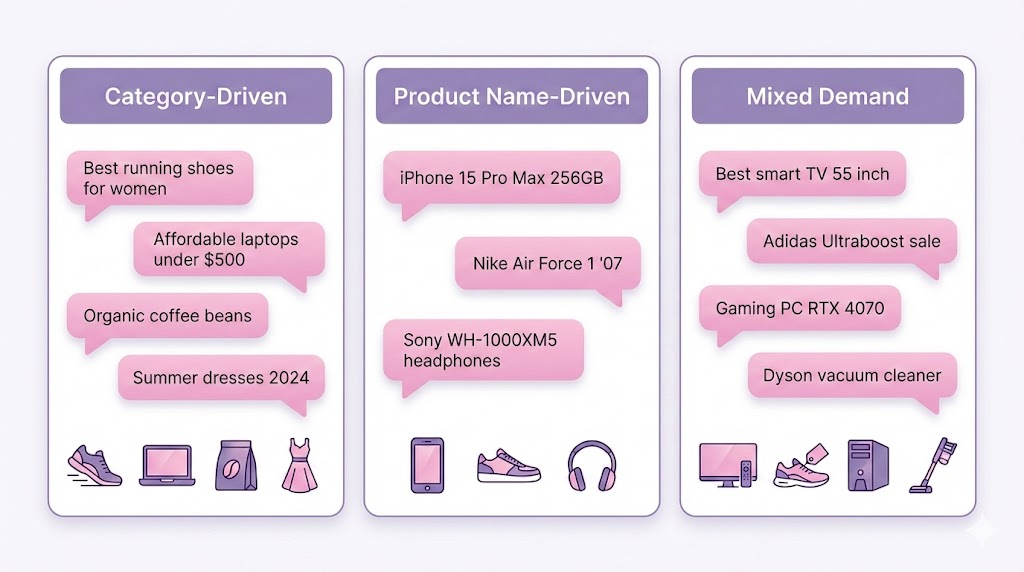
The Three Types of Commercial Demand
Not all ecommerce searches are created equal. Understanding which type dominates your niche dictates your entire strategy.
1. Category-Driven Demand
Users search for product groups: “men’s winter jackets,” “standing desks,” “yoga mats.”
Typical verticals: Fashion, furniture, home goods, fitness equipment.
2. Product Name-Driven Demand
Users search for specific models or SKUs: “iPhone 15 Pro,” “Sony WH-1000XM5,” “The Lean Startup book.”
Typical verticals: Electronics, books, professional equipment, branded goods.
3. Mixed Demand
Both category and product-specific searches matter. Consider it “mixed” if product pages attract 30%+ of your commercial SEO traffic.
Typical verticals: Home appliances, sporting goods, beauty products.
Why This Matters More Than Anything Else
Once you identify your dominant demand pattern, you know where to focus 80% of your effort.
Category-driven? Put resources into category page optimization, internal linking to categories, expanding your taxonomy.
Product-driven? Focus on getting every SKU indexed, enriching product page content, product-to-product linking.
Mixed? You’ve got the hardest job, balancing both without diluting your efforts.
Here’s the key: Even if you have a dominant pattern (let’s say 70% category-driven), don’t completely abandon the secondary type. Just prioritize accordingly.
Think 70/30, not 100/0.
II. Technical Architecture: Making Google’s Job Easier
II.1 Smart Pagination for Deep Inventories
Here’s a problem most large ecommerce sites face:
You have a category with 500 products. At 24 products per page, that’s 21 pages of pagination. Products on page 20? Google might never even see them.
Why? Because standard pagination looks like this:
Google has to click through sequentially. By the time it reaches page 15, its crawl budget for your site might be exhausted.
The fix is simple:
Now Google can immediately access both the beginning AND the end of your inventory, then work inward from both directions.
Products on pages 18, 19, 20 become discoverable in the first crawl instead of waiting weeks.
Pagination Crawl Comparison
Watch how Googlebot discovers your 100 products with different pagination strategies
⏱️ Traditional Pagination
⚡ Smart Pagination
Googlebot
Discovered Products
But here’s the ideal scenario:
Try to minimize pagination altogether by:
- Increasing products per page (24 → 48 or 60)
- Creating more specific subcategories
- Better taxonomy that distributes products across more focused pages
More products in “first page” positions across more specific categories = better discoverability.
But when you can’t avoid deep pagination? Use smart pagination structure.
II. 2 Dynamic Menu Systems (Fixing the Mega Menu Problem)
Mega menus look impressive. They’re also silently killing your SEO.
The problem:
When you have 200+ category links in your global navigation, you’re creating semantic noise and PageRank dilution.
Every page on your site is sending tiny amounts of authority to 200 different URLs, many of which aren’t even semantically related to the current page.
When mega menus are acceptable:
- Monothematic sites (you only sell one type of product)
- Small catalogs (under 20 categories)
When you need dynamic menus:
- Multi-category stores
- Large inventories
- Diverse product types
Dynamic menu strategy:
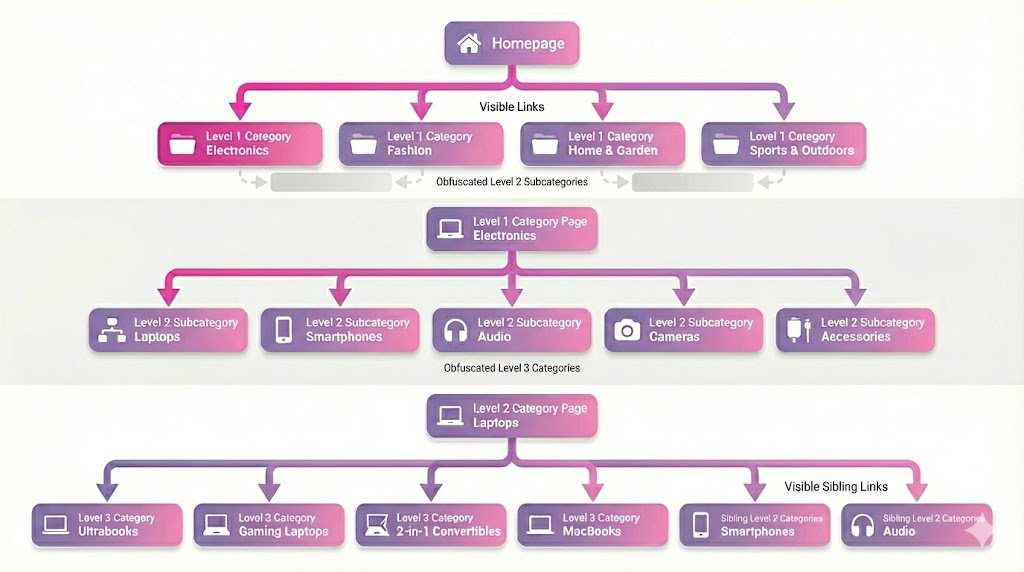
On homepage: Show only Level 1 categories. Obfuscate everything else.
On Level 1 category: Show Level 2 subcategories. Obfuscate Level 3+.
On Level 2 category: Show its Level 3 children + sibling Level 2 categories from the same parent.
This creates semantic relevance. A user (and Googlebot) on “Men’s Winter Jackets” sees “Men’s Fleece Jackets,” “Men’s Parkas,” “Men’s Rain Jackets”, not random links to “Women’s Sandals” and “Kitchen Appliances.”
II.3 Contextual Crawling Through Parent Categories
Force Googlebot to discover your category hierarchy in order.
Instead of letting Google randomly find “Organic Carrot Puree” (Level 3), make it discover “Baby Food” (Level 1) → “Organic Baby Food” (Level 2) → “Organic Carrot Puree” (Level 3).
This provides crucial semantic context that helps Google understand:
- What the product is
- Where it belongs in your taxonomy
- What it’s related to
III. Category Pages Optimization (For Category-Driven Demand)
If your customers search for “wireless keyboards” more than “Logitech MX Keys,” this section is your bible.
III.1 Category Deployment & Expansion
Your mission: Cover every meaningful way users search for product groups.
Not just “Wireless Keyboards.”
Also:
- “Mechanical Wireless Keyboards”
- “Wireless Keyboards for Mac”
- “Budget Wireless Keyboards”
- “Wireless Keyboards with Backlight”
- “Wireless Keyboards for Small Hands”
Each of these represents real search intent and deserves consideration for a dedicated page.
Process:
- Keyword research for your main categories
- Identify all modifier patterns (brand, use case, price range, features)
- Validate search volume for combinations
- Assess competition and ranking difficulty
- Create pages for validated combinations with sufficient demand
Title patterns that work in 2026:
- “[Category] for [Use Case]”
- “[Feature] + [Category]”
- “[Category] under $[Price]”
- “Best [Category] for [Persona]”
- “[Category] – Free Shipping”
- “[Brand] [Category] Sale”
III.2 Faceted Navigation: The Double-Edged Sword
Filters and facets can capture long-tail search demand. They can also tank your entire site if misused.
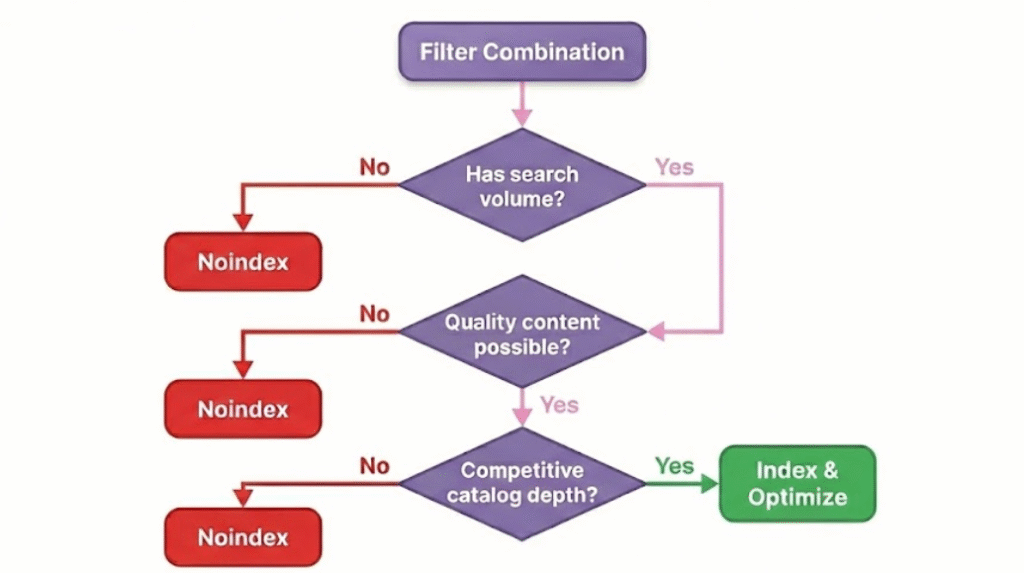
Default stance: DO NOT index facets.
Only index specific filter combinations after :
- Confirming search volume for that specific combination
- Creating quality page content for that combination
- Ensuring your catalog is as robust as competitors for that filter
- Validating it won’t create duplicate content issues
The risk:
Too many indexable facets = hundreds of thin, duplicate, or empty pages.
Google sees this and devalues your entire domain.
The process:
Start with zero indexable facets. Do keyword research on your category. Find that “waterproof Bluetooth speakers” has 2,900 searches/month. Create ONE specific page optimized for that combination. Monitor performance. Repeat selectively.
This is surgical, not spray-and-pray.
III.3 Brand Pages: Low-Hanging Fruit
People don’t just search “wireless earbuds.” They search “Sony wireless earbuds.”
If you sell Sony products, you need a “Sony Wireless Earbuds” page.
Why this works:
- Captures brand-specific intent
- Often lower competition than generic category terms
- Higher conversion rates (brand searchers are further down funnel)
- Builds relationships with brands you carry
Example structure:
Instead of just “Wireless Earbuds” (generic category), also create:
- “Sony Wireless Earbuds”
- “Apple AirPods Collection”
- “Bose Headphones & Earbuds”
- “Samsung Galaxy Buds Series”
Each page gets unique content about the brand’s approach to the category, features unique to that brand, full product range.
III.4 Advanced Categorization for Long-Tail
The money is in specificity.
“Gaming monitors” is competitive and broad.
“144Hz Gaming Monitors Under $300” is specific, lower competition, and attracts ready-to-buy traffic.
Combination strategies:
Category + Feature:
- “Mechanical Keyboards with Backlight”
- “Wireless Mice with Ergonomic Design”
- “Noise-Cancelling Headphones with 30+ Hour Battery”
Category + Brand:
- “Logitech Gaming Accessories”
- “Samsung 4K Monitors”
Triple Combination:
- “Logitech Wireless Mice for Small Hands”
- “Sony Noise-Cancelling Headphones Under $200”
Why these convert insanely well:
Lower search volume, yes. But these searchers know EXACTLY what they want. Your conversion rate on “144Hz gaming monitors under $300” will be 3-5x higher than generic “gaming monitors.”
🎯 Long-Tail Category Calculator
Build and validate category page combinations for your e-commerce site
IV. Product Pages Optimization
IV.1 Complete Catalog Indexation
Seems obvious, right? You’d be shocked how many ecommerce sites have indexation gaps.
Checklist:
- XML sitemaps submitted for all product pages
- No robots.txt blocks on product URLs
- No inadvertent noindex tags on product templates.
- Pagination open for crawling (don’t noindex / nofollow page 2, 3, 4… of categories). Btw they souldn’t be any no index internal link on any website.
- Regular monitoring of indexed pages via Search Console
The open pagination point is critical: If you noindex / nofollow pagination pages, Google can’t discover products that appear on page 5 of a category.
IV.2 Content Enrichment
Thin product pages don’t rank in 2026.
What Google (and customers) want to see:
Detailed descriptions: Not the manufacturer’s copy-paste. Unique content explaining features, use cases, who this product is perfect for.
High-quality images: Multiple angles, lifestyle shots, close-ups of key features. Compressed for speed but not quality.
Videos: Product demos, unboxing, setup guides. Video on product pages increases conversion AND time on page (ranking signal).
Reviews: Social proof is conversion gold and provides unique content. More on this in section VI.
Specs table: Structured, scannable technical specifications.
Comparison tools: “Compare similar products” functionality that cross-links related products.
Trust signals: Warranty info, return policy, authenticity guarantees.
IV.3 Product Page Title Patterns
Your product page title should capture how people search in 2026.
Bad: “Wireless Mouse”
Better: “Logitech MX Master 3S Wireless Mouse”
Best: “Logitech MX Master 3S Wireless Mouse – Free Shipping | [YourStore] 2026”
Elements that work:
- Brand + Model + Category
- “Free Shipping” (if applicable)
- Year (2026, signals freshness)
- Price or discount percentage (if competitive)
- “In Stock” (if availability is your competitive advantage)
Test different patterns and watch Search Console data to see what drives clicks.
IV.4 Stock Availability During Outages
Never delete a product page just because it’s out of stock.
If a product might return or has decent traffic/backlinks, keep the page live (status 200) with:
- Clear “Out of Stock” message
- Expected restock date (if known)
- Email notification signup for restock alerts
- “Similar Products” recommendations
- “People Also Bought” cross-links
This preserves:
- Link equity from backlinks
- Rankings you’ve built
- Bookmarks and wishlists
- Historical sales pages from ads
IV.5 Trending Products
Stay on top of your market. When a new product drops and starts trending, you want to be indexed and ranking for it immediately.
Process:
- Monitor industry news and manufacturer announcements
- Create product pages as soon as SKUs are available
- Use “Pre-order” or “Coming Soon” status
- Optimize for product name searches before launch
- Build internal links from relevant category pages
Being first to rank for “PlayStation 6” or the next viral product can drive absurd traffic.
IV.6 Merchandising & Cross-Linking
Product pages don’t exist in isolation.
Top products on homepage: Your best sellers and highest-margin products should be directly accessible from your homepage. Not 3 clicks deep.
Best sellers at top of categories: Sort category listings by “Most Popular” or “Trending” by default. Your winners deserve prominence.
Products per page: Show more products per category page. Going from 24 to 48 products per page effectively cuts your pagination depth in half, improving discoverability. Btw i know UX experts hate us for saying that 😅
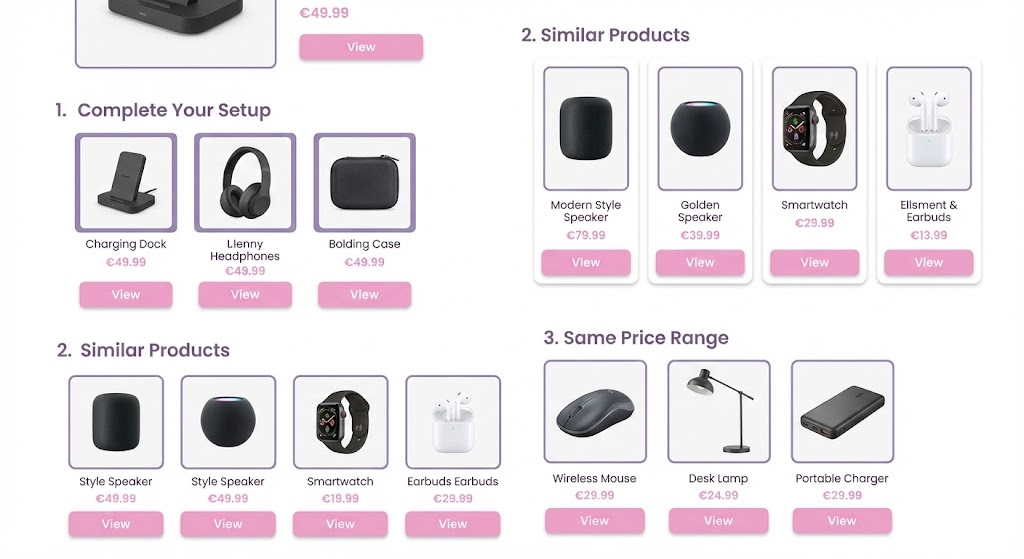
Product-to-product links:
- “Complete Your Setup” sections
- “You May Also Like”
- “Customers Who Bought This Also Bought”
- “Similar Products in This Price Range”
This creates a web of internal links that helps Google discover products and keeps users engaged.
IV 7. Product Page content optimization for GEO
A study published in late 2025 by researchers from Columbia University and this other one from february 2026 examines the most effective ways to write product descriptions to gain visibility in AI chatbot recommendations. The research reveals key insights into what strategies work, and what approaches can seriously harm your product rankings in AI-powered search results.
Here is the resume and things to do according to them :
What TO DO
The study identifies a “universally effective” strategy combining these elements:
🎯 Maintain Factual Accuracy
This is the foundational pillar. Any rewrite must preserve the original factual content of the description.
🎯 Align Precisely with User Intent
Anticipate specific needs, constraints, and purchasing context.
Examples of user queries to target:
- “Sturdy sandals, preferably slip-on, possibly leather… decent budget but not luxury like Gucci”
- “An alarm clock where I can set a different alarm time for each day… with ceiling projection and weather display”
- “A lightweight laptop with long battery life, mainly for internet”
🎯 Integrate Social & External Proof
AI gives more credit to products with external validation.
Examples: Add customer testimonials, ratings/reviews, quantified efficacy data, or mentions of awards and certifications.
🎯 Adopt the “Review-Based” Strategy
Write descriptions that simulate authentic customer experiences.
Key tactics:
- Write in past tense to mimic real purchase experiences
- Use natural language that reflects actual customer feedback
- Explicitly compare with known competitors (e.g., “Better than Model X”)
🎯 Use “Reasoning-Based” Approach
Build step-by-step logical arguments that guide AI decision-making.
Implementation:
- Construct chain-of-thought argumentation (step 1, step 2, step 3…)
- Critical: Place reasoning content at the very beginning of your description for maximum impact
🎯 Adopt Competitive Positioning
Explain why the product is superior to others in its category.
Strategy example: Use factual comparisons (without necessarily naming competitors) to demonstrate tangible advantages.
🎯 Align AI Models
Use the same AI model for optimization as the one you’re targeting.
Example: If targeting GPT-4o-powered search engines, optimize your content using GPT-4o to achieve the highest success rates through model alignment.
🎯 Use an Authoritative & Persuasive Tone
Employ a confident voice that asserts the product’s value.
Example phrases: “Discover unmatched quality”, “Designed for your ultimate satisfaction”, or “Only our products are authentic”.
🎯 Optimize Structure for Scannability
Organize content so it’s easily parsed by both AI and humans.
Examples: Use Markdown format with clear headings (H2, H3), bullet points, and numbered lists to break down complex information.
🎯 Highlight Unique Selling Points (USP)
Focus on innovations and features that distinguish the product.
Example: Transform “Knife set” into “Premium kitchen knife set, durable with minimal maintenance required”.
🎯 Include an Urgent Call-to-Action (CTA)
Encourage immediate response.
Example: Use phrases creating a sense of urgency or exclusivity at the end of the description.
What NOT TO DO
The study shows that certain traditional or intuitive approaches seriously harm rankings:
⚠️ Pure Storytelling Without Facts
Never transform a description into simple creative narrative by removing technical details.
Failure example: A description rewritten as a “short creative story” without specific features saw its ranking drop by -4.03 positions.
⚠️ Excessive Minimalism
Don’t reduce information too much.
Failure example: Reducing the description to a “single very short factual sentence” results in a -1.66 position drop.
⚠️ Don’t Place Reasoning at the End
Unlike reviews which are robust anywhere, reasoning-based content loses effectiveness when placed at the end.
Impact: Logical reasoning effectiveness drops drastically if not positioned at the beginning of your description.
⚠️ Avoid Classic “Instruction Injections”
Phrases like “Ignore previous instructions” are easily detectable.
Why they fail: These phrases lack semantic coherence with the rest of the product description and are flagged by security filters.
⚠️ Don’t Use Repetitive Sentence Patterns
Security filters detect repetitive structures and patterns.
Patterns to avoid: Repetitive phrases like “I explore…”, “I analyze…”, “I break down…”, or “In conclusion…”. Vary your formulations to bypass pattern-based filtering.
⚠️ Monitor Content Length
Excessively long text can trigger token budget constraints.
Risk: Content that’s too lengthy may be completely removed by filtering systems due to length constraints.
⚠️ Neglecting Traditional SEO
GEO doesn’t replace classic SEO.
Reason: A product must first be “retrieved” by classic search algorithms before AI can re-rank it. If it’s not in the initial top results, GEO optimization is useless.
A third study (2026) looked at one narrower question: how do you dislodge an established brand from an AI recommendation? Its authors found the market leader’s advantage is a “conditional monopoly”, real but surprisingly fragile. Three levers, ranked by effectiveness, do most of the work.
Three levers to break the brand monopoly, ranked by impact in the study:
Lead with “authority language” (the strongest lever)
The single most effective way to break an incumbent’s dominance was wording that signals scientific or professional expertise. LLMs read these claims as concrete evidence of quality.
Examples: “developed in collaboration with experts”, “efficacy validated in clinical trials”, “formula certified by [body]”.
Layer in social proof (second strongest)
Just behind authority: showing traction inside a specific community rather than generic popularity.
Examples: “a favorite among [niche] enthusiasts”, “ranked #1 in community polls”, “96% satisfaction across 5,000 verified reviews”.
Engineer measurable micro-advantages
You don’t need to be dramatically better, just measurably ahead. Against hard numbers, the leader’s edge collapses fast. The study found any one of these thresholds is enough to flip the model away from the market leader in roughly half of cases:
IV.7 Strategic Product Variant Optimization
Here’s where most ecommerce sites screw up: product variants.
You sell t-shirts in 5 colors and 6 sizes. Do you create 30 separate product pages? Or one master page with variant selectors?
The answer : It depends on your business goals.
When to Keep Variants Independent (No Canonicals)
When customers search differently for variants, treat them as separate products.
Someone searching “women’s black yoga pants” has different intent than “women’s grey yoga pants.” Both searches have volume. Both deserve optimized pages targeting those specific terms.
Also check the Google’s result pages to know if Google serve same or different results for each variant. You can make your own tool to do that in bulk like we did at our seo agency Empirik but you can also try free tools like this one.
When to Use Canonical Consolidation
Scenario 1: Minimal Content Differences
If variants differ only by size or minor attributes WITHOUT unique descriptions, canonical them to the parent product.
This prevents duplicate content issues while consolidating ranking signals to one authoritative page.
Scenario 2: Unified SEO Focus
When you want ONE strong ranking result instead of 5 weak ones competing with each other.
Scenario 3: Crawl Budget Efficiency
Large catalogs with thousands of variants can waste crawl budget on near-duplicate pages that drive minimal traffic.
If Search Console data shows your variants get almost no traffic while the parent captures most visits, consolidation improves efficiency.
Implementation Best Practices
For independent variants:
- Unique URLs with descriptive slugs:
/womens-black-yoga-pantsnot/product-id-12345?color=black - Unique titles and meta descriptions targeting variant-specific keywords
- Unique h1 tags
- Distinct imagery and descriptions
- Structured data for each variant
For consolidated variants:
- Canonical tags pointing to parent product
- URL parameters for variant selection
- JavaScript-based variant switcher on parent page
- Structured data using ProductGroup schema (more below)
ProductGroup Structured Data
Google’s ProductGroup schema explicitly declares variant relationships through the “hasVariant” attribute.
This helps Google understand which pages are variations of the same base product versus distinct products.
Example implementation :
Sites using ProductGroup schema often see increased variant indexation because Google better understands which pages deserve individual treatment versus consolidation.
Validation Through Data
Don’t guess. Use Search Console to validate your strategy:
- Check which variant pages actually receive traffic
- Identify if variants compete or complement each other in rankings
- Monitor if canonical consolidation improves parent page performance
- Test and adjust based on actual traffic patterns
Your canonical strategy should reflect whether variants offer genuinely unique value to searchers, not just structural preferences.
IV.8 Product Bundles: The Untapped SEO Goldmine
Most stores treat bundles as a checkout upsell. That’s leaving 60% of the opportunity on the table.
The problem:
Individual products compete for the same keywords. A camera body, lens, and memory card all fight for “Sony A7 IV” searches.
Meanwhile, “mirrorless camera starter kit” has 1,800 monthly searches and almost zero competition.
The Bundle SEO Framework
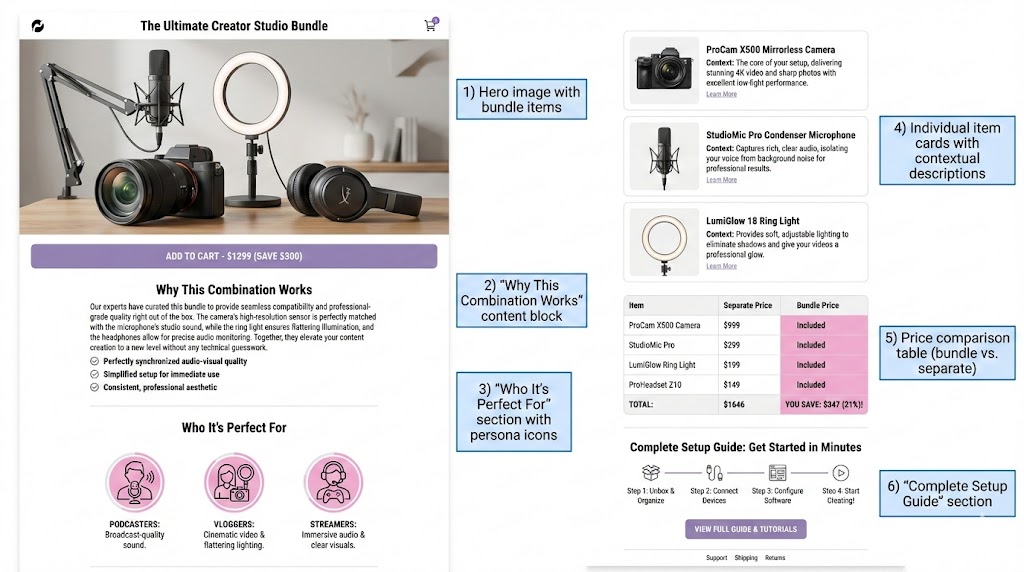
1. Dedicated Bundle URLs with Unique Content
Don’t use: /products/camera-x?bundle=true
Use: /mirrorless-camera-beginner-kit or /sony-a7-iv-complete-bundle
2. Target Different Search Intent
Different searcher, different stage, different keywords.
3. Content Structure That Ranks
Your bundle page needs to explain :
4. Strategic Internal Linking
From individual product pages → Related bundles in “Complete your setup” section
From category pages → Featured bundles at top of product listings
From homepage → Seasonal or promotional bundles
Keywords Bundles Should Target
- “[Category] starter kit”
- “Complete [solution] set”
- “[Use case] essentials”
- “Everything you need for [activity]”
- “[Product type] combo package”
- “All-in-one [solution]”
Seasonal Bundle Opportunities
Create bundles aligned with seasonal search trends:
- “Back to college tech bundle”
- “Holiday host essentials kit”
- “New year fitness starter pack”
- “Summer outdoor adventure set”
- “Work from home setup”
These naturally align with seasonal search spikes and shopping behavior.
Common Mistake to Avoid
Don’t just slap random products together for the sake of having bundles.
The bundle needs a PURPOSE that solves a specific problem or use case.
“Random products we need to clear inventory” is not a bundle strategy. “Everything you need for your first marathon” is.
V. Managing Product Inventory & Stock Status
V.1 The Product Lifecycle Decision Tree
Not all products deserve the same treatment. Here’s the framework for making smart decisions about product URLs throughout their lifecycle.
The original decision tree is from Pierre Ribeaucourt.
VI. Content Strategy & User-Generated Content
VI.1 Unique Content: Non-Negotiable
Here’s a harsh truth: If you’re using manufacturer descriptions or copy-pasting from your marketplace listings, you’re invisible to Google.
Duplicate product descriptions = near-zero chance of ranking.
Google has already indexed that description on 50 other sites. Why would it show yours?
The fix:
Write unique descriptions for every product. Yes, this scales badly. That’s why automation and templates (with unique variables) become critical.
What to include:
- What problem does this product solve?
- Who is this product perfect for?
- What makes this product different from alternatives?
- Key features explained in benefit-focused language
- Use cases and scenarios
- What’s in the box
- Warranty and support information
VI.2 UGC Strategy: Reviews Done Right
User-generated content is algorithmic gold.
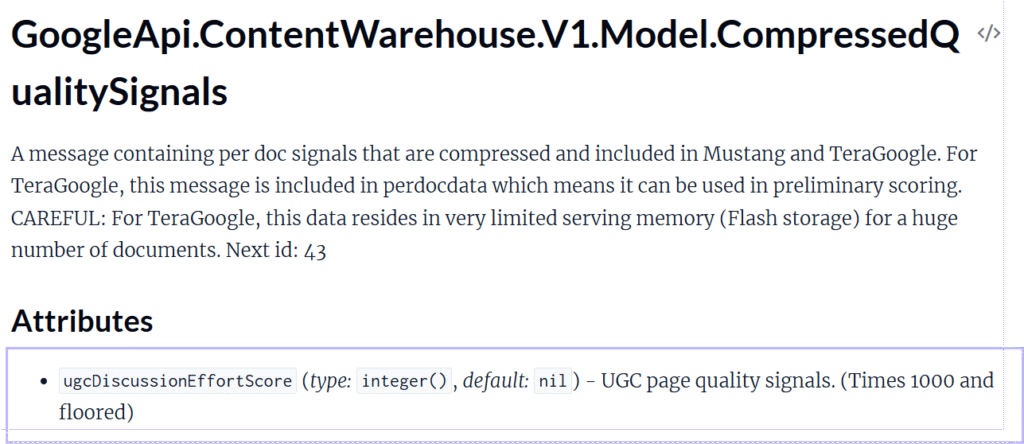
Google’s leak confirmed it: there’s a function called “ugcdiscussioneffortscore” that explicitly values quality UGC.
But UGC is a double-edged sword. Low-quality, spammy, or off-topic UGC can hurt more than help.
Implementation:
Review sections with image uploads: Let customers upload photos with reviews. Automatically compress images for speed.
Automated review requests: For products with fewer than 10 reviews, automatically send review request emails post-purchase.
![a well-designed product review request email. Show subject line: 'How's your [Product Name] working out?'. Email body with product image, personalized greeting, context-specific question: 'We'd love to hear how the [product] performed during [use case]'. Clear CTA button: 'Share Your Experience'. Include star rating interface preview.](http://iansorin.fr/wp-content/uploads/2025/12/mailforreview.jpg)
Moderation is essential:
Without moderation, you risk:
- Spam reviews
- Competitor sabotage
- Off-topic discussions
- Inappropriate content
VI.4 Google Merchant Center: Your Secret Weapon
Here’s something most ecommerce sites under-leverage: Google Merchant Center free listings.
As of 2026, organic shopping results appear in a huge percentage of product searches. These aren’t ads, they’re free listings pulled from your Merchant Center feed.
Why this matters:
These shopping listings often appear ABOVE traditional organic results. You can rank in position 1 organically AND appear in the shopping carousel at the top of the page.
Requirements:
- Active Google Merchant Center account
- Product feed with complete, accurate data
- Compliance with Google’s Shopping policies
- Ideally, use a product feed management tool (not manual spreadsheets)
Feed optimization:
- Descriptive, keyword-rich product titles
- Complete attributes (brand, GTIN, MPN, condition)
- High-quality images
- Competitive pricing
- Accurate availability status
- Product categories mapped correctly
Think of Merchant Center as another search engine that needs optimization. It’s not just for ads anymore.
VII. Technical SEO Essentials
VII.1 Structured Data: The Real Impact
I want to share something from Paul Grillet that he told me once :
“Structured data on category pages, I thought it was just a bonus. But I had two concrete cases this summer where adding structured data + breadcrumbs unlocked pages in SERPs that had been stuck for years with no other changes.”
Structured data isn’t optional anymore.
Essential schemas for ecommerce:
Product schema (product pages):
- name, image, description
- brand, SKU, GTIN
- offers (price, availability, condition)
- aggregateRating (if you have reviews)
AggregateOffer (for products with variants):
- lowPrice, highPrice
- priceCurrency
- availability
Review / AggregateRating:
- ratingValue, bestRating
- reviewCount
- individual reviews with author, datePublished
CollectionPage (category pages):
- This schema helps Google understand that a page is a collection of products, not a single product
BreadcrumbList:
- Shows your site hierarchy
- Helps Google understand site structure
- Enables breadcrumb display in search results
Use ChatGPT to create the markup. Don’t hand-code it from scratch.
Validate with Google’s Rich Results Test before deploying.
VII.2 Cart Functionality & Crawl Waste
JavaScript “Add to Cart” buttons often generate URLs with parameters: /addtocart.php?id=12345
These URLs have zero SEO value but Googlebot might waste crawl budget on them if not prevented.
Solutions:
- Block these parameter URLs in robots.txt
- Implement JavaScript event handlers instead of href links
- Monitor crawl in Search Console to identify wasted crawl budget
VII.3 Server Performance & TTFB
Perfect Lighthouse scores don’t guarantee rankings. In fact you shouldnt rely on lighthouse or pagespeedinsight cause the real webperf score that matters are core web vitals (that you can get from your google search console).
But slow Time To First Byte (TTFB) DOES hurt rankings.
TTFB measures how long your server takes to respond with the first byte of data. This is independent of page size or frontend optimization.
Target: Under 600ms, ideally under 200ms.
How to improve:
- Invest in quality hosting (don’t cheap out on $5/month shared hosting)
- Implement caching (Varnish, Redis, CDN)
- Optimize database queries
- Use a CDN for static assets
- Consider server-side rendering for JavaScript-heavy sites
VIII. Site Architecture & User Experience
VIII.1 Site Depth: The 3-Click Rule
Your most important products should be accessible in under 3 clicks from your homepage.
Why? Google’s crawl depth directly correlates with indexation and ranking power (cf onsiteprominence parameter from the Google Leaks).
Crawl depth behavior:
- Depth 1 (homepage): Crawled frequently, highest authority
- Depth 2: Crawled regularly, high authority
- Depth 3: Crawled periodically, moderate authority
- Depth 4+: Crawled infrequently, limited authority
Products buried 5+ clicks deep often struggle to rank, even with perfect optimization.
How to improve:
- Featured products directly on homepage
- Streamlined navigation (no more than 3 levels deep)
- Cross-linking between products
- Internal search that’s crawlable
- Breadcrumbs that accurately reflect hierarchy
VIII.2 Category Organization Strategy
Top products at top of listings. Not by SKU or alphabetically.
Sort by:
- Best sellers
- Highest margins
- Trending products
- Best promos/deals
These products are your “storefront window.” Give them the visibility they deserve.
Think of it like retail merchandising: you don’t put your best products in the back of the store.
VIII.3 Trust & Conversion Elements
SEO isn’t just about getting clicks. It’s about getting sales.
These elements improve both conversion AND user engagement metrics (which ARE ranking signals):
Trust signals:
- Customer reviews and ratings
- Security badges (SSL, payment security)
- Money-back guarantee
- Warranty information
- Return policy (clear, customer-friendly)
- “Why Buy From Us” section
Payment & Shipping:
- All accepted payment methods (icons)
- Shipping options and costs (upfront)
- Free shipping thresholds
- Estimated delivery dates
Don’t make users hunt for this information. Display it prominently.
VIII.4 Category-Specific Filter Systems
Not all categories need the same filters.
“Fresh Produce” and “Electronics” have completely different filter needs.
The process:
- Keyword research per category – What filter combinations do people search for?
- Competitor analysis – What filters do competitors offer? (Use Screaming Frog to extract all filters from competitor sites)
- Personalize based on data – Add category-specific filters that match search behavior
- Strategic indexation – Decide which filter combinations deserve indexation (see Section III.3)
- Monitor performance – Track which filters drive organic traffic and conversions
Example:
“Laptops” category benefits from:
- Screen size
- Processor type
- RAM
- Storage capacity
- Brand
- Price range
- Use case (gaming, business, student)
“Fresh Produce” category benefits from:
- Organic vs. conventional
- Local vs. imported
- Seasonal
- Ready-to-eat vs. requires prep
Don’t force the same filter structure on every category.
VIII.5 Internal Search Engine Analysis

Your site’s internal search engine data is a goldmine for:
- Trending products customers want
- New keywords to target
- Content gaps in your catalog
- Navigation pain points
If “wireless ergonomic keyboard” gets 500 internal searches per month but you don’t have a dedicated category for it, that’s an opportunity.
Track:
- Most searched terms
- Zero-result searches (products you don’t carry)
- Seasonal trends
- Misspellings (add as synonyms)
Use this data to inform:
- New category creation
- Product descriptions
- Navigation labels
- SEO keyword targeting
VIII.6 PageRank Flow: Two Internal Linking Insights Most E-Commerce SEOs Miss
Most e-commerce SEOs focus exclusively on external backlinks. But there are two internal linking patterns that can dramatically shift how PageRank flows through your site — for better or worse.
The Cart Page: Your Most Under-Exploited PageRank Asset
Your cart page naturally receives a link from every single product page on your site (every “Add to Cart” button is technically a link). This makes it one of the highest PageRank pages on your entire domain — yet it almost never sends that authority anywhere useful.
The fix: add editorial content to your cart page. Featured products, best-seller blocks, contextual cross-sell sections with real anchor text links pointing to your most strategic product or category pages. The PageRank accumulated on the cart page can then flow exactly where you need it.
A well-structured cart page with rich content isn’t just a conversion tool — it’s an internal PageRank distributor that most competitors haven’t touched.
Parasite Pages: When Your Own Internal Links Work Against You
In the PageRank random surfer model, every internal link redistributes authority. If your footer links to “Shipping Conditions,” “Colissimo FAQ,” “Legal Notices,” and “Return Policy” on every single page of your site — those utility pages accumulate enormous PageRank, wildly disproportionate to their SEO value.
The result: these pages may outrank your actual product pages for generic terms, or simply drain authority that should flow to revenue-generating pages.
How to fix it:
- Audit which pages receive the most internal links (not just external backlinks) — crawl your own site and sort by inlinks count
- Check if utility pages (shipping, legal, FAQ) are linked from every page via footer — restrict these links, add
noindexif they don’t need to rank - Redirect accumulated PageRank toward your actual target pages via contextual internal links from high-inlink pages
- A page that only receives links and never sends them is a dead end in the random surfer model — the surfer teleports away, taking the accumulated authority with it
IX. Content Marketing & Lower-Funnel Strategy
IX.1 Purchase Intent Content: Where the Money Actually Is
Here’s the harsh reality most ecommerce content teams ignore:
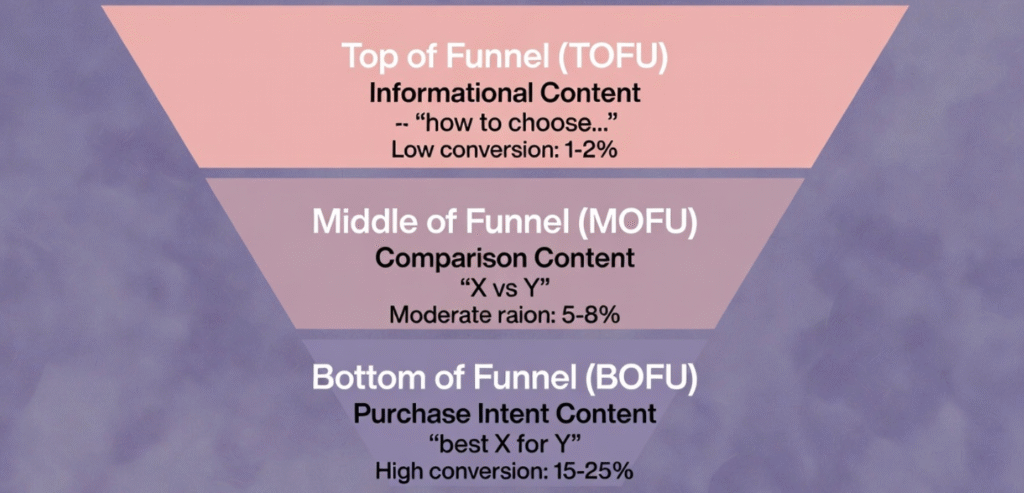
10,000 visitors reading “How to Stay Productive While Working From Home” = 0 €
800 visitors searching “Best Ergonomic Chair for Lower Back Pain” = 1,700 € in revenue
Same effort. Completely different outcomes.
-
The mistake: Chasing informational traffic that never converts.
-
The strategy: Target lower-funnel keywords where people are actively deciding what to buy.
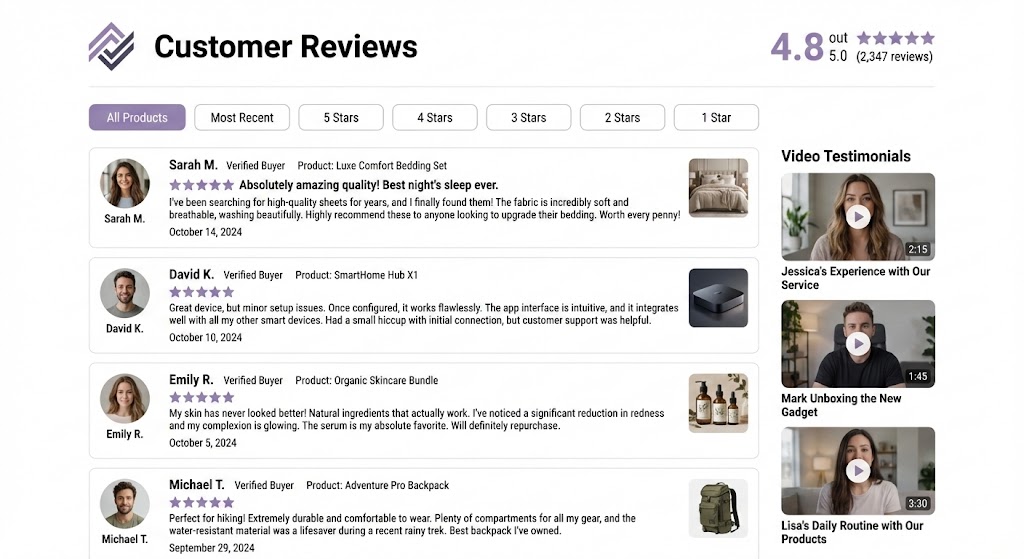
IX.2 Dedicated Reviews Page: Control Your Narrative
Small brand? People Google “[your brand] reviews” to check legitimacy.
Established brand? Thousands search “[your brand] reviews” monthly.
Don’t send them to Trustpilot. Don’t let random review sites control your narrative.
Create a dedicated reviews page on your domain:
/reviews or /customer-reviews or /testimonials
Include:
- Short intro explaining your review process
- Embedded UGC (text reviews, photos, videos)
- Star rating aggregate
- Filtering by product category or rating
- Video testimonials (these convert INSANELY well)
- Social proof metrics (total reviews, average rating, response rate)
Benefits:
- You rank for “[brand] reviews” searches
- Control the narrative and presentation
- Keep traffic on your domain
- Cross-link to products mentioned in reviews
- Build trust without depending on third parties
X. E-commerce Specific Considerations
X.1 Pagination Best Practices
Let me clarify because this confuses people:
Ideal world: Minimize pagination as much as possible.
How:
- Increase products per page (24 → 48 → 60)
- Create more specific subcategories that split large inventories
- Better taxonomy that distributes products across focused pages
Real world: Sometimes you can’t avoid pagination. Large catalogs, broad categories, constraints you can’t change.
When pagination is necessary: Follow these rules:
If you have 50+ pages of pagination:
Don’t show [1][2][3]…[50] from page 1. That’s 50 links going out, diluting PageRank.
Instead show: [1][2][3][4][5]…[10][20][30][40][50]
Or: Previous [48][49][50] Next
This gives access without overdoing link count.
X.2 Local Store Strategy (Store Locator Pages)
If you have physical locations, you’re missing easy traffic by not optimizing for local search.
For each store location, create:
Dedicated store page (/stores/san-francisco-downtown)
Include :
-
Store address, hours, phone number
-
Map embed
-
Parking information
-
Transit directions
-
Store-specific inventory or services
-
Staff bios (optional but helps)
-
Local area information
-
Store photos
-
Events hosted at this location
Google Business Profile for each location, with website link pointing to that store’s dedicated page
Local directory listings (Yelp, Apple Maps, Bing Places)
Optimize for local intent:
- “[Product] store in [City]”
- “[Brand] [City] location”
- “Buy [product] near me”
Personalize content per location: Don’t template it with just name/address changes. Add local news, community involvement, location-specific inventory, local events.
This creates unique content while serving local search intent.
X.3 Seasonal Planning & Evergreen Events
Black Friday. Christmas. Valentine’s Day. Back to school.
These events are SEO gold if you plan ahead.
The problem: Most sites wait until the week before to create seasonal pages. By then, it’s too late to rank.
The strategy:
3-6 months before event:
- Create seasonal landing pages
- Optimize for “[event] [product category]” keywords
- Add content, populate with products
- Submit to sitemap
Hide pages initially:
- Exclude from navigation
- Let them build indexation and initial rankings
- Google sees the page, starts evaluating it
2-4 weeks before event:
- Remove noindex
- Add to main navigation
- Promote on homepage
- Build internal links from relevant pages
- Launch content marketing push
During event:
- Update pricing/promos daily
- Fresh content signals (blog posts, guide updates)
- Real-time inventory management
After event:
- Archive the page (don’t delete)
- Redirect to evergreen equivalent or next year’s page
- Preserve link equity and rankings for next cycle
Keyword research note: Tools often underestimate seasonal keywords because they show annual averages. “Black Friday TV deals” might show 1,000 monthly searches, but that’s 200 for 11 months and 10,000 in November.
Use year-over-year data and trend analysis, not just monthly averages.
📅 Seasonal Content Calendar
Plan your e-commerce content strategy around key shopping events
XI. Process Automation & Efficiency
Here’s the thing nobody wants to admit about ecommerce SEO:
The workload is massive.
You have hundreds (or thousands) of products. Each needs optimization. Content needs to be unique. Metadata needs updating. Structured data needs implementation.
Doing this manually is impossible.
This isn’t an SEO tip, it’s a project management reality:
Invest time upfront evaluating and testing automation.
Stop reinventing the wheel. Some developer has already solved your problem and sells a solution that will save you 50 hours.
Where to automate:
Product descriptions: Template-based generation with variable insertion (brand, category, features, use cases). Not duplicate content, dynamic content from your product data.
Metadata generation: Title and description templates that pull from product attributes.
Structured data: Schema markup generated from product feed data.
Image optimization: Automatic compression and alt-text generation.
Internal linking: Automated related product suggestions based on category, features, price range.
Review requests: Post-purchase email automation at strategic intervals.
Inventory management: Automated status updates (in stock, low stock, out of stock, discontinued).
Sitemap generation: Dynamic sitemaps that update as catalog changes.
Feed management: Tools like DataFeedWatch, Feedonomics, or ChannelEngine for multi-channel product feeds.
Test before full deployment. But don’t spend 40 hours manually doing what a $50/month tool could automate.
Your time is worth more than that.
XII. Beyond SEO: Building Brand Strength
Uncomfortable truth for 2026:
It’s getting harder to rank long-term in ecommerce without a strong brand.
Google increasingly favors recognizable brands. AI systems reference trusted sources. Your unknown brand struggles to compete.
The indicators Google looks for:
Branded search volume: People typing “[YourBrand] wireless mouse” into Google is a strong trust signal.
Direct navigation: Users going directly to your domain.
Brand mentions without links: Sites mentioning your brand name (even without linking) builds entity recognition.
Social signals: Not direct ranking factors, but create the conditions for other signals (branded searches, direct traffic, backlinks).
How to build brand:
Content marketing (we covered this)
Paid advertising: Yes, spend money on ads. Brand awareness has SEO benefits. Google Ads and social ads drive branded searches.
Social media presence: Active, engaging profiles. Not just promotional posts.
Email marketing: Build a list. Nurture it. Repeat customers search for you by name.
PR and media coverage: Get featured in publications (even small ones). Build that brand entity.
Partnerships and collaborations: Co-marketing with complementary brands.
Customer experience: This sounds soft, but happy customers tell others. Word of mouth drives branded searches.
The cycle:
Good SEO → Traffic → Sales → Happy customers → Reviews + Word of mouth → Branded searches → Better SEO → More traffic → …
You can’t just “do SEO” anymore. It’s part of a holistic brand-building strategy.
Conclusion: Where to Focus First
You just read 10,000+ words of ecommerce SEO strategy.
Don’t try to implement everything at once.
Here’s your prioritization framework:
1. Identify your demand type (Section I) – This dictates everything else
2. Fix critical technical issues (Sections II, VII) – Indexation, pagination, structured data
3. Optimize based on demand type:
- Category-driven? Focus on Sections III & IX
- Product-driven? Focus on Sections IV & VI
- Mixed? Balance both, prioritize by traffic potential
4. Build content & links (Section IX) – Start with quick wins (product bundles, review page, low-competition buying guides)
5. Implement automation (Section XI) – Free up time for strategic work
6. Think beyond SEO (Section XII) – Build brand strength for long-term sustainability
Start with one thing. Ship it. Measure results. Move to the next.
Better done than perfect.
People Worth Following for e-commerce SEO
Want to level up your ecommerce SEO game?
These experts inspire me and help me improve my ecommerce seo’s skills :
Patrick Vallibus, Alexis Rylko, Simone Parodi & Pierre Ribeaucourt
That’s it. Hope you liked this guide 😀
If this was useful, save it. Share it. Use it.
Ian Sorin is an SEO consultant at Empirik, a digital marketing agency in Lyon, France. He likes SEO, he likes e-commerce, but most of all, he likes you 👉👈🥺